
文章目标
上一篇建立了 Agent 可观测性的统一对象模型:Session、Task、Run、Trial、Turn、Step、Trace、Span、Event、Artifact、State Snapshot 与 Score。本篇继续解决更具体的工程问题:
如何真正把 Trace 埋进 Agent Loop,而不是只在模型 API 外面包一层计时器?
仅给一次模型请求记录开始时间和结束时间,最多只能回答“模型调用耗时多久”。一个真正可用于诊断、评测和审计的 Agent Trace,还必须解释:
- 用户任务何时进入系统;
- 上下文由哪些部分组成;
- 模型何时开始返回第一个 Token;
- Tool Call 是何时、如何被增量解析出来的;
- 工具调用是否需要审批;
- 工具执行是否重试、回退或产生副作用;
- Tool Result 如何回填进下一轮模型上下文;
- 并行工具和子 Agent 之间是什么关系;
- 网络断流、取消和超时分别发生在哪个阶段;
- 观测后端不可用时,Agent 本身是否仍能继续工作。
本文继续使用同一个 Coding Agent 场景:
用户要求 Agent 修复代码仓库中的 failing test。Agent 读取仓库、检索代码、调用模型生成计划,执行文件读取和编辑工具,运行测试,并可能遇到 429、流式连接中断、工具超时、人工审批和任务恢复。
本文会给出:
- Agent Loop 的完整埋点边界;
- OpenTelemetry 信号与语义模型;
- Span 类型和父子关系设计;
- Python 与 TypeScript 的异步上下文传播方式;
- 流式模型调用的记录方法;
- 并行工具与重试 Attempt 的建模;
- Collector、队列、采样和强制 Flush 配置;
- 隐私、高基数和内容采集边界;
- 一套可直接改造成项目代码的实现骨架。
标准状态与实现边界
在进入代码前,需要先明确本文使用的标准边界。
OpenTelemetry 的 Trace、Metric、Log、Resource、Context 与 OTLP 等核心能力已经相对稳定;但面向生成式 AI 和 Agent 的语义约定仍在持续演进。截至 2026 年 8 月 5 日,OpenTelemetry 的 GenAI Semantic Conventions 仍标记为 Development,并在独立的 semantic-conventions-genai 仓库中维护。它已经覆盖模型调用、Agent、工具、检索、记忆和 MCP 等对象,但字段名和具体要求仍可能发生变化。12
因此,本文采用以下策略:
- 能使用正式 OpenTelemetry 语义的地方,优先使用
service.*、deployment.*、error.type、gen_ai.*等标准字段; - Agent 特有但尚无稳定标准的字段,放在自定义命名空间,例如
app.agent.*; - 自定义字段必须附带
app.agent.telemetry.schema.version; - 不重新定义标准字段已有的含义;
- 代码示例直接使用属性字符串,而不是依赖某个特定版本生成的常量包;
- 生产环境应锁定语义约定版本,并在升级时执行兼容性迁移。
MCP 方面,2026-07-28 规范已经为 _meta 中的 traceparent、tracestate 和 baggage 预留了 OpenTelemetry 上下文传播键,并要求其值遵循 W3C Trace Context 与 W3C Baggage 格式。34
这意味着 Agent、MCP Client 和 MCP Server 之间已经可以使用标准 Trace Context 连接调用链,但实际 SDK 和 Server 是否完整支持,仍需要结合具体实现版本验证。
1. Agent Loop 中的埋点位置
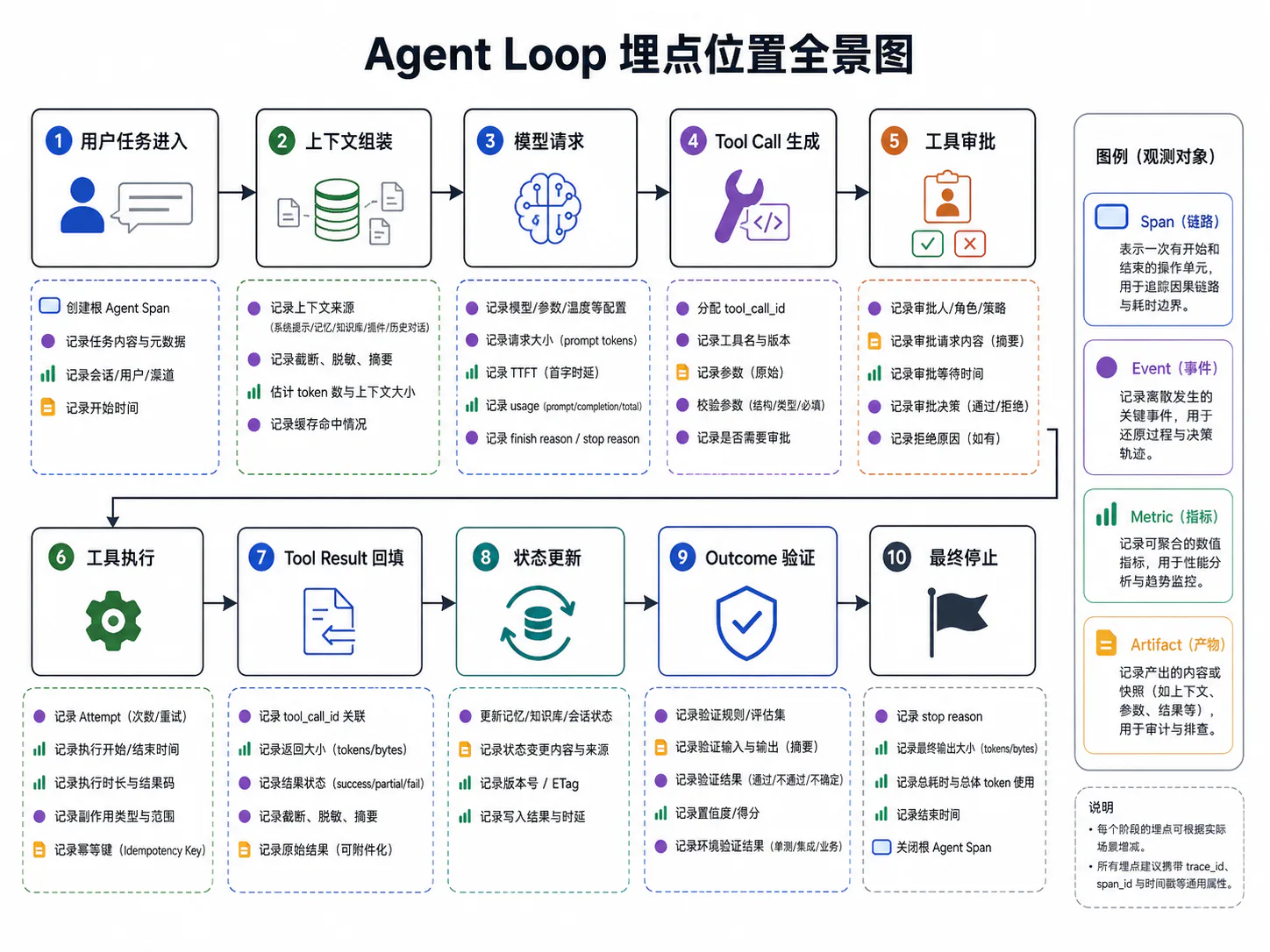
1.1 用户任务进入
一次 Agent Trace 应从“用户任务进入系统”开始,而不是从第一次模型 API 请求开始。
假设用户输入:
修复
tests/test_order.py::test_discount的失败问题,并确保没有修改无关模块。
系统在这一刻至少已经得到以下信息:
- 用户目标;
- 会话标识;
- 任务标识;
- Agent 名称和版本;
- 当前部署环境;
- 权限模式;
- 可用工具集合;
- 任务预算;
- 是否属于线上运行或离线 Trial。
这些信息应挂在最外层的 Agent Span 或 Run Span 上。
一个推荐的根 Span 结构是:
invoke_agent coding-agent├── context.compose├── chat model-name├── approval.wait├── execute_tool code_search├── execute_tool read_file├── execute_tool edit_file├── execute_tool run_tests├── state.commit└── outcome.verify根 Span 不应该直接以完整用户 Prompt 命名,例如:
错误:修复王某某订单系统里 ID=938281 的折扣问题这会同时造成:
- Span 名称高基数;
- 用户隐私泄漏;
- 后端索引成本上升;
- 查询和聚合失效。
更好的 Span 名称是稳定、低基数的:
invoke_agent coding-agent具体任务内容通过引用、摘要、Hash 或受控内容字段保存。
创建根 Span 时,应该尽早放入可能参与采样和路由的属性:
root_attributes = { "gen_ai.operation.name": "invoke_agent", "gen_ai.agent.name": "coding-agent", "app.agent.telemetry.schema.version": "1.0.0", "app.agent.task.type": "code_fix", "app.agent.execution.mode": "production", "app.agent.permission.mode": "workspace_write",}凡是需要参与 Head Sampling 的字段,都必须在 Span 创建时可用。后续才调用 set_attribute() 的字段,Head Sampler 已经无法看到。为了减少不同采样方式之间的行为差异,Agent 名称、操作类型、环境、Provider 和模型等关键字段最好在创建 Span 时就设置。5
用户输入应该记录到什么程度
默认情况下,根 Span 不应直接记录完整用户内容,而应先记录 Shape:
{ "app.agent.input.message_count": 1, "app.agent.input.char_count": 68, "app.agent.input.content_type": "text/plain", "app.agent.input.content_hash": "sha256:...", "app.agent.input.content_ref": "artifact://input/request-001"}只有在用户明确授权、环境允许并且后端访问控制完善时,才将完整输入作为受控内容保存。
1.2 上下文组装
Agent 在调用模型前,通常会把多种信息组装成最终上下文:
- System Prompt;
- 用户消息;
- 对话历史;
- 工具定义;
- 检索结果;
- 长期记忆;
- 当前计划;
- 环境摘要;
- 历史 Tool Result;
- 上下文压缩后的 Summary。
如果只记录最终模型请求,而不记录这些来源的组成方式,就无法回答:
- 错误内容来自用户输入还是检索结果;
- 某条记忆是否被错误注入;
- 工具定义是否因版本变化而改变;
- 上下文是否在压缩时丢失关键约束;
- Token 成本为什么突然上升。
因此,上下文组装应有独立的 Span:
context.compose它不一定要保存全部内容,但至少应该保存结构信息:
| 字段 | 含义 |
|---|---|
app.agent.context.message_count | 最终消息数量 |
app.agent.context.input_token_estimate | 组装后的输入 Token 估计 |
app.agent.context.system_prompt.version | System Prompt 版本 |
app.agent.context.tool_definition.count | 工具定义数量 |
app.agent.context.retrieval.item_count | 注入检索项数量 |
app.agent.context.memory.item_count | 注入记忆数量 |
app.agent.context.compacted | 是否发生过压缩 |
app.agent.context.content_hash | 最终上下文内容 Hash |
app.agent.context.artifact_ref | 完整上下文的受控引用 |
上下文组装失败也需要单独归因。例如:
- 检索服务超时;
- Tool Schema 序列化失败;
- Token 预算计算错误;
- 记忆过滤器异常;
- 上下文超过模型上限。
这些错误不能被笼统归入“模型调用失败”,因为模型请求可能根本还没有发出。
1.3 模型请求
模型 Span 的边界应该覆盖:
从客户端真正开始向模型 Provider 发起请求,到流式响应结束、取消或失败。
它不应该覆盖上游的上下文组装,也不应该把后续工具执行包含进来。
推荐 Span 名称:
chat model-name或按照所用 GenAI 语义约定采用对应的操作名。
模型 Span 应记录以下几类信息:
请求身份
gen_ai.operation.namegen_ai.provider.namegen_ai.request.modelserver.address请求配置
gen_ai.request.temperaturegen_ai.request.max_tokensapp.agent.prompt.versionapp.agent.tool_schema_set.version响应结果
gen_ai.response.modelgen_ai.response.finish_reasonsgen_ai.usage.input_tokensgen_ai.usage.output_tokens流式运行数据
app.agent.stream.ttft_msapp.agent.stream.chunk_countapp.agent.stream.text_delta_countapp.agent.stream.tool_delta_countapp.agent.stream.termination内容数据
GenAI 语义约定已经定义了消息、工具参数和工具结果相关属性,但官方同时明确提示:输入消息、输出消息、Tool Arguments、Tool Result、检索查询和记忆记录都可能包含敏感信息,不应默认无条件采集。6
因此建议:
- 默认只记录 Token、长度、数量、Hash、版本和引用;
- 内容采集必须显式 Opt-in;
- 内容字段在进入 SDK 前先脱敏;
- Collector 再进行第二层删除或替换;
- 观测后端实施独立权限和保留周期。
1.4 Tool Call 生成
Tool Call 的产生和工具的真实执行不是同一个动作。
模型流式输出可能先产生这样的增量片段:
{"id":"call_1","name":"read_file","arguments":"{\"pa"}{"id":"call_1","arguments":"th\":\"src/order"}{"id":"call_1","arguments":"/service.py\"}"}此时至少存在三个不同阶段:
- 模型正在生成 Tool Call;
- 客户端完成 Tool Call 拼装与 JSON 解析;
- 工具运行时真正开始执行。
如果把它们都压成一个 Tool Span,会丢失很多关键问题:
- 模型是否生成了不完整 JSON;
- Tool Call 是否因流式断开而只收到一半;
- 参数是否在执行前被修复;
- 审批人是否修改了参数;
- 相同 Tool Call 是否被重复执行。
推荐做法是:
- 在 Model Span 中记录
tool_call.completedEvent; - 为每个逻辑 Tool Call 分配稳定的
tool_call_id; - 参数完成拼装和 Schema 校验后,再创建 Tool Span;
- 如果参数被修复,保留
raw_arguments_hash和validated_arguments_hash; - 不把未完成的参数片段直接当作可执行输入。
示例:
model_span.add_event( "tool_call.completed", { "gen_ai.tool.call.id": tool_call_id, "gen_ai.tool.name": tool_name, "app.agent.tool.arguments.byte_count": len(arguments_json), "app.agent.tool.arguments.valid": True, },)这里仍然没有必要把完整参数写入 Event。完整参数可以放在加密 Artifact 中,通过 content_ref 引用。
1.5 工具审批
高风险工具往往需要人工或策略引擎审批,例如:
- 写文件;
- 删除文件;
- 执行 Shell;
- 访问生产数据库;
- 发送邮件;
- 部署服务;
- 调用付费或不可逆接口。
审批过程不应只记录成一个布尔值。至少要区分:
- 是否要求审批;
- 哪个策略触发审批;
- 审批对象是什么;
- 等待了多久;
- 谁作出决定;
- 参数是否被修改;
- 结果是允许、拒绝、过期还是取消。
推荐使用独立的 approval.wait Span:
approval.wait它的时长直接体现 Agent 被人类阻塞的时间。
建议字段:
app.agent.approval.requiredapp.agent.approval.policy.versionapp.agent.approval.decisionapp.agent.approval.actor.typeapp.agent.approval.wait_msapp.agent.approval.arguments_modified需要注意:审批拒绝不一定是系统错误。
如果策略正常识别出高风险动作,用户也正常选择拒绝,那么这是一条合法业务路径。此时 Span 可以保持 UNSET 或正常结束,通过:
app.agent.approval.decision = "denied"表达结果,而不是统一设置为 ERROR。
只有审批服务不可用、审批状态丢失或协议异常,才属于技术错误。
1.6 工具执行
工具执行 Span 应从“已经获得可执行参数”开始,到“工具返回结果或失败”结束。
推荐名称:
execute_tool read_fileexecute_tool run_testsexecute_tool edit_file对本地函数调用,Span Kind 通常可以是 INTERNAL;对远程 API 或外部服务调用,则通常更适合 CLIENT。对于 Agent 本身,同进程内的调用一般建模为 INTERNAL,远程 Agent 调用则可以使用 CLIENT。当前 GenAI Agent Span 语义也采用了类似区分。5
Tool Span 至少应记录:
| 类别 | 字段示例 |
|---|---|
| 工具身份 | gen_ai.tool.name、app.agent.tool.schema.version |
| 调用身份 | gen_ai.tool.call.id、app.agent.operation.id |
| 参数结构 | 参数字节数、字段数量、校验结果、参数 Hash |
| 权限 | 权限模式、审批结果 |
| 副作用 | read_only、reversible_write、irreversible |
| 幂等性 | app.agent.tool.idempotency_key |
| 结果 | 状态、返回字节数、结果类型、Artifact 引用 |
| 错误 | error.type、错误类别、是否可重试 |
| Attempt | Attempt 编号、重试次数、Fallback 目标 |
工具返回“业务失败”与“调用失败”也要区分。
例如,执行测试工具返回:
exit_code = 1tests_failed = 1工具本身成功运行,只是测试结果失败。此时 Tool Span 不应该被标记为网络或调用错误;应记录:
app.agent.tool.execution.status = "completed"app.agent.tool.business_outcome = "tests_failed"而如果测试进程无法启动、超时或被操作系统杀死,才属于工具执行错误。
1.7 Tool Result 回填
工具执行结束后,结果通常还不能直接交给模型。系统可能需要:
- 截断过长输出;
- 过滤 ANSI 控制字符;
- 将二进制结果转为 Artifact;
- 摘要压缩;
- 隐私脱敏;
- 结构化解析;
- 将错误转换成统一 Tool Message;
- 按
tool_call_id回填到正确位置。
因此,Tool Result 回填最好有独立的逻辑步骤,例如:
tool_result.normalizetool_result.attach它可以是短 Span,也可以是 Step 上的 Event,取决于是否存在明显耗时和失败可能。
建议记录:
app.agent.tool_result.original_bytesapp.agent.tool_result.final_bytesapp.agent.tool_result.truncatedapp.agent.tool_result.redactedapp.agent.tool_result.summary_appliedapp.agent.tool_result.content_hashapp.agent.tool_result.artifact_refgen_ai.tool.call.id这一层对于排查“工具明明返回了正确内容,模型为什么还是答错”非常重要。
根因可能不是模型没有理解,而是:
- Result 被截断;
- Result 回填到了错误的 Tool Call;
- 结构化解析丢失字段;
- 摘要器删掉了关键错误信息;
- 上下文预算不足导致结果未进入下一次模型请求。
1.8 状态更新和最终停止
Agent 完成一轮工具调用后,通常会更新内部状态:
- 当前计划;
- 已完成步骤;
- 对话历史;
- 工作区状态;
- 记忆候选;
- Checkpoint;
- Outcome;
- Stop Reason。
这一步不能简单理解为“把模型回答返回给用户”。一个 Agent 真正停止前,至少应回答两个问题:
- 它为什么停止?
- 它声称完成的结果是否被环境证据验证?
常见 Stop Reason:
completedmax_steps_reachedbudget_exhausteduser_cancelledapproval_deniedunrecoverable_errorhandoff_to_humanwaiting_for_external_event推荐将“结果生成”和“结果验证”分开:
state.commitoutcome.verify例如 Coding Agent 声称“修复完成”,但 outcome.verify 需要检查:
- 测试是否真的通过;
- Git Diff 是否只包含允许的文件;
- 是否存在未提交冲突;
- 是否产生了意外副作用。
只有验证完成后,根 Agent Span 才结束。
一条完整埋点链
invoke_agent coding-agent│├── context.compose│ ├── retrieval│ └── memory.retrieve│├── chat model-name│ ├── event: stream.first_token│ ├── event: tool_call.completed│ └── event: response.completed│├── approval.wait│├── execute_tool edit_file│ ├── tool.attempt 1│ └── state.diff│├── tool_result.normalize│├── chat model-name│├── execute_tool run_tests│ ├── tool.attempt 1 [ERROR: timeout]│ ├── event: retry.scheduled│ └── tool.attempt 2 [OK]│├── state.commit└── outcome.verify这条链才真正描述了 Agent 如何完成任务,而不是只记录两次模型 API 延迟。
2. OpenTelemetry 在 Agent 中的作用
2.1 Trace、Metric、Log 和 Event
OpenTelemetry 提供多类信号。Agent 系统不应该把所有数据都塞进 Trace,也不应该只依赖 Log。
| 信号 | 最适合回答的问题 | Agent 中的典型用途 |
|---|---|---|
| Trace | 某一次任务为什么这样执行 | 模型、工具、检索、审批、重试的因果链 |
| Metric | 整体趋势是否异常 | 成功率、TTFT、工具错误率、Token、费用 |
| Log | 某个组件输出了什么诊断信息 | SDK 日志、工具 stderr、解析器错误 |
| Event | 某个离散状态变化何时发生 | 首 Token、审批决定、重试、压缩、恢复 |
OpenTelemetry 中“Event”存在两个容易混淆的层次:
- Span Event:附着在某个 Span 上的时间点注释;
- Event Log:具有稳定事件名称的 LogRecord。
例如“模型收到第一个 Token”通常适合作为 Model Span 的 Span Event:
stream.first_token而“系统级审批策略发生配置变更”可能更适合作为独立 Event Log。
Trace 不适合替代 Metric
如果要查询过去一小时平均 TTFT,不应该实时扫描所有 Trace,而应该同时记录 Histogram:
gen_ai.client.operation.durationapp.agent.stream.ttftTrace 用于解释单次异常,Metric 用于发现整体异常。
Metric 不适合携带单次任务身份
以下字段不应该成为 Metric Label:
session_idtask_idrun_idtrace_iduser_idtool_call_id完整文件路径原始 Prompt它们会制造极高基数。Metric 的作用是聚合,不是保存单次请求详情。
2.2 Resource、Span 和 Attribute
Resource:谁产生了这些遥测数据
Resource 描述产生遥测数据的实体,例如:
service.name = coding-agentservice.version = 1.4.2service.instance.id = pod-7f89deployment.environment.name = productioncloud.region = ap-northeast-1这类字段在进程生命周期内通常较稳定,应放在 Resource,而不是每个 Span 上重复建模。OpenTelemetry 将 Resource 定义为产生遥测数据的实体表示。7
Span:哪个操作正在发生
Span 表示一个有开始和结束的操作,例如:
invoke_agentcontext.composechatexecute_toolretrievalapproval.wait一个 Span 通常包含:
- 名称;
- 开始和结束时间;
- Span Kind;
- Attributes;
- Events;
- Links;
- Status;
- Parent Span;
- Resource;
- Instrumentation Scope。
Attribute:这个操作有什么特征
Attribute 应描述当前操作的结构化特征,例如:
gen_ai.provider.name = openaigen_ai.request.model = model-xgen_ai.tool.name = run_testsapp.agent.retry.count = 2app.agent.tool.side_effect = reversible_write属性值应尽量保持:
- 稳定;
- 有界;
- 可查询;
- 不包含大段文本;
- 不包含不必要的敏感数据。
Event:操作过程中发生了什么
Span Event 适合记录:
stream.first_tokentool_call.completedapproval.decidedretry.scheduledcontext.compactedcheckpoint.created不要为每个流式 Chunk 创建一个 Span,否则会产生极大的数据量和后端压力。
Link:除了父子关系,还依赖谁
一个 Span 只能有一个直接 Parent,但 Agent 操作可能依赖多个并行结果。此时可以使用 Span Link 表示额外因果关系。
例如,第二轮模型调用依赖三个并行工具结果:
chat follow-up├── parent: execute_parallel_tools├── link: tool span A├── link: tool span B└── link: tool span COpenTelemetry 也建议在 Scatter/Gather 等不适合单一父子关系的场景使用 Links。8
2.3 OpenTelemetry GenAI 语义
OpenTelemetry GenAI Semantic Conventions 为常见生成式 AI 操作提供统一字段和 Span 语义。当前范围已经包括:
- 模型请求;
- Agent 调用;
- Workflow;
- Planning;
- Tool Execution;
- Retrieval;
- Memory 操作;
- MCP;
- GenAI Metric 和 Event。12
常见操作名包括:
invoke_agentinvoke_workflowplanexecute_toolretrievalcreate_memoryretrieve_memoryupdate_memorydelete_memory应优先复用的标准字段
gen_ai.operation.namegen_ai.provider.namegen_ai.request.modelgen_ai.response.modelgen_ai.agent.namegen_ai.agent.idgen_ai.tool.namegen_ai.tool.call.idgen_ai.usage.input_tokensgen_ai.usage.output_tokensgen_ai.conversation.iderror.typeserver.address不要为了“字段完整”而伪造值
例如 gen_ai.conversation.id 只有在 Provider 或应用本身确实存在稳定会话 ID 时才应填写,不应为了让 Dashboard 好看而临时生成一个 UUID 冒充 Provider Conversation ID。9
同理:
- 没有 Agent ID 时不要伪造;
- Provider 未返回 Response Model 时不要猜;
- Token Usage 不完整时应标记缺失,不要用字符数冒充精确 Token;
- Tool Result 未真实执行时不能标记成功。
标准字段与自定义字段的边界
如果标准语义已经定义了:
gen_ai.tool.name就不应再创建一个含义相同的:
app.agent.tool_name自定义字段只补充标准没有覆盖的语义:
app.agent.step.idapp.agent.operation.idapp.agent.attempt.idapp.agent.tool.side_effectapp.agent.approval.decisionapp.agent.context.compactedapp.agent.outcome.status2.4 自定义 Agent 语义字段
建议为项目建立一个独立的语义字段注册表,而不是让开发者随意命名。
推荐字段分层
任务与运行
app.agent.task.idapp.agent.task.typeapp.agent.run.idapp.agent.trial.idapp.agent.turn.idapp.agent.step.id逻辑操作与 Attempt
app.agent.operation.idapp.agent.attempt.idapp.agent.attempt.numberapp.agent.retry.countapp.agent.recovery.status上下文
app.agent.context.message_countapp.agent.context.input_token_estimateapp.agent.context.compactedapp.agent.context.content_hash工具
app.agent.tool.schema.versionapp.agent.tool.arguments.validapp.agent.tool.side_effectapp.agent.tool.idempotency_keyapp.agent.tool.result.artifact_ref审批
app.agent.approval.requiredapp.agent.approval.policy.versionapp.agent.approval.decisionapp.agent.approval.wait_ms结果
app.agent.outcome.statusapp.agent.outcome.verifiedapp.agent.stop.reasonapp.agent.state.before.refapp.agent.state.after.refapp.agent.state.diff.ref字段注册表至少包含什么
| 字段 | 类型 | 允许值 | 是否敏感 | 可否进入 Metric | 版本 |
|---|---|---|---|---|---|
app.agent.task.type | string | 固定枚举 | 否 | 可以 | 1.0 |
app.agent.task.id | string | 任意 ID | 可能 | 不可以 | 1.0 |
app.agent.tool.side_effect | string | 固定枚举 | 否 | 可以 | 1.0 |
app.agent.approval.decision | string | approved/denied/… | 否 | 可以 | 1.0 |
app.agent.input.content_ref | string | Artifact URI | 是 | 不可以 | 1.0 |
如果没有字段注册表,几个月后往往会同时出现:
agent.run_idagent.run.idrunIdrun_idapp.run.id这会使查询、评测和数据迁移极其困难。
3. Span 类型设计
3.1 Agent Span
Agent Span 表示一个 Agent 被调用并推进任务的过程。
推荐边界
从 Agent 开始处理目标,到:
- 完成任务;
- 交给另一个 Agent;
- 等待外部事件;
- 失败终止;
- 用户取消。
推荐属性
gen_ai.operation.name = invoke_agentgen_ai.agent.namegen_ai.agent.idapp.agent.task.typeapp.agent.run.idapp.agent.stop.reasonapp.agent.outcome.statusSpan Kind
- 同一进程内部调用:
INTERNAL - 远程 Agent 服务调用:客户端
CLIENT,服务端SERVER
不应该放进去的内容
- 完整用户 Prompt 作为 Span 名;
- 每一条工具结果全文;
- 不受控的用户 ID;
- 整段隐藏推理文本。
Agent Span 负责组织链路,不应该变成所有内容的垃圾桶。
3.2 Model Span
Model Span 表示一次实际模型请求。
推荐边界
从请求开始发送,到:
- 非流式响应完成;
- 流式响应正常结束;
- 用户取消;
- 超时;
- 连接断开;
- Provider 返回错误。
推荐属性
gen_ai.operation.namegen_ai.provider.namegen_ai.request.modelgen_ai.response.modelgen_ai.request.temperaturegen_ai.usage.input_tokensgen_ai.usage.output_tokensserver.addresserror.type推荐 Events
request.sentresponse.headers_receivedstream.first_tokentool_call.completedusage.receivedstream.completedstream.cancelledstream.disconnected不是每个系统都需要全部 Event。应根据诊断价值和数据量选择。
3.3 Tool Span
Tool Span 表示一次逻辑工具操作。
推荐边界
从参数校验和审批完成后开始,到逻辑操作:
- 成功;
- 最终失败;
- 被取消;
- 被 Fallback 替代。
如果内部发生多次尝试,Tool Span 作为外层逻辑操作,下面再创建 Attempt Span:
execute_tool run_tests├── tool.attempt 1 [timeout]├── retry.backoff└── tool.attempt 2 [success]推荐属性
gen_ai.operation.name = execute_toolgen_ai.tool.namegen_ai.tool.call.idapp.agent.operation.idapp.agent.tool.schema.versionapp.agent.tool.side_effectapp.agent.retry.countapp.agent.recovery.status业务失败不等于调用错误
例如:
pytest 正常退出,但存在失败用例应记录为工具调用成功、业务 Outcome 失败,而不是 Provider Error。
3.4 Retrieval Span
Retrieval Span 表示一次检索行为。
推荐边界
从构造查询开始,到返回、过滤、重排完成。
复杂系统可以进一步拆分:
retrieval├── query.rewrite├── vector.search├── keyword.search├── merge├── rerank└── context.select推荐 Shape 字段
app.agent.retrieval.sourceapp.agent.retrieval.index.versionapp.agent.retrieval.top_kapp.agent.retrieval.candidate_countapp.agent.retrieval.selected_countapp.agent.retrieval.query_hash默认不记录原始查询和完整文档内容。检索内容可能包含用户数据、内部文档和商业机密。
3.5 Memory Span
Memory Span 表示记忆的召回、过滤、注入、更新或删除。
推荐拆分:
retrieve_memorymemory.filtermemory.injectupdate_memorydelete_memory关键字段
app.agent.memory.storeapp.agent.memory.query_hashapp.agent.memory.candidate_countapp.agent.memory.filtered_countapp.agent.memory.injected_countapp.agent.memory.update_countOpenTelemetry GenAI 属性说明中特别提醒,Memory Query 和 Memory Records 可能包含敏感信息,默认不应采集,除非明确 Opt-in。6
这也是为什么 Memory Span 应优先记录:
- 数量;
- ID 引用;
- Hash;
- 策略版本;
- 过滤原因代码;
而不是默认把记忆原文复制到遥测系统。
3.6 MCP Span
MCP 观测至少包含两层:
- Agent 侧的逻辑工具执行;
- MCP Client 到 MCP Server 的协议调用。
可能的结构:
execute_tool search_repository└── mcp.client tools/call └── mcp.server tools/call └── internal repository search但需要防止重复埋点。
如果上层 Agent Framework 已经创建了 execute_tool Span,而 MCP Instrumentation 又创建一个语义完全相同的 Tool Span,后端就会看到重复操作。当前 MCP 语义约定建议:如果外层已经存在对应的 GenAI Tool Execution Span,MCP 埋点应尽量补充 MCP 属性,而不是再生成一条重复逻辑 Span。10
MCP Trace Context
MCP 请求的 _meta 可以携带:
{ "_meta": { "traceparent": "00-0af7651916cd43dd8448eb211c80319c-00f067aa0ba902b7-01", "tracestate": "...", "baggage": "..." }}Client 负责 Inject,Server 负责 Extract。3
3.7 Approval 与 Handoff Span
Approval Span
用于记录:
- 等待人工审批;
- 策略引擎决策;
- 参数修改;
- 拒绝或过期。
名称示例:
approval.waitapproval.evaluateHandoff Span
Handoff 表示任务或控制权从一个 Agent 转移到另一个 Agent。
建议记录:
app.agent.handoff.sourceapp.agent.handoff.targetapp.agent.handoff.reasonapp.agent.handoff.task_contract.versionapp.agent.handoff.context_refHandoff 不只是一个函数调用,还涉及:
- 交付了什么任务;
- 传递了什么上下文;
- 接收方是否接受;
- 后续 Outcome 如何回挂到父任务。
4. Trace Context 传播
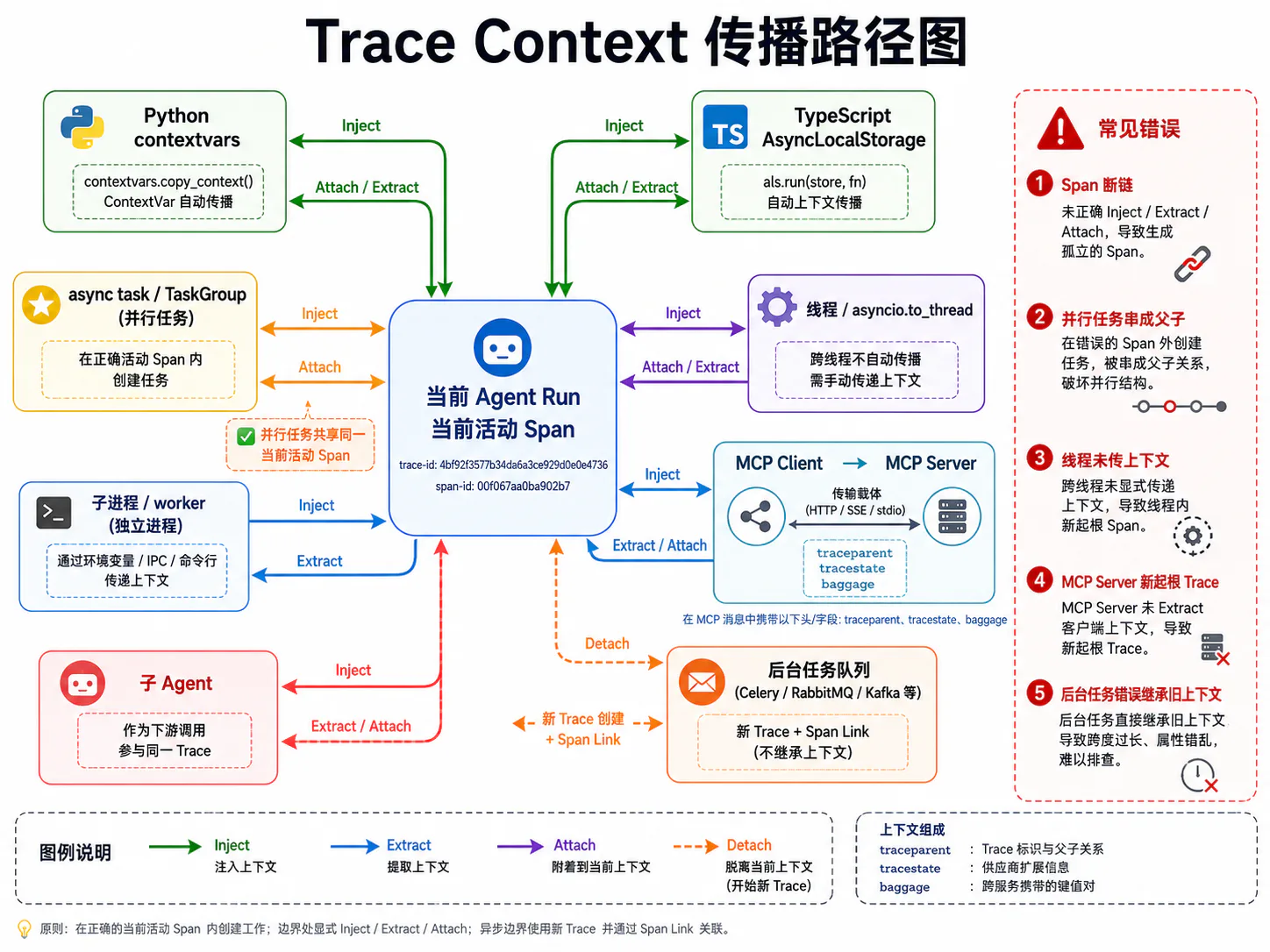
Trace 的父子关系依赖 Context 传播。如果上下文传播错误,就会出现:
- Span 全部变成独立根节点;
- 不同用户的 Span 串到一起;
- 并行工具互相成为父子;
- 子 Agent 无法回挂;
- MCP Client 和 Server Trace 断裂;
- 后台任务继承了已经结束的错误上下文。
OpenTelemetry 的 Context Propagation 通过 Inject 和 Extract,在进程、服务和协议边界之间传递 Trace Context。11
需要区分两种上下文:
- OpenTelemetry Context:当前活动 Span、Baggage 等;
- Agent 领域上下文:
task_id、run_id、step_id、权限、预算等。
OpenTelemetry SDK 负责第一类;应用自己的 contextvars 或 AsyncLocalStorage 负责第二类。不要把 Span 对象塞进全局变量手动维护。
4.1 Python contextvars
Python 的 contextvars 专门用于保存异步上下文局部状态,并原生支持 asyncio。每个线程维护自己的 Context Stack,ContextVar.set() 会返回 Token,随后应通过 reset() 恢复。12
下面定义一个不可变的 Agent 领域上下文:
from __future__ import annotations
from contextlib import contextmanagerfrom contextvars import ContextVar, Tokenfrom dataclasses import dataclassfrom typing import Iterator
@dataclass(frozen=True, slots=True)class AgentExecutionContext: session_id: str task_id: str run_id: str turn_id: str | None = None step_id: str | None = None
_AGENT_CONTEXT: ContextVar[AgentExecutionContext | None] = ContextVar( "agent_execution_context", default=None,)
def current_agent_context() -> AgentExecutionContext: value = _AGENT_CONTEXT.get() if value is None: raise RuntimeError("Agent execution context is not bound") return value
@contextmanagerdef bind_agent_context( value: AgentExecutionContext,) -> Iterator[AgentExecutionContext]: token: Token[AgentExecutionContext | None] = _AGENT_CONTEXT.set(value) try: yield value finally: _AGENT_CONTEXT.reset(token)使用:
async def handle_task(task: Task) -> Result: execution_context = AgentExecutionContext( session_id=task.session_id, task_id=task.task_id, run_id=task.run_id, )
with bind_agent_context(execution_context): return await run_agent(task)为什么建议不可变对象
asyncio.create_task() 会复制当前 Context,但如果 ContextVar 中保存的是可变字典,不同 Task 复制的仍可能是同一对象引用。并发修改会引发数据竞争。
因此更安全的方式是:
- 使用不可变
dataclass; - 每次 Step 创建新对象;
- 不在共享 Context 中原地修改列表和字典。
例如:
from dataclasses import replace
base = current_agent_context()step_context = replace(base, step_id="step_004")
with bind_agent_context(step_context): await execute_step()4.2 TypeScript AsyncLocalStorage
Node.js 的 AsyncLocalStorage 可以在回调和 Promise 链中保持异步局部状态。Node 官方建议优先使用它,而不是直接基于底层 async_hooks 自己实现上下文系统,因为前者经过了性能和内存安全优化。13
import { AsyncLocalStorage } from "node:async_hooks";
type AgentExecutionContext = Readonly<{ sessionId: string; taskId: string; runId: string; turnId?: string; stepId?: string;}>;
const agentContext = new AsyncLocalStorage<AgentExecutionContext>();
export function currentAgentContext(): AgentExecutionContext { const value = agentContext.getStore(); if (!value) { throw new Error("Agent execution context is not bound"); } return value;}
export async function withAgentContext<T>( value: AgentExecutionContext, fn: () => Promise<T>,): Promise<T> { return agentContext.run(value, fn);}使用:
await withAgentContext( { sessionId: task.sessionId, taskId: task.taskId, runId: task.runId, }, async () => { await runAgent(task); },);Node 文档建议多数情况下优先使用 run(),而不是 enterWith()。run() 的作用范围更明确,更不容易让后续不相关异步操作意外继承上下文。13
OpenTelemetry Node SDK 通常会使用基于 AsyncLocalStorage 的 Context Manager 来保存当前 Span。业务代码无需再自行把 Span 存进自己的 AsyncLocalStorage。
4.3 Async Task
Python asyncio.create_task() 默认会复制创建时的当前 Context。14
因此下面的创建位置非常重要:
with tracer.start_as_current_span("agent.step.execute_tools"): async with asyncio.TaskGroup() as group: group.create_task(execute_tool(call_a)) group.create_task(execute_tool(call_b))两个 Tool Task 会继承 agent.step.execute_tools 作为活动父上下文。
而下面的写法容易产生错误:
coroutines = [ execute_tool(call_a), execute_tool(call_b),]
with tracer.start_as_current_span("agent.step.execute_tools"): # 如果 Task 早已在其他位置创建,可能已经捕获错误上下文 await asyncio.gather(*coroutines)关键原则是:
Task 应在正确的活动 Span 内创建,而不只是“在那个 Span 内等待”。
不要把并行执行误建成串行父子链
错误:
tool A└── tool B └── tool C如果三者实际并行,它们应该是同级兄弟:
execute_parallel_tools├── tool A├── tool B└── tool C完成顺序不应改变父子关系。
4.4 Thread 和子进程
asyncio.to_thread
Python 的 asyncio.to_thread() 会将当前 contextvars.Context 传播到工作线程。14
result = await asyncio.to_thread(blocking_file_scan, path)如果 OpenTelemetry Python Context Manager 也基于 ContextVar,这通常能让活动 Trace Context 一起传播。
原始线程池
使用原始 ThreadPoolExecutor.submit() 时,不应假设 Context 一定自动传播。可以显式复制:
from concurrent.futures import ThreadPoolExecutorfrom contextvars import copy_context
pool = ThreadPoolExecutor(max_workers=4)
ctx = copy_context()future = pool.submit(ctx.run, blocking_file_scan, path)result = future.result()子进程
Context 不会自动跨进程传播。你需要显式 Inject:
from opentelemetry import propagate
carrier: dict[str, str] = {}propagate.inject(carrier)
payload = { "trace_context": carrier, "task_id": current_agent_context().task_id, "command": ["pytest", "-q"],}子进程或 Worker 收到后 Extract:
from opentelemetry import context as otel_contextfrom opentelemetry import propagate
extracted = propagate.extract(payload["trace_context"])token = otel_context.attach(extracted)
try: run_worker(payload)finally: otel_context.detach(token)不要把完整 Prompt、Access Token 或敏感用户数据放进 Baggage。Baggage 会被传播到下游,传播范围通常比你想象得更广。
4.5 MCP Client 与 Server
MCP 调用的标准传播过程如下:
Agent active Span │ ├── MCP Client: inject(traceparent, tracestate, baggage) │ └── MCP request params._meta │ ▼ MCP Server: extract │ ▼ Server Span / Tool SpanPython 伪代码:
from opentelemetry import propagate
def inject_mcp_trace_context(params: dict) -> dict: carrier: dict[str, str] = {} propagate.inject(carrier)
meta = dict(params.get("_meta", {}))
for key in ("traceparent", "tracestate", "baggage"): if key in carrier: meta[key] = carrier[key]
return { **params, "_meta": meta, }Server:
from opentelemetry import context as otel_contextfrom opentelemetry import propagate
async def handle_mcp_request(request: dict) -> dict: meta = request.get("params", {}).get("_meta", {}) carrier = { key: meta[key] for key in ("traceparent", "tracestate", "baggage") if key in meta }
extracted = propagate.extract(carrier) token = otel_context.attach(extracted)
try: return await dispatch_request(request) finally: otel_context.detach(token)MCP 的两个常见错误
错误一:没有 Extract 就创建 Server Span。
结果是 MCP Server 每次都产生新的根 Trace。
错误二:Agent Framework 和 MCP SDK 都生成相同 Tool Span。
结果是一次工具调用在 Trace 中出现两次。应明确哪一层负责逻辑 Tool Span,另一层只负责协议 Span或属性增强。
4.6 子 Agent 和后台任务
同步子 Agent
如果主 Agent 调用子 Agent,并等待结果,可以使用普通父子关系:
invoke_agent parent└── invoke_agent child脱离当前生命周期的后台任务
如果后台任务:
- 进入队列;
- 稍后由其他 Worker 处理;
- 可能在父任务结束后才执行;
- 不适合被视为直接同步子调用;
可以创建新 Trace,并使用 Span Link 指向原始 Span。
from opentelemetry import tracefrom opentelemetry.trace import Link
parent_span_context = trace.get_current_span().get_span_context()
# 将 SpanContext 序列化后的标准传播载体放入队列;# Worker 创建新 Trace 时,通过 Link 保留逻辑来源。links = [Link(parent_span_context)]同时在任务消息中传递:
task_idrun_idoperation_idtrace_contextcaused_by_event_id需要注意:
- Parent-child 表示明确生命周期隶属;
- Link 表示引用、因果、批处理或汇聚关系;
- 不要为了保持“一条大 Trace”无限延长跨小时、跨天的后台工作流;
- 长生命周期任务更适合使用业务 Run ID 串联多个 Trace Segment。
5. 流式模型调用如何记录
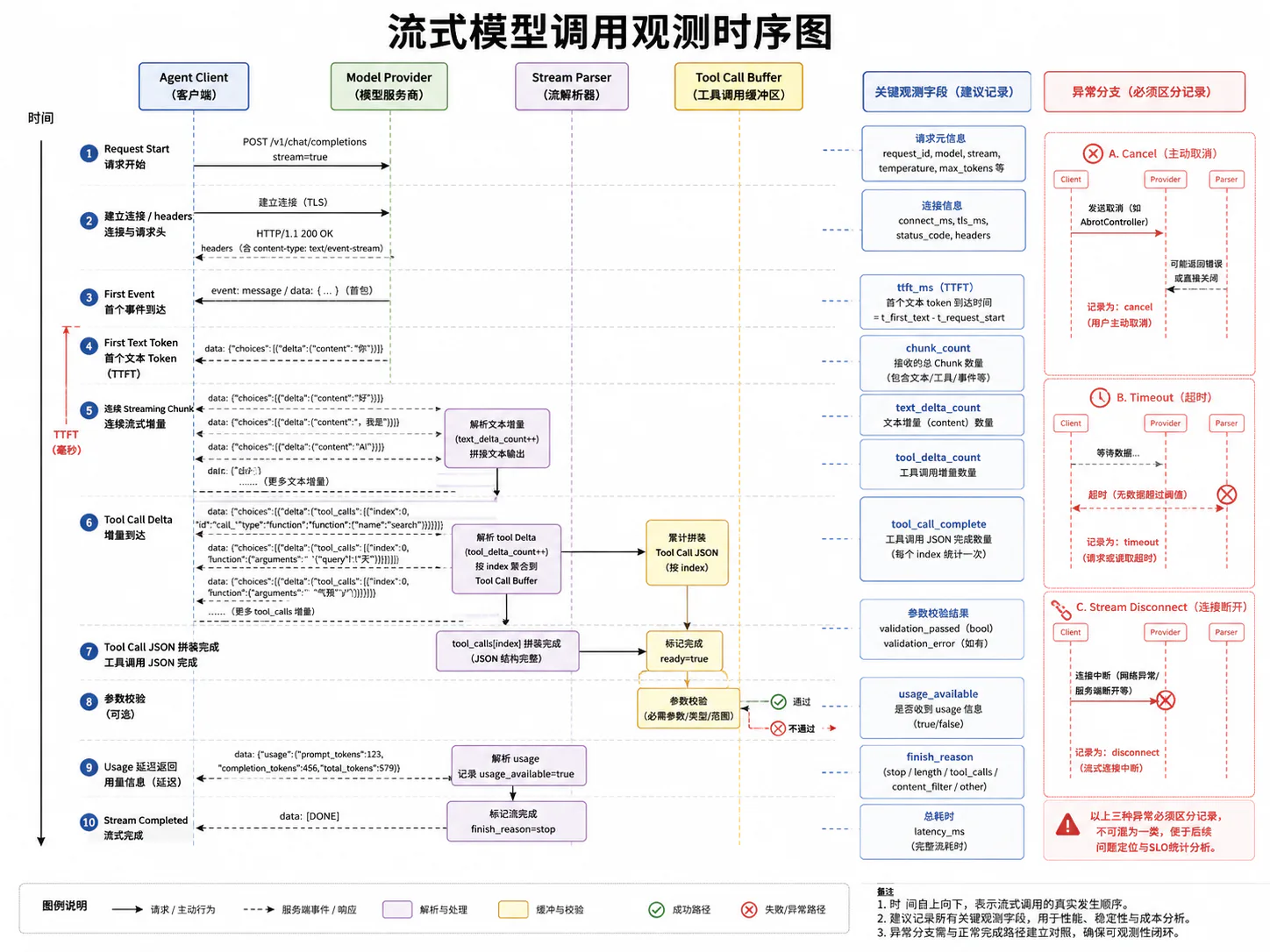
流式调用是 Agent 观测中最容易被错误实现的部分。一个流式请求不是简单的:
开始 → 结束而是:
Request Start→ Connection / Headers→ First Byte→ First Token→ Text Deltas→ Tool Call Deltas→ Finish Reason→ Usage→ Stream Close不同 Provider 的事件协议不同,但观测模型应该统一。
5.1 Request Start
Model Span 应在客户端真正开始请求时创建,而不是在 Prompt 组装时创建。
with tracer.start_as_current_span( "chat model-x", kind=SpanKind.CLIENT, attributes={ "gen_ai.operation.name": "chat", "gen_ai.provider.name": "provider-x", "gen_ai.request.model": "model-x", "server.address": "api.provider.example", },): stream = await client.create_stream(request)如果把上下文组装也包进 Model Span,就无法区分:
- 本地 Prompt 构造慢;
- 网络建立慢;
- Provider 排队慢;
- 模型生成慢。
5.2 Time to First Token
Time to First Token,简称 TTFT,表示从请求开始到收到第一个可展示 Token 的时间。
它通常包含:
- 本地序列化;
- 网络连接;
- Provider 排队;
- 输入处理;
- 首 Token 生成;
- 首个数据帧传输。
记录 TTFT 时,应先定义“第一个 Token”的口径:
- 第一个流式事件;
- 第一个文本 Delta;
- 第一个非空文本 Token;
- 第一个 Tool Call Delta。
推荐同时区分:
time_to_first_eventtime_to_first_text_tokentime_to_first_tool_delta因为 Tool-use Agent 可能不输出任何文本,而是直接生成 Tool Call。
started_ns = time.perf_counter_ns()first_event_seen = Falsefirst_text_seen = False
async for frame in stream: now_ns = time.perf_counter_ns()
if not first_event_seen: first_event_seen = True span.add_event( "stream.first_event", { "app.agent.stream.time_to_first_event_ms": (now_ns - started_ns) / 1_000_000, }, )
if frame.type == "text_delta" and frame.text and not first_text_seen: first_text_seen = True ttft_ms = (now_ns - started_ns) / 1_000_000 span.set_attribute("app.agent.stream.ttft_ms", ttft_ms) span.add_event("stream.first_text_token")TTFT 既应该作为单条 Trace 属性,也应该写入 Histogram Metric,用于观察整体分布。
5.3 Streaming Chunk
不要为每个 Chunk 创建 Span。
假设每次模型调用返回 500 个 Chunk,一天 100 万次调用,就会制造 5 亿个 Span 或 Event,成本和噪声都不可接受。
更合理的方式是:
- 聚合 Chunk 数量;
- 记录首个 Event;
- 记录工具调用完成;
- 记录异常 Chunk;
- 必要时对少量 Trace 开启详细 Chunk 调试;
- 原始流写入短期受控 Artifact,而不是全量 Trace 属性。
建议字段:
app.agent.stream.chunk_countapp.agent.stream.text_delta_countapp.agent.stream.tool_delta_countapp.agent.stream.output_bytesapp.agent.stream.empty_chunk_count需要定位协议问题时,可以记录有限 Event:
stream.first_eventstream.first_text_tokenstream.tool_call_startedstream.tool_call_completedstream.usage_receivedstream.completed5.4 增量 Tool Call 解析
多个 Tool Call 的参数 Delta 可能交错到达,因此不能只维护一个全局字符串 Buffer。
需要按:
- Tool Call ID;
- Tool Call Index;
- 工具名称;
- 当前解析状态;
分别聚合。
from dataclasses import dataclass, fieldimport json
@dataclassclass ToolCallBuffer: tool_name: str | None = None fragments: list[str] = field(default_factory=list)
def append(self, fragment: str) -> None: self.fragments.append(fragment)
def finalize(self) -> dict: payload = "".join(self.fragments) value = json.loads(payload)
if not isinstance(value, dict): raise ValueError("Tool arguments must be a JSON object")
return value管理多个调用:
buffers: dict[str, ToolCallBuffer] = {}
async for frame in stream: if frame.type == "tool_call_delta": buffer = buffers.setdefault( frame.tool_call_id, ToolCallBuffer(tool_name=frame.tool_name), ) buffer.append(frame.arguments_delta)
elif frame.type == "tool_call_done": arguments = buffers[frame.tool_call_id].finalize() validate_against_tool_schema( tool_name=buffers[frame.tool_call_id].tool_name, arguments=arguments, )何时可以执行工具
正常情况下,应等待:
- Tool Call 完成;
- JSON 完整;
- Schema 校验通过;
- 审批完成;
- 幂等信息生成;
然后才执行。
不要因为已经收到一部分参数就提前执行,除非协议明确支持可恢复的增量执行,并且工具本身具备严格事务语义。
5.5 Usage 延迟返回
有些 Provider 会在最后一个 Usage 事件中才返回 Token 用量;也有 Provider 在流结束后才能读取 Usage。
正确处理方式:
- Span 在 Usage 到达前不要过早结束;
- 如果协议明确保证 Usage 作为终止事件的一部分,就等待该事件;
- 如果 Usage 可能永远缺失,设置合理的终止边界;
- Usage 缺失时记录
usage_available=false; - 不用字符数冒充精确 Token 数。
如果 Span 已结束,OpenTelemetry Span 通常不应再被修改。此时可以:
- 产生一条带
trace_id/span_id的 Log; - 更新业务侧 Run Record;
- 通过 Artifact 或数据仓库补充;
- 不应创建一条伪造的第二个模型调用 Span。
5.6 Cancel、Timeout 与 Stream Disconnect
这三者必须区分。
Cancel
用户主动停止、上游任务取消或应用关闭连接。
app.agent.stream.termination = client_cancel主动取消通常不代表 Provider 故障。可以保留 Span 的正常或未设置状态,并通过终止类型表达。
Timeout
客户端等待超过配置阈值。
error.type = timeoutapp.agent.stream.termination = timeoutTimeout 通常是错误,应记录 Timeout 阶段:
connect_timeoutfirst_token_timeoutidle_timeoutoverall_timeoutStream Disconnect
连接在正常 Finish Event 前意外断开。
error.type = stream_disconnectedapp.agent.stream.termination = disconnectapp.agent.stream.partial_output = true还应该记录:
- 已收到多少 Chunk;
- 是否已收到完整 Tool Call;
- 是否可能安全重试;
- 是否存在部分外部副作用;
- 重试时是否会重复生成 Tool Call。
一个完整的流式观测函数
from __future__ import annotations
import asyncioimport timefrom collections.abc import AsyncIteratorfrom typing import Any
from opentelemetry import metrics, tracefrom opentelemetry.trace import SpanKind, Status, StatusCode
tracer = trace.get_tracer("example.agent")meter = metrics.get_meter("example.agent")
ttft_histogram = meter.create_histogram( "app.agent.stream.ttft", unit="ms", description="Time from model request start to first text token",)
async def consume_model_stream( *, client: Any, request: Any, provider_name: str, model_name: str,) -> tuple[str, list[dict[str, Any]], dict[str, int] | None]: attributes = { "gen_ai.operation.name": "chat", "gen_ai.provider.name": provider_name, "gen_ai.request.model": model_name, }
with tracer.start_as_current_span( f"chat {model_name}", kind=SpanKind.CLIENT, attributes=attributes, ) as span: started_ns = time.perf_counter_ns() first_event_seen = False first_text_seen = False chunk_count = 0 text_delta_count = 0 tool_delta_count = 0 output_parts: list[str] = [] tool_buffers: dict[str, ToolCallBuffer] = {} completed_tool_calls: list[dict[str, Any]] = [] usage: dict[str, int] | None = None
try: async for frame in client.stream(request): chunk_count += 1 now_ns = time.perf_counter_ns()
if not first_event_seen: first_event_seen = True span.add_event( "stream.first_event", { "app.agent.stream.time_to_first_event_ms": (now_ns - started_ns) / 1_000_000, }, )
if frame.type == "text_delta": text_delta_count += 1 output_parts.append(frame.text)
if frame.text and not first_text_seen: first_text_seen = True ttft_ms = (now_ns - started_ns) / 1_000_000 span.set_attribute("app.agent.stream.ttft_ms", ttft_ms) span.add_event("stream.first_text_token")
ttft_histogram.record( ttft_ms, { "gen_ai.provider.name": provider_name, "gen_ai.request.model": model_name, }, )
elif frame.type == "tool_call_delta": tool_delta_count += 1 buffer = tool_buffers.setdefault( frame.tool_call_id, ToolCallBuffer(tool_name=frame.tool_name), ) buffer.append(frame.arguments_delta)
elif frame.type == "tool_call_done": buffer = tool_buffers[frame.tool_call_id] arguments = buffer.finalize()
completed_tool_calls.append( { "id": frame.tool_call_id, "name": buffer.tool_name, "arguments": arguments, } )
span.add_event( "tool_call.completed", { "gen_ai.tool.call.id": frame.tool_call_id, "gen_ai.tool.name": buffer.tool_name or "unknown", "app.agent.tool.arguments.valid": True, }, )
elif frame.type == "usage": usage = { "input_tokens": frame.input_tokens, "output_tokens": frame.output_tokens, } span.add_event("stream.usage_received")
elif frame.type == "done": span.set_attribute( "gen_ai.response.finish_reasons", [frame.finish_reason], )
span.set_attribute("app.agent.stream.chunk_count", chunk_count) span.set_attribute( "app.agent.stream.text_delta_count", text_delta_count, ) span.set_attribute( "app.agent.stream.tool_delta_count", tool_delta_count, ) span.set_attribute("app.agent.stream.termination", "completed")
if usage is not None: span.set_attribute( "gen_ai.usage.input_tokens", usage["input_tokens"], ) span.set_attribute( "gen_ai.usage.output_tokens", usage["output_tokens"], ) span.set_attribute("app.agent.usage.available", True) else: span.set_attribute("app.agent.usage.available", False)
return "".join(output_parts), completed_tool_calls, usage
except asyncio.CancelledError: span.set_attribute( "app.agent.stream.termination", "client_cancel", ) span.add_event("stream.cancelled") raise
except asyncio.TimeoutError: span.set_attribute("error.type", "timeout") span.set_attribute( "app.agent.stream.termination", "timeout", ) span.set_status(Status(StatusCode.ERROR)) span.add_event("stream.timeout") raise
except Exception as exc: span.set_attribute("error.type", type(exc).__name__) span.set_attribute( "app.agent.stream.termination", "disconnect_or_protocol_error", ) span.set_status(Status(StatusCode.ERROR)) span.record_exception(exc) raise生产环境中,record_exception() 可能捕获异常消息和 Stack Trace。若异常文本可能包含 Prompt、Tool Arguments 或凭证,应在进入遥测管道前做专门的异常脱敏。
6. 并行与重试
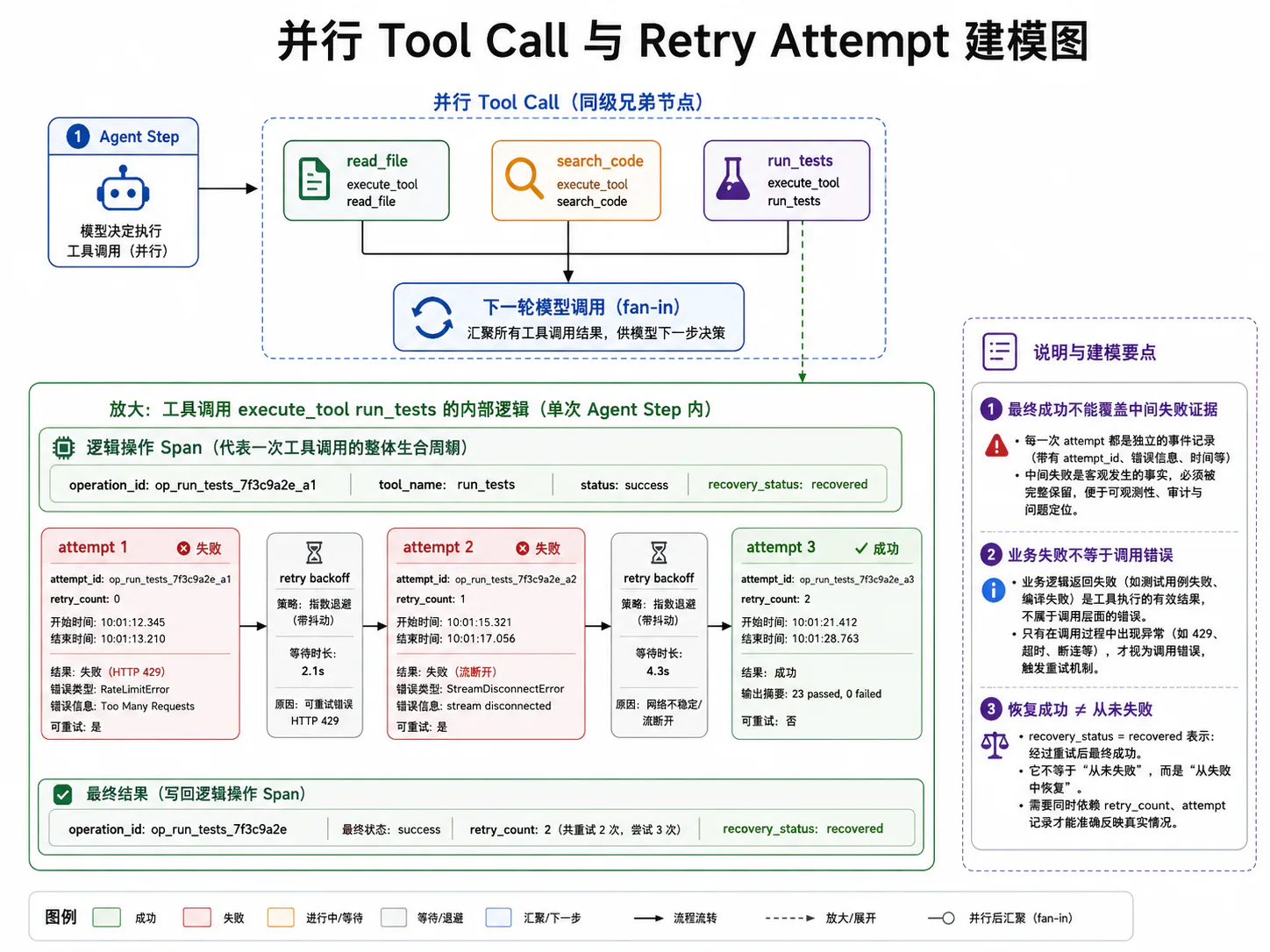
6.1 并行 Tool Call 的父子关系
模型一次返回多个 Tool Call:
[ {"name": "read_file", "arguments": {"path": "a.py"}}, {"name": "read_file", "arguments": {"path": "b.py"}}, {"name": "search_code", "arguments": {"query": "discount"}}]这三个调用应是同一个 Step 下的兄弟 Span。
agent.step.execute_tools├── execute_tool read_file├── execute_tool read_file└── execute_tool search_codePython:
import asynciofrom typing import Any
from opentelemetry import trace
tracer = trace.get_tracer("example.agent")
async def execute_tools_in_parallel( calls: list[ToolCall], runtime: ToolRuntime,) -> list[Any]: results: list[Any] = [None] * len(calls)
async def run_one(index: int, call: ToolCall) -> None: results[index] = await execute_tool_observed( call=call, runtime=runtime, )
with tracer.start_as_current_span( "agent.step.execute_tools", attributes={ "app.agent.tool_call.count": len(calls), "app.agent.execution.parallel": True, }, ): async with asyncio.TaskGroup() as group: for index, call in enumerate(calls): group.create_task(run_one(index, call))
return resultsTaskGroup 内创建的 Task 会继承创建时的 Context。不要根据工具完成顺序决定父子关系。
Fan-in 后的下一次模型调用
下一轮模型请求依赖所有工具结果。可以:
- 将下一轮模型 Span 设为
agent.step.execute_tools的后继子 Span; - 对具体工具 Span 添加 Links,表达它依赖多个结果。
Links 必须在 Span 创建时提供,因此应在工具调用结束后保存它们的 SpanContext。
6.2 一个逻辑操作与多个 Attempt
一次逻辑工具操作可能经历:
第 1 次调用 → 429等待 1 秒第 2 次调用 → 网络断开等待 2 秒第 3 次调用 → 成功如果每次重试都生成完全独立的 Tool Span,就很难看出它们属于同一个逻辑操作。
推荐两层结构:
execute_tool remote_search ← 逻辑操作├── tool.attempt 1 [429]├── tool.attempt 2 [disconnect]└── tool.attempt 3 [success]稳定字段:
app.agent.operation.id = op_123每次尝试字段:
app.agent.attempt.id = att_001app.agent.attempt.number = 1外层 Tool Span 记录最终 Outcome 和总耗时;Attempt Span 记录每次真实网络或工具执行。
6.3 429、5xx 和网络中断
错误类型必须是稳定、可聚合的类别,不能直接把完整异常消息作为 error.type。
推荐:
rate_limitprovider_5xxconnect_timeoutread_timeoutstream_disconnecteddns_errortls_errorconnection_resettool_process_crashed完整异常消息可以存在受控 Log 或 Artifact 中,但 Metric Label 只使用稳定类别。
重试策略不能只看状态码
是否可重试还取决于:
- 操作是否幂等;
- 是否已经产生副作用;
- 是否收到部分响应;
- Tool Call 是否已经执行;
- Provider 是否支持 Idempotency Key;
- 当前预算是否允许;
- 用户是否已经取消任务。
例如:
- 模型请求在首 Token 前 503:通常较安全地重试;
- 模型已生成完整支付 Tool Call,但客户端在收到确认前断流:不能盲目再次执行支付;
- 只读检索工具超时:通常可重试;
- 发送邮件接口返回不确定状态:应先查询发送状态,而不是直接重发。
6.4 Retry Backoff 和 Fallback
重试等待时间应作为 Event 记录:
operation_span.add_event( "retry.scheduled", { "app.agent.attempt.number": attempt_number, "app.agent.retry.delay_ms": delay_ms, "app.agent.retry.reason": error_category, "app.agent.retry.strategy": "exponential_jitter", },)推荐退避公式:
delay = min(max_delay, base_delay × 2^(attempt-1)) + jitterFallback 也应显式记录:
app.agent.fallback.type = modelapp.agent.fallback.from = model-aapp.agent.fallback.to = model-bapp.agent.fallback.reason = rate_limit不要把 Fallback 后的成功当作“原模型成功”。
带 Attempt 的工具执行示例
from __future__ import annotations
import asyncioimport randomimport uuidfrom typing import Any, Callable, Awaitable
from opentelemetry import tracefrom opentelemetry.trace import Status, StatusCode
tracer = trace.get_tracer("example.agent")
class RetryableToolError(Exception): def __init__(self, category: str, message: str = "") -> None: super().__init__(message) self.category = category
async def execute_with_retry( *, operation_name: str, tool_name: str, action: Callable[[], Awaitable[Any]], max_attempts: int = 3, base_delay_seconds: float = 0.5, max_delay_seconds: float = 8.0,) -> Any: operation_id = f"op_{uuid.uuid4().hex}"
with tracer.start_as_current_span( operation_name, attributes={ "gen_ai.operation.name": "execute_tool", "gen_ai.tool.name": tool_name, "app.agent.operation.id": operation_id, }, ) as operation_span: last_error: Exception | None = None
for attempt_number in range(1, max_attempts + 1): attempt_id = f"att_{uuid.uuid4().hex}"
with tracer.start_as_current_span( f"{tool_name}.attempt", attributes={ "app.agent.operation.id": operation_id, "app.agent.attempt.id": attempt_id, "app.agent.attempt.number": attempt_number, }, ) as attempt_span: try: result = await action()
attempt_span.set_attribute( "app.agent.attempt.outcome", "success", ) operation_span.set_attribute( "app.agent.retry.count", attempt_number - 1, )
if attempt_number > 1: operation_span.set_attribute( "app.agent.recovery.status", "recovered", ) else: operation_span.set_attribute( "app.agent.recovery.status", "not_needed", )
return result
except RetryableToolError as exc: last_error = exc attempt_span.set_attribute("error.type", exc.category) attempt_span.set_attribute( "app.agent.attempt.outcome", "retryable_error", ) attempt_span.set_status(Status(StatusCode.ERROR)) attempt_span.record_exception(exc)
if attempt_number == max_attempts: break
exponential = base_delay_seconds * ( 2 ** (attempt_number - 1) ) delay = min(max_delay_seconds, exponential) delay += random.uniform(0, delay * 0.2)
operation_span.add_event( "retry.scheduled", { "app.agent.attempt.number": attempt_number, "app.agent.retry.delay_ms": delay * 1000, "app.agent.retry.reason": exc.category, "app.agent.retry.strategy": "exponential_backoff_with_jitter", }, )
await asyncio.sleep(delay)
except Exception as exc: last_error = exc attempt_span.set_attribute( "error.type", type(exc).__name__, ) attempt_span.set_attribute( "app.agent.attempt.outcome", "non_retryable_error", ) attempt_span.set_status(Status(StatusCode.ERROR)) attempt_span.record_exception(exc) break
operation_span.set_attribute( "app.agent.recovery.status", "failed", ) operation_span.set_attribute( "app.agent.retry.count", max_attempts - 1, ) operation_span.set_attribute( "error.type", type(last_error).__name__ if last_error else "unknown", ) operation_span.set_status(Status(StatusCode.ERROR))
if last_error is not None: raise last_error
raise RuntimeError("Tool execution failed without an error")真实系统还需要将:
- HTTP 状态码;
- Provider 错误码;
- 幂等性;
- Partial Result;
- Timeout 阶段;
- Circuit Breaker;
纳入重试判断。
6.5 最终成功不能覆盖中间失败证据
如果第 3 次 Attempt 成功:
- 外层逻辑 Tool Span 可以是成功;
- 第 1、2 次 Attempt Span 仍然应保持
ERROR; - 外层记录
retry.count=2; - 外层记录
recovery.status=recovered; - Trace 应能被 Tail Sampling 策略保留。
错误做法:
最终成功 → 把前两次失败 Span 改成 OK这会让系统无法发现:
- Provider 近期是否频繁限流;
- 网络是否不稳定;
- 成本是否因重试放大;
- 恢复能力是否真正发挥作用。
恢复成功和从未失败不是同一件事。
7. Collector 和导出链路
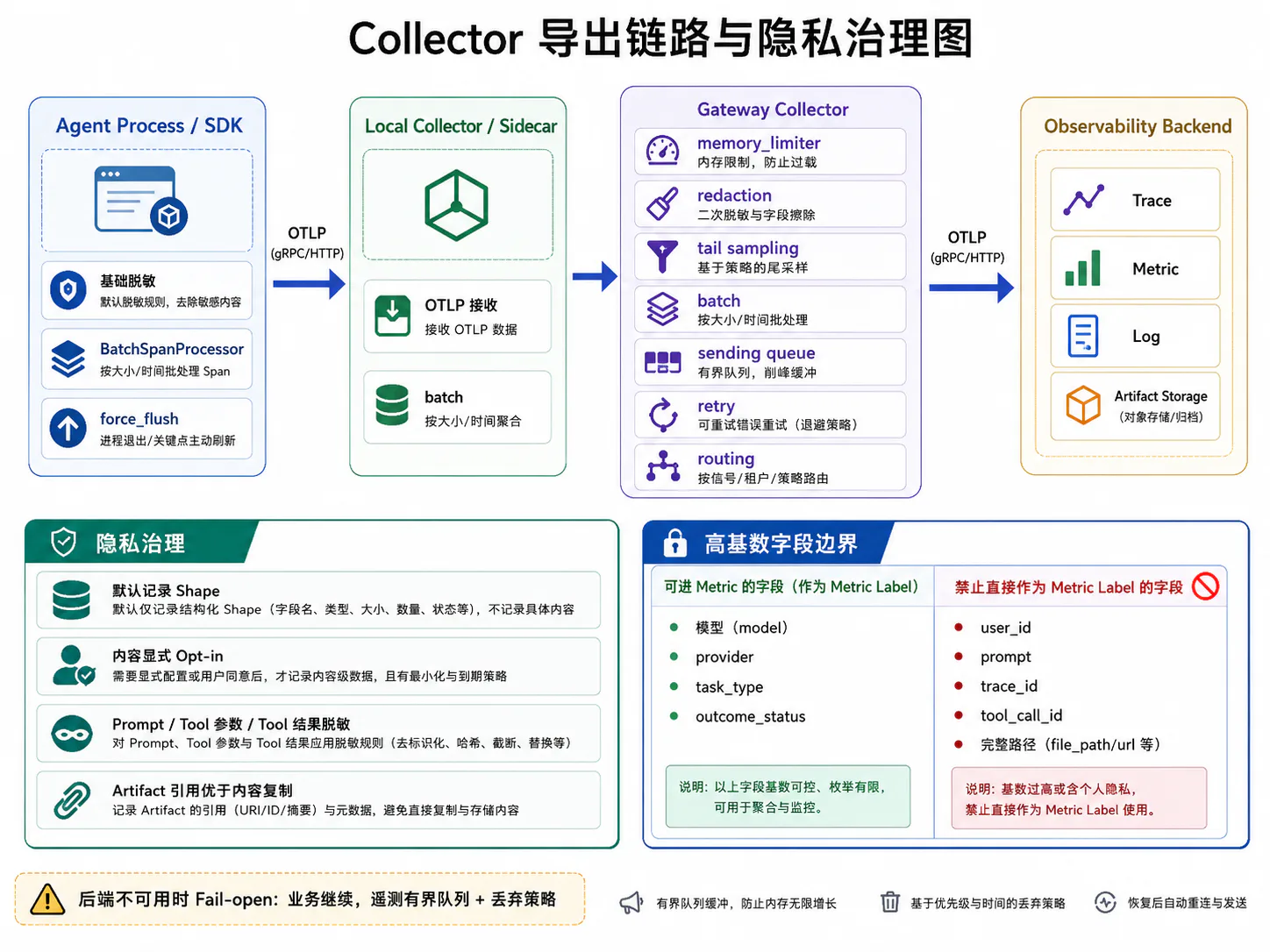
推荐的生产链路是:
Agent Process │ OTLP ▼Local / Sidecar Collector │ ▼Gateway Collector ├── Tail Sampling ├── Redaction ├── Routing └── Multi-backend Export应用进程负责:
- 创建 Span;
- 传播 Context;
- 基础脱敏;
- 批量导出;
- 不阻塞主业务。
Collector 负责:
- 接收 OTLP;
- 二次脱敏;
- 队列与重试;
- Tail Sampling;
- 路由到多个后端;
- 统一治理。
Collector 中定义了 Processor 并不代表它会自动生效,必须将它加入 service.pipelines。15
7.1 Batch
Batch 的作用是将多个遥测对象聚合后再导出,从而减少:
- 网络连接次数;
- 请求头开销;
- 后端写入次数;
- 压缩损耗。
OpenTelemetry Collector 的 Batch Processor 通常应放在:
memory_limitersampling / filtering / redactionbatchexporter的后部。官方文档也建议将 Batch 放在 memory_limiter 和采样 Processor 之后。16
Batch 关注的是“如何成批发送”,不是“后端不可用时能缓存多久”。
典型配置:
processors: batch: timeout: 1s send_batch_size: 1024 send_batch_max_size: 2048参数需要按:
- Span 平均大小;
- 请求延迟目标;
- Collector 内存;
- 后端批量写入限制;
进行压测,而不是直接复制默认值。
7.2 Queue 与 Backpressure
Sending Queue 位于 Exporter 侧,用于吸收后端短时抖动。
Processor → Sending Queue → Export Worker → Backend需要关注:
- Queue 是否有界;
- 满时是丢弃还是阻塞;
- Queue 单位是请求、批次还是字节;
- 是否启用持久化;
- 消费者并发数;
- 后端恢复后的排空速度。
Exporter Helper 默认提供重试和 Sending Queue 能力;如果队列无法入队,数据可能被丢弃,因此必须监控对应失败指标。17
Agent 不应使用无界内存队列
如果后端宕机数小时,无界队列会让 Agent 或 Collector 内存持续增长,最后把业务本身拖垮。
正确优先级通常是:
- Agent 任务继续执行;
- 保留必要的本地审计记录;
- 遥测队列有界;
- 超过容量后按策略丢弃非关键遥测;
- 对丢弃本身产生 Collector Internal Metric。
7.3 Retry
Exporter Retry 与 Agent Tool Retry 是两套完全不同的重试。
Agent Tool Retry
重试的是业务操作:
模型请求工具调用MCP 调用外部 APIExporter Retry
重试的是遥测数据导出:
OTLP Export → Observability Backend不能把二者混为一谈。
推荐 Exporter 配置:
exporters: otlphttp/backend: endpoint: ${env:OTEL_BACKEND_ENDPOINT} headers: Authorization: "Bearer ${env:OTEL_BACKEND_TOKEN}"
sending_queue: enabled: true queue_size: 10000 num_consumers: 8
retry_on_failure: enabled: true initial_interval: 1s max_interval: 30s max_elapsed_time: 5m官方 Exporter Helper 的重试默认使用指数退避,并提供最大间隔和最大持续时间等配置。17
7.4 Tail Sampling
Head Sampling 在 Trace 开始时决定保留还是丢弃;但此时你还不知道:
- 最终是否失败;
- 是否发生重试;
- 是否高延迟;
- 是否高成本;
- 是否产生危险副作用;
- 是否被人工接管。
Agent 特别适合使用 Tail Sampling,因为采样决策可以在看到 Trace 结果后作出。
推荐保留策略:
- 所有 ERROR Trace;
- 所有恢复后成功 Trace;
- 所有高延迟 Trace;
- 所有高 Token / 高费用 Trace;
- 所有审批拒绝或人工接管 Trace;
- 所有不可逆副作用 Trace;
- 正常 Trace 随机保留少量基线样本。
Tail Sampling 的两个关键约束
第一,完整 Trace 必须路由到同一个 Sampling Collector 实例。
如果同一 trace_id 的 Span 被分散到多个 Gateway,每个实例都只能看到部分链路,采样决策会错误。Agent-to-Gateway 部署通常需要按 Trace ID 做一致路由。18
第二,长 Agent Trace 容易产生 Late Span。
Tail Sampling 需要在内存中等待 decision_wait。如果:
- Agent 运行时间长;
- 子 Agent 延迟返回;
- 后台 Span 晚到;
num_traces太小;
Trace 可能在采样决策前被过早移出,或者晚到 Span 得到不同决策。官方 Tail Sampling 文档要求重点监控 sampling_trace_dropped_too_early 和 Late Span 等指标。19
因此,不能机械设置:
decision_wait: 10s然后假设它适合所有 Agent。应根据实际 Trace 时长分布和网关内存进行调优。
7.5 短生命周期 CLI 的强制 Flush
Coding Agent、命令行工具和一次性 Worker 经常在任务完成后立即退出。如果使用 BatchSpanProcessor,进程退出前未导出的 Span 可能丢失。
Python:
from opentelemetry import tracefrom opentelemetry.sdk.trace import TracerProvider
def flush_and_shutdown(timeout_millis: int = 5000) -> None: provider = trace.get_tracer_provider()
if not isinstance(provider, TracerProvider): return
flushed = provider.force_flush( timeout_millis=timeout_millis, )
if not flushed: # 写入本地 stderr 或应用日志,不要递归发送 OTel Log。 print("OpenTelemetry force_flush timed out")
provider.shutdown()force_flush() 会尝试导出已经结束、但尚未导出的 Span,并返回是否在超时内完成。20
什么时候调用
- CLI 正常结束;
- 收到 SIGTERM;
- Worker 结束任务准备退出;
- Serverless Invocation 收尾;
- 测试进程结束。
不要在每个 Span 结束时调用 force_flush(),否则会破坏批处理并显著增加延迟。
7.6 观测后端不可用时的 Fail-open
Agent 的主任务不应因为观测后端不可用而失败。
如果 Langfuse、Tempo、Jaeger、Phoenix 或其他后端暂时不可用,正常的代码修复任务仍应继续。
Fail-open 的实现原则
- 使用 BatchSpanProcessor,而不是同步逐 Span 导出;
- 应用只发送到本地 Collector;
- Collector 使用有界 Queue;
- Exporter 异步重试;
- 队列满时允许丢弃非关键遥测;
- 对丢弃率、Queue Length 和 Export Failure 建立内部告警;
- 禁止遥测异常向上冒泡影响 Agent Loop。
但审计不能完全依赖 Best-effort Trace
对于支付、删除生产数据、部署和发送消息等不可逆动作,可能存在强审计要求。此时应单独维护:
- 本地 Append-only Audit Log;
- 事务内 Outbox;
- 业务数据库审计表;
- 不可抵赖操作记录。
OpenTelemetry Trace 仍用于诊断,但不应是唯一合规凭证。
Collector 完整示例
下面是一份 Gateway Collector 的参考配置。实际字段应根据使用的 Collector Distribution 和版本验证。
extensions: file_storage: directory: /var/lib/otelcol/file_storage
receivers: otlp: protocols: grpc: endpoint: 0.0.0.0:4317 http: endpoint: 0.0.0.0:4318
processors: memory_limiter: check_interval: 1s limit_mib: 512 spike_limit_mib: 128
# 第二道内容治理防线。 # 第一层脱敏仍应在应用进程内完成。 transform/redact: error_mode: ignore trace_statements: - context: span statements: - delete_key(attributes, "gen_ai.input.messages") - delete_key(attributes, "gen_ai.output.messages") - delete_key(attributes, "gen_ai.tool.call.arguments") - delete_key(attributes, "gen_ai.tool.call.result") - delete_key(attributes, "app.agent.input.raw") - delete_key(attributes, "app.agent.output.raw")
tail_sampling: decision_wait: 30s num_traces: 50000 policies: - name: errors type: status_code status_code: status_codes: [ERROR]
- name: slow-agent-runs type: latency latency: threshold_ms: 15000
- name: recovered-after-retry type: string_attribute string_attribute: key: app.agent.recovery.status values: [recovered]
- name: baseline type: probabilistic probabilistic: sampling_percentage: 5
batch: timeout: 1s send_batch_size: 1024 send_batch_max_size: 2048
exporters: otlphttp/backend: endpoint: ${env:OTEL_BACKEND_ENDPOINT} headers: Authorization: "Bearer ${env:OTEL_BACKEND_TOKEN}"
sending_queue: enabled: true storage: file_storage queue_size: 10000 num_consumers: 8
retry_on_failure: enabled: true initial_interval: 1s max_interval: 30s max_elapsed_time: 5m
service: extensions: [file_storage]
pipelines: traces: receivers: [otlp] processors: [ memory_limiter, transform/redact, tail_sampling, batch, ] exporters: [otlphttp/backend]生产部署中的进一步拆分
本地 Agent Collector:
memory_limiter → batch → gatewayGateway Collector:
memory_limiter → redaction → tail_sampling → batch → backendsTail Sampling 不建议在每个 Sidecar 上独立执行,否则同一 Trace 的跨服务 Span 可能无法被统一决策。
8. 隐私和高基数字段治理
8.1 默认记录 Shape,不默认记录完整 Content
Agent 可观测性经常需要处理最敏感的数据:
- 用户 Prompt;
- 代码;
- 文件内容;
- 数据库结果;
- Tool Arguments;
- Tool Result;
- 检索文档;
- 长期记忆;
- 浏览器页面;
- API 凭证;
- 邮件和消息内容。
“为了调试方便全部记录”不是可接受的默认策略。
Shape 与 Content
| 对象 | 默认 Shape | 可选 Content |
|---|---|---|
| Prompt | 消息数、字符数、Token、Hash、模板版本 | 完整消息 |
| Tool Arguments | 字节数、字段数、Schema 版本、校验结果 | 完整参数 |
| Tool Result | 状态、字节数、行数、MIME、Hash | 完整返回 |
| Retrieval | top-k、候选数、索引版本 | Query 和文档 |
| Memory | 候选数、注入数、策略版本 | 记忆原文 |
| File | 路径类别、大小、Hash、Diff 统计 | 完整代码 |
| Browser | URL Origin、DOM 节点数、截图引用 | 完整页面 |
内容引用优于内容复制
推荐:
{ "app.agent.tool.result.byte_count": 38420, "app.agent.tool.result.content_hash": "sha256:...", "app.agent.tool.result.artifact_ref": "artifact://run-123/tool-result-9"}而不是将 38 KB Tool Result 直接写进 Span Attribute。
Artifact Store 可以具备:
- 加密;
- 更短保留周期;
- 独立访问控制;
- 访问审计;
- 按需删除;
- 大对象存储优化。
8.2 Prompt、工具参数和工具结果脱敏
脱敏最好分为三层。
第一层:应用内脱敏
在数据进入 OpenTelemetry SDK 前处理:
SENSITIVE_KEYS = { "authorization", "api_key", "access_token", "refresh_token", "password", "cookie", "secret",}
def redact_mapping(value: object) -> object: if isinstance(value, dict): result: dict[str, object] = {}
for key, item in value.items(): if key.lower() in SENSITIVE_KEYS: result[key] = "[REDACTED]" else: result[key] = redact_mapping(item)
return result
if isinstance(value, list): return [redact_mapping(item) for item in value]
return value实际系统还需要:
- PII 识别;
- 正则与结构化字段组合;
- 代码 Secret Scanner;
- SQL / URL 参数清洗;
- 大小限制;
- Allowlist 优先。
第二层:Collector 过滤
Collector 删除任何不应离开环境的字段。即使某个应用漏做脱敏,Collector 仍能提供第二道防线。
第三层:后端治理
- RBAC;
- 多租户隔离;
- 内容访问审计;
- 数据保留周期;
- 删除请求;
- 导出限制;
- Production 与 Development 项目隔离。
不要把脱敏只放在 UI
如果只是前端页面把字段隐藏,原始敏感内容仍已:
- 进入网络;
- 写入存储;
- 被索引;
- 出现在备份;
- 可能被管理员 API 查询。
真正的脱敏必须发生在采集和存储前。
8.3 Trace 字段与 Metric Label 的边界
Trace Attribute 和 Metric Attribute 虽然都使用键值对,但用途不同。
适合进入 Metric 的字段
应是低基数、稳定枚举:
service.nameservice.versiondeployment.environment.namegen_ai.provider.namegen_ai.request.modelgen_ai.operation.nameapp.agent.task.typeapp.agent.tool.categoryapp.agent.tool.side_effectapp.agent.outcome.statusapp.agent.recovery.statuserror.type其中 tool.name 是否适合,要看工具集合是否有界。若 MCP Server 可以动态创建任意工具名,更安全的是使用 tool.category 或受控映射。
只适合 Trace / Log / Artifact 的字段
session_idtask_idrun_idtrial_idturn_idstep_idtrace_idspan_idtool_call_idartifact_iduser_id原始文件路径完整 URLPromptTool ArgumentsTool Result异常消息这些字段可能高基数或敏感。
OpenTelemetry Metric SDK 会为每一种 Attribute 组合维护聚合状态。用户 ID 和原始 URL Path 等高基数字段可能造成无界内存增长。当前 OpenTelemetry Metric 文档描述的默认 Cardinality Limit 为每个 Metric Stream 2000 个唯一组合;超过后会聚合进 otel.metric.overflow=true 数据点,这会导致按原属性分组的查询失真。21
一个容易被忽略的组合爆炸
即使单个字段看起来不多,组合也会快速膨胀:
20 个模型× 50 个工具× 30 个错误类型× 10 个 Agent 版本× 4 个环境= 1,200,000 种组合所以 Metric 设计不能只看单字段基数,还要看属性组合。
8.4 为什么用户 ID、Prompt 不能直接作为指标维度
用户 ID
假设有 1000 万用户,每个用户 ID 都成为 Metric Label:
agent_task_total{user_id="..."}Metric 后端需要为大量用户分别维护时间序列。即使单用户请求很少,聚合状态和索引成本仍会持续膨胀。
如果要分析用户级问题,应:
- 使用 Trace 搜索;
- 使用受控数据仓库;
- 使用抽样;
- 使用租户级或用户分群级 Metric;
- 不在实时 Metric 中逐用户展开。
Prompt
Prompt 不仅高基数,还可能非常长和敏感。将它作为 Label 会造成:
- 每条请求几乎一条新时间序列;
- 巨大网络和存储成本;
- 用户数据泄漏;
- 后端查询不可用;
- Dashboard 完全无法聚合。
正确方式是:
app.agent.prompt.version = planner_v7app.agent.prompt.template_id = code_fixapp.agent.prompt.char_count = 3280app.agent.prompt.content_hash = sha256:...其中:
prompt.version和template_id可以进入 Metric;char_count作为测量值或 Trace 属性;content_hash只留在 Trace;- Prompt 原文保存到受控 Artifact,默认关闭。
9. 一套可落地的 Agent 埋点骨架
前面分别介绍了各部分,下面把它们组合成一个简化的 Agent Loop。
from __future__ import annotations
import asyncioimport uuidfrom dataclasses import dataclass, replacefrom typing import Any
from opentelemetry import tracefrom opentelemetry.trace import SpanKind, Status, StatusCode
tracer = trace.get_tracer("example.coding_agent")
@dataclass(frozen=True, slots=True)class Task: session_id: str task_id: str run_id: str goal: str
@dataclass(frozen=True, slots=True)class AgentState: step_number: int messages: tuple[dict[str, Any], ...] completed: bool = False stop_reason: str | None = None
async def run_agent(task: Task) -> AgentState: domain_context = AgentExecutionContext( session_id=task.session_id, task_id=task.task_id, run_id=task.run_id, )
root_attributes = { "gen_ai.operation.name": "invoke_agent", "gen_ai.agent.name": "coding-agent", "app.agent.telemetry.schema.version": "1.0.0", "app.agent.task.type": "code_fix", "app.agent.run.id": task.run_id, }
with bind_agent_context(domain_context): with tracer.start_as_current_span( "invoke_agent coding-agent", kind=SpanKind.INTERNAL, attributes=root_attributes, ) as root_span: state = AgentState( step_number=0, messages=( { "role": "user", "content": task.goal, }, ), )
try: while not state.completed: if state.step_number >= 20: state = replace( state, completed=True, stop_reason="max_steps_reached", ) break
step_id = f"step_{state.step_number + 1:03d}" step_context = replace( current_agent_context(), step_id=step_id, )
with bind_agent_context(step_context): state = await run_agent_step(state)
with tracer.start_as_current_span( "outcome.verify", attributes={ "app.agent.stop.reason": state.stop_reason or "unknown", }, ) as outcome_span: verified = await verify_environment_outcome(state)
outcome_span.set_attribute( "app.agent.outcome.verified", verified, )
if not verified: outcome_span.set_status( Status(StatusCode.ERROR), ) root_span.set_attribute( "app.agent.outcome.status", "verification_failed", ) root_span.set_status( Status(StatusCode.ERROR), ) else: root_span.set_attribute( "app.agent.outcome.status", "success", )
root_span.set_attribute( "app.agent.stop.reason", state.stop_reason or "completed", ) return state
except asyncio.CancelledError: root_span.set_attribute( "app.agent.stop.reason", "user_or_parent_cancelled", ) root_span.set_attribute( "app.agent.outcome.status", "cancelled", ) raise
except Exception as exc: root_span.set_attribute( "error.type", type(exc).__name__, ) root_span.set_attribute( "app.agent.outcome.status", "failed", ) root_span.set_status(Status(StatusCode.ERROR)) root_span.record_exception(exc) raise
async def run_agent_step(state: AgentState) -> AgentState: context = current_agent_context()
with tracer.start_as_current_span( "agent.step", attributes={ "app.agent.step.id": context.step_id or "unknown", "app.agent.step.number": state.step_number + 1, }, ): with tracer.start_as_current_span("context.compose") as compose_span: request = await compose_model_request(state)
compose_span.set_attribute( "app.agent.context.message_count", len(request.messages), ) compose_span.set_attribute( "app.agent.context.tool_definition.count", len(request.tools), )
output, tool_calls, usage = await consume_model_stream( client=model_client, request=request, provider_name="provider-x", model_name="model-x", )
if tool_calls: approved_calls = await approve_tool_calls(tool_calls) results = await execute_tools_in_parallel( approved_calls, tool_runtime, )
with tracer.start_as_current_span( "tool_result.attach", attributes={ "app.agent.tool_result.count": len(results), }, ): next_messages = attach_tool_results( messages=state.messages, tool_calls=approved_calls, results=results, )
return replace( state, step_number=state.step_number + 1, messages=next_messages, )
return replace( state, step_number=state.step_number + 1, messages=( *state.messages, { "role": "assistant", "content": output, }, ), completed=True, stop_reason="completed", )这段代码刻意保留了以下分层:
invoke_agent:整个任务;agent.step:Agent Loop 的逻辑步骤;context.compose:上下文组装;chat:模型请求;approval:工具审批;execute_tool:工具执行;tool_result.attach:结果回填;outcome.verify:环境结果验证。
它比“只给模型 SDK 包一个 Decorator”多做了关键的一步:
把 Agent 的控制流、状态变化和环境结果都纳入 Trace,而不仅仅观测模型。
10. 最小落地清单
如果团队暂时无法一次完成全部设计,至少先实现以下十项:
- 每个 Task 创建一个稳定的根 Agent Span;
- 上下文组装、模型、工具和 Outcome Verification 分开建 Span;
- 使用
tool_call_id将模型 Tool Call 与 Tool Result 关联; - Python 使用
contextvars,Node 使用AsyncLocalStorage或 OTel Context Manager; - 并行 Task 在正确的活动父 Span 内创建;
- 流式请求记录 TTFT、Chunk 数量、终止类型和 Usage 是否可用;
- 逻辑 Tool Operation 与每个 Retry Attempt 分开;
- Collector 使用 Batch、有限 Queue、Retry 和必要的 Tail Sampling;
- CLI 在退出前
force_flush()和shutdown(); - 默认只记录 Shape,内容采集显式 Opt-in。
完成这十项后,系统才具备最基本的 Agent 级可观测性。
结语
Agent 埋点的难点不在于调用 start_span(),而在于划分正确的语义边界。
一次模型请求只是 Agent 执行链中的一个节点。真正完整的观测需要覆盖:
任务进入→ 上下文组装→ 模型流式响应→ Tool Call 拼装→ 审批→ 工具执行→ Result 回填→ 状态更新→ Outcome 验证同时还要正确处理:
- 异步 Context;
- 并行 Tool Call;
- 跨线程和跨进程传播;
- MCP Client / Server;
- 子 Agent 和后台任务;
- 429、5xx 和网络断流;
- Retry Attempt 与 Fallback;
- Collector Queue 和 Tail Sampling;
- CLI Flush;
- 隐私与高基数。
可以把本文的核心原则概括为一句话:
Trace 应围绕 Agent 的逻辑操作和因果关系建立,而不是围绕某个 SDK 函数建立。
当这套埋点落地后,下一篇才能进一步回答:模型、工具、RAG、记忆和 MCP 各自到底应该记录哪些字段,如何从这些字段中重建错误传播路径。