
文章目标
Coding Agent 的一次任务,不是“用户发出 Prompt,模型返回答案”这么简单。一个典型的代码修复任务通常包含:
用户目标→ 上下文组装→ 模型流式响应→ Tool Call→ 权限审批→ Shell / 文件操作→ Tool Result 回填→ 测试与环境验证→ 上下文压缩→ 断线恢复或 Session Resume→ 最终结果这条链横跨本地 CLI、模型 Provider、文件系统、Shell 子进程、MCP Server、权限系统和远程遥测后端。任何一个环节出现断点,都可能造成三类问题:
- 无法恢复:进程退出后不知道任务做到哪一步;
- 无法诊断:只能看到最终失败,看不到最早异常;
- 无法审计:不知道谁批准了哪个工具、修改了哪些文件、产生了什么副作用。
本文基于截至 2026 年 8 月 5 日的官方文档、官方开源仓库固定快照、可验证 CLI 行为,以及明确标注为非官方的社区解析,对比 Claude Code 与 Codex CLI 如何组织:
- 本地 Session Record;
- Message、Turn 与 Parent 关系;
- 模型请求和流式事件;
- Tool Call、Tool Result、Shell 与文件变更;
- Permission、Approval 与 Sandbox;
- MCP 活动;
- Context Compaction、Fork 与 Resume;
- OpenTelemetry Metrics、Events/Logs 与 Trace;
- Retry、Fallback、Usage 与成本缺失;
- 后续评测、事故复盘和运行重建接口。
本文不比较两者的代码能力,也不尝试记录或推断隐藏 Chain-of-Thought。分析对象仅限于:
用户可观察、系统可持久化、运行时可导出、能够参与因果重建的事实。
贯穿全文的统一案例是:
用户要求 Coding Agent 修复
orders/discount.py中的边界条件错误,只允许修改orders/和tests/orders/,不得修改payments/;Agent 需要读取仓库、搜索代码、修改文件、运行测试,并输出最终 Diff。
1. 分析方法与证据边界
1.1 官方文档
官方文档用于确定公开支持的行为和兼容性边界。
Claude Code 官方 Session 文档明确说明:
- Session 是绑定项目目录的本地保存会话;
- Session 会持续写入本地 Transcript;
--continue、--resume、--from-pr和/resume可以继续会话;- Resume 会恢复对话历史,包括 Tool Call 与 Tool Result;
/compact会使用摘要替换历史;- Transcript 默认位于
~/.claude/projects/<project>/<session-id>.jsonl; - 每行是 Message、Tool Use 或 Metadata 等 JSON 对象;
- Transcript Entry 格式属于 Claude Code 内部格式,可能随版本变化;
- 官方建议面向自动化优先使用
/export、claude -p --output-format json|stream-json、Hooks 或 Agent SDK,而不是把内部 JSONL 当成稳定公共 Schema。1
Claude Code 官方 Monitoring 文档明确说明:
- OpenTelemetry Export 是 Opt-in;
- Metrics、Events/Logs 与 Trace 是三条不同信号管线;
- Trace 目前为 Beta,默认关闭;
prompt.id用于关联同一次 Prompt 触发的 Event;message.uuid、request_id、client_request_id和tool_use_id可与 Transcript 或 Span 对齐;event.sequence用于 Session 内事件排序;- 用户 Prompt、Assistant Response、Tool Arguments、Tool Content 和原始 API Body 默认不会全部导出,需要独立开关显式开启;
- Cost Metric 是近似值,正式计费应以 Provider Billing 为准。2
Codex 官方 CLI 文档与配置文档明确说明:
codex resume可以恢复交互式 Session;codex exec resume可以恢复非交互式 Session;codex exec --ephemeral不写入本地 Session Rollout;codex exec --json输出换行分隔的 JSON Event;approval_policy控制何时暂停审批;sandbox_mode控制 Shell 命令的文件系统与网络边界;- OTel 默认关闭,开启后可以导出 API Request、SSE/WebSocket Event、Prompt、Tool Decision 和 Tool Result;
otel.log_user_prompt=false是默认值;- 当前配置同时提供 Log、Metric 与 Trace Exporter。345
官方文档的优点是稳定、面向用户;不足是通常不会披露所有内部字段和异常分支。
1.2 开源代码和公开仓库
Codex CLI 的核心实现公开在 openai/codex。本文固定引用:
openai/codexcommit: f2d825533c9423728f319a6dbcbb31c21768aa69date: 2026-08-05固定 Commit 很重要。直接引用 main 会让文章中的类型和字段随着仓库更新而漂移。
官方源码可以补足文档没有展开的四类细节。
第一类:本地 Rollout 持久化
RolloutRecorder 的模块注释直接说明,它将 Codex Session Rollout 持久化为 JSONL,使 Session 能够在以后被检查或恢复。当前参数中可以看到:
session_idconversation_id / ThreadIdforked_from_idparent_thread_idSessionSourceThreadSourceBaseInstructionsDynamicToolsSelectedCapabilityRootsMultiAgentVersionThreadHistoryModeHistoryPositionInitialWindowIdRecorder 还区分:
CreateResume并通过后台 Writer Task 处理:
AddItemsPersistFlushShutdown这说明 Codex 的本地记录不是普通调试日志,而是 Thread Listing、Resume、Fork、History 和状态发现的一部分。6
第二类:结构化 Exec Event
Codex TypeScript SDK 和 Rust exec_events.rs 公开了非交互模式的顶层 Event:
thread.startedturn.startedturn.completedturn.faileditem.starteditem.updateditem.completederror其中 thread.started.thread_id 可用于以后恢复 Thread;turn.completed 带 Token Usage;Item 有独立 ID 和生命周期。78
第三类:Tool、Shell、文件和 MCP Item
当前公开 Item 类型包括:
agent_messagereasoningcommand_executionfile_changemcp_tool_callcollab_tool_callweb_searchtodo_listerrorCommand Item 可以表达:
commandaggregated_outputexit_codestatusFile Change Item 可以表达:
pathadd / delete / updatepatch statusMCP Item 可以表达:
servertoolargumentsresulterrorstatus第四类:OTel 与审批实现
codex-otel 官方 Crate 同时提供:
- Log、Trace、Metric Exporter;
- Session-scoped Business Event;
- Trace Context Helper;
- 显式 Shutdown / Flush;
- 可配置 Span Attribute 与 W3C
tracestate。10
SessionTelemetry 当前记录:
codex.conversation_startscodex.startup_phasecodex.turn_ttftcodex.api_requestcodex.sse_eventcodex.websocket_connectcodex.websocket_requestcodex.websocket_eventcodex.user_promptcodex.tool_decisioncodex.sandbox_outcomecodex.tool_resultApproval 实现则把决策来源区分为:
Hook / ConfigGuardian / Automated ReviewerUser并将 Shell、Exec Command 和 Apply Patch 作为不同 Approval Action。1112
开源代码能解释当前实现,但仍不是永久公共数据合同。文章中的源码字段必须带 Commit。
1.3 可验证运行行为
“可验证运行行为”指不依赖内部源码,用户可以在受控环境中亲自复现的现象。
Claude Code 可以验证:
# 查看本地 Transcriptls ~/.claude/projects/<project>/
# 恢复最近会话claude --continue
# 按 Session ID 恢复claude --resume <session-id>
# 结构化非交互输出claude -p --output-format stream-json "inspect this repository"
# 查看上下文/context
# 执行压缩/compact
# 导出可读 Transcript/exportCodex 可以验证:
# 恢复交互式 Sessioncodex resume <session-id>
# 非交互式 JSONL Eventcodex exec --json "inspect the failing test"
# 不持久化 Rolloutcodex exec --ephemeral "summarize this repository"
# 设置 Sandboxcodex exec --sandbox workspace-write "fix the bug"
# 恢复非交互式 Sessioncodex exec resume <session-id> "continue and run tests"可验证行为能确认:
- 文件是否真实落盘;
- Session 是否能恢复;
- JSONL Event 是否能被机器消费;
- Permission 和 Sandbox 是否改变实际工具行为;
- OTel 后端是否收到 Event、Metric 和 Span。
它不能直接证明某个闭源内部函数如何实现。
1.4 社区源码解析
Claude Code 没有公开完整产品源码,因此社区解析具有一定参考价值,但必须降低证据等级。
本文参考 Windy3f3f3f3f/how-claude-code-works 的固定 Commit:
4a1fe85d3dc6956b47318645280b16d541847ecd该仓库把 Claude Code 可观测性概括为四层:
MetricEventTraceTranscript并讨论:
- Prompt Event 使用 ID 做离散关联;
- Trace 使用 Parent-child 表达因果和时延;
- Metric 应避免 Prompt 级高基数 ID;
- Transcript 使用 Message Parent 支撑连续性;
- Compaction 后需要区分物理历史和逻辑历史。13
这些结论与当前官方 Monitoring 文档的大方向一致,但社区仓库中的:
- 内部函数名;
- 文件路径;
- 私有状态字段;
- 某个版本的逻辑 Parent 字段;
都不能被写成长期稳定接口。
社区解析适合用于:
- 提出验证假设;
- 理解设计意图;
- 定位当前版本的实现线索;
- 提炼可复用架构模式。
不适合用于:
- 承诺未来兼容性;
- 作为官方安全合同;
- 建立无版本号的生产解析器。
1.5 事实、实现推断和设计推测分开标记
本文使用以下证据层级:
| 标记 | 说明 | 可以得出的结论 |
|---|---|---|
| [官方文档] | 产品公开文档 | 公共行为、配置和兼容性边界 |
| [官方源码] | 官方仓库固定 Commit | 当前实现和类型结构 |
| [可验证行为] | 用户可以复现实验 | 实际可观察现象 |
| [社区解析] | 非官方固定快照 | 实现线索和待验证假设 |
| [工程推断] | 基于前述证据的抽象 | 可复用设计建议,不是产品事实 |
判断优先级要根据问题类型选择:
问“官方支持什么” → 官方文档问“当前源码怎么做” → 固定 Commit 官方源码问“我的版本实际怎样” → 可验证实验问“闭源内部可能怎样” → 社区解析 + 明确边界问“我们应该怎样设计” → 工程推断特别要避免下面三种写法。
错误写法一:把社区字段写成官方合同
Claude Code 永远使用字段 X 维护逻辑 Parent。更准确:
某社区快照观察到字段 X;官方只承诺 Transcript 可恢复,且明确声明内部 Entry 格式会变化。错误写法二:把 Codex 源码实现写成稳定 JSON Schema
Rollout 永远包含这些枚举和字段。更准确:
在 commit f2d825... 中,RolloutRecorder 和 Exec Event 使用这些类型;生产解析器仍需锁定 Codex 版本并做兼容性测试。错误写法三:把设计推断写成产品行为
出现恢复成功,说明系统切换了 Fallback Model。更准确:
只有 Provider / Model Route 字段确实变化时,才能确认 Model Fallback;网络重试、非流式降级和模型切换不是同一概念。2. Coding Agent 为什么需要本地运行记录
2.1 CLI 生命周期与远程服务不同
传统服务通常是长生命周期进程:
请求进入→ 执行→ Exporter 批量导出→ 进程继续运行CLI Agent 随时可能因为以下原因退出:
Ctrl+CTerminal 关闭SSH 断开系统休眠进程崩溃CLI 升级Shell 子进程卡死网络断开机器重启如果系统只依赖远程 OTel:
- 未 Flush 的 Span 可能丢失;
- 最后一段 Tool Result 可能未导出;
- Trace 可能被采样;
- 远程 Backend 可能不可用;
- OTel 本身不保存完整恢复上下文。
本地 Session Record 解决的是:
上次做到哪里哪些消息已经存在模型已经发起哪些 Tool Call哪些 Tool Result 已经回填Context 是否经过压缩当前 Thread / Session 是什么恢复时从哪里继续远程 Telemetry 解决的是:
哪一步失败哪一步最慢Retry 是否放大谁批准了工具成本和 Token 如何变化哪些版本发生回归二者的可靠性目标不同。
2.2 任务恢复依赖本地状态
一次代码修复任务可能经历:
Turn 1:理解问题Turn 2:搜索代码Turn 3:读取文件Turn 4:修改文件Turn 5:运行测试Turn 6:处理测试失败Turn 7:再次修改Turn 8:最终验证恢复至少要知道:
- Conversation / Thread ID;
- Message 或 Item 历史;
- Tool Call 与 Tool Result;
- 当前模型或 Agent 配置;
- Context Compaction 结果;
- Pending Approval;
- Pending Tool;
- 已完成副作用;
- 工作目录和环境 Revision。
Claude Code 官方文档说明 Resume 会恢复完整对话历史、Tool Call 与 Result,并尝试恢复模型、Agent、Permission Mode、Active Goal 和部分 Scheduled Task;但不是所有启动参数都会自动恢复,例如某些 MCP、Settings、Plugin、Fallback Model 和附加目录需要再次传入。1
这说明:
Session Resume 不是进程内内存快照,而是基于已持久化状态重新构建运行环境。
Codex 的 RolloutRecorder 同样把 Create 与 Resume 分开,并保存 Thread、Parent、Fork、Instructions、Tools 和 History Mode 等元数据。6
2.3 文件和 Shell 操作需要完整审计
Coding Agent 会产生真实环境副作用。仅记录:
{ "tool_name": "shell", "success": true}没有足够诊断价值。
Shell 至少需要:
command_idcommand_hashcwdenvironment_idsandbox_policyapproval_request_idapproval_decisionstart_timedurationexit_codestdout_refstderr_refcancelledtimed_out文件操作至少需要:
tool_call_idtarget_path_hashpath_classstate_beforestate_afterdiff_refpatch_statusadded_linesdeleted_linesforbidden_scope_touchedrollback_point还要区分:
工具执行成功≠业务结果成功例如:
pytest 进程正常启动并返回 exit_code=1表示 Shell Runtime 正常,但测试业务 Outcome 失败。
本地 Session Record 可以保存较完整的 Command 和 Result。远程 OTel 更适合默认保存:
- Tool Name;
- Duration;
- Exit / Success;
- Input / Output 长度;
- Call ID;
- Error Category;
- Artifact Reference。
完整代码、命令和输出应进入受控本地文件或 Artifact Store。
2.4 本地记录与远程 Telemetry 的职责分离
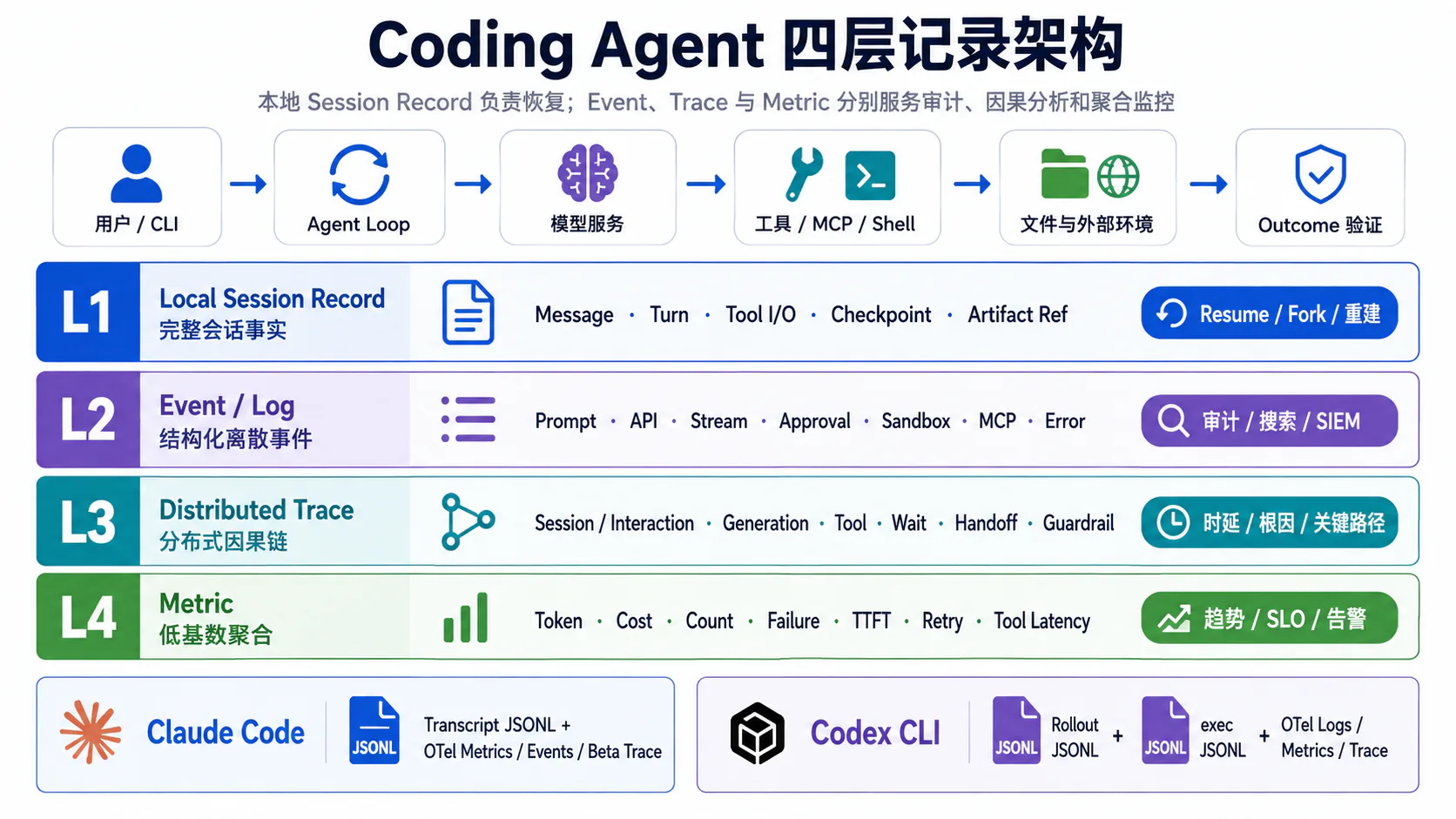
Coding Agent 的运行证据可以拆成四层。
flowchart TB U[用户任务] --> A[Agent Loop] A --> M[模型请求] A --> T[工具 / Shell / MCP] T --> E[文件系统与外部环境] E --> O[环境 Outcome]
subgraph L1[第一层:Local Session Record] S1[Message / Turn / Item] S2[Tool Call / Tool Result] S3[Checkpoint / Compaction / Resume] S4[Artifact Reference] end
subgraph L2[第二层:Event / Log] E1[Prompt] E2[API / Stream] E3[Approval / Sandbox] E4[MCP / Error / Retry] end
subgraph L3[第三层:Distributed Trace] R1[Interaction / Workflow] R2[Generation / LLM] R3[Tool / Wait / Execution] R4[Handoff / Guardrail / Custom] end
subgraph L4[第四层:Metric] K1[Token / Cost] K2[Latency / TTFT] K3[Success / Failure] K4[Tool / Retry Count] end
A -.恢复与重建.-> L1 A -.离散审计.-> L2 A -.因果与关键路径.-> L3 A -.趋势与 SLO.-> L4四层的职责如下。
| 层 | 数据结构 | 主要问题 | 是否适合完整内容 |
|---|---|---|---|
| Session Record | 顺序 Journal / JSONL / State DB | 如何 Resume、Fork 和恢复上下文 | 相对完整,但高度敏感 |
| Event / Log | 离散结构化记录 | 某件事何时发生、由谁触发 | 默认记录 Shape |
| Trace | Parent-child Span | 哪一步导致哪一步、哪里最慢 | 大内容应引用 Artifact |
| Metric | 低基数时间序列 | 整体成功率、成本和延迟是否异常 | 不适合高基数 ID 和原文 |
一个成熟的设计不应把四层合并成一份“万能日志”。
3. Claude Code 的观测层次
3.1 Session Record
[官方文档] Claude Code 将 CLI Session 持续保存为本地 Transcript:
~/.claude/projects/<project>/<session-id>.jsonl每行是一个 JSON 对象,可能对应:
MessageTool UseTool ResultMetadata官方同时明确警告:
Entry Format 是内部格式,会跨版本变化。因此建议两种使用方式。
面向普通自动化
优先使用稳定接口:
/exportclaude -p --output-format jsonclaude -p --output-format stream-jsonHook transcript_pathAgent SDK面向故障取证和版本锁定分析
可以直接解析 JSONL,但必须同时保存:
claude_code_versionsession_idsource_pathsource_file_hashtranscript_schema_fingerprintingestion_timeparser_version不应编写“永远适用”的无版本解析器。
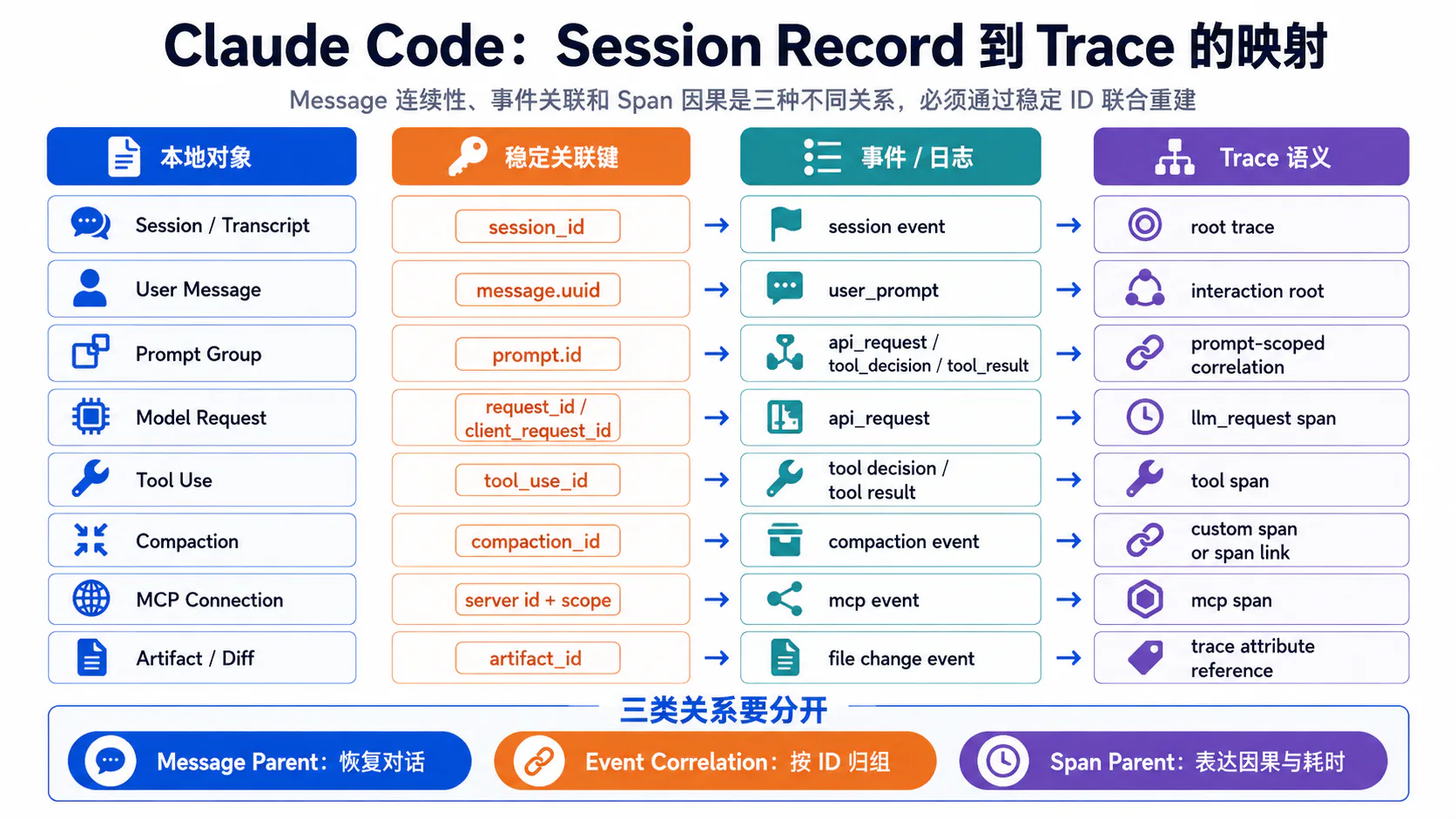
3.2 Message 与 Parent 关系
Claude Code 当前公开了两类关系。
Message Chain
Transcript 内的 Message 使用 Message UUID 和 Parent 关系维持对话连续性:
message.uuidparentUuid官方 Monitoring 文档说明:
user_prompt.message.uuid可以指向持久化的 User Message;assistant_response.message.uuid指向本次响应最后一个 Transcript Entry;- 下一轮从该 Entry 的
parentUuid继续; - 一次 API Response 可能按 Content Block 保存成多个 Entry。2
Trace Parent
Trace 使用:
trace_idspan_idparent_span_id表达运行时因果与嵌套。
二者不能混用:
Message Parent:对话从哪里继续Span Parent:哪个操作触发了哪个操作一条 Message 可以对应多个 Span;一个模型请求也可能落成多个 Transcript Entry。
3.3 Model Request
Claude Code 的 Model Request 至少出现在三层。
Transcript
Assistant Entry 可以保留:
- Content Block;
- Usage;
- Request ID;
- Tool Use;
- Message Parent。
Event
当前官方 Event 包含:
claude_code.api_requestclaude_code.api_errorclaude_code.api_refusalclaude_code.assistant_responseclaude_code.api_retries_exhausted关键关联字段:
request_idclient_request_idmessage.uuidprompt.idevent.sequencequery_sourcerequest_id 来自服务端响应。
client_request_id 是客户端生成的 x-client-request-id,即使 Timeout 没有服务端 Request ID,也可以关联 Request 与 Failure;第三方 Provider 和某些非流式 Fallback 场景可能缺失。2
Trace
当前 Span:
claude_code.llm_request可以记录:
modelgen_ai.systemgen_ai.request.modelquery_sourceagent_idparent_agent_idduration_msttft_msinput_tokensoutput_tokenscache_read_tokenscache_creation_tokensrequest_idclient_request_idattemptsuccessstatus_codeerrorresponse.has_tool_callstop_reasongen_ai.response.finish_reasons每次 Retry Attempt 还可以作为:
gen_ai.request.attemptSpan Event 保存 attempt 和 client_request_id。2
query_source 的价值
同一 Session 中并非所有模型请求都来自主对话:
repl_main_threadcompactsubagentworkflowsession title generation不记录 query_source,就会把 Compaction Token、子 Agent Token 和主任务 Token 混在一起。
3.4 Tool Call 与 Tool Result
Claude Code 使用:
tool_use_id作为 Tool 生命周期的核心关联键。
模型 tool_use block │ ├── tool_decision Event ├── Hook Payload ├── claude_code.tool Span ├── tool.execution Span └── tool_result Event官方还把同一值映射为:
gen_ai.tool.call.id以对齐 OpenTelemetry GenAI 语义。2
Tool Result Event
当前可以表达:
tool_nametool_use_idsuccessduration_mserror_typedecision_typeresult_tokens / sizeMCP scope需要牢记:
Rejected Tool Call 不产生 tool_result拒绝应从 tool_decision 查询。
因此:
没有 tool_result不能直接解释成:
工具执行失败。它还可能表示:
执行前被拒绝Session 中断Event 丢失3.5 Permission 与 Approval
Claude Code 当前 Trace Hierarchy 把 Tool 分成:
claude_code.tool├── claude_code.tool.blocked_on_user└── claude_code.tool.execution其中:
- Parent Tool Span 记录总墙钟时间;
blocked_on_user记录等待权限的时间;tool.execution记录工具本体执行时间。2
这解决了一个常见误判:
工具总耗时 45 秒实际可能是:
等待用户批准:44.8 秒工具执行:0.2 秒tool_decision Event 还记录:
decision = accept | rejectsourceDecision Source 可以来自:
confighookuser_permanentuser_temporaryuser_abortuser_reject对企业审计而言,关键问题不是“工具最终运行了吗”,还包括:
谁作出授权授权来自什么策略是否是永久授权是否被 Hook 阻断是否等待了用户3.6 MCP Event
Claude Code 当前提供:
claude_code.mcp_server_connection用于表示 MCP Server 的:
connectedfaileddisconnected可观测属性包括:
transport_typeserver_scopeduration_mserror_codeplugin contextMCP Tool Call 不需要另建一套完全不同的生命周期,而是继续复用:
tool_use_idtool_decisiontool_resultclaude_code.tool这形成两条互补链:
MCP Connection Event:Server 是否可用MCP Tool Lifecycle:具体调用是否成功如果只记录 Connection:
connected = true仍无法判断某次 Tool Call 是否 Timeout。
如果只记录 Tool Call,也无法知道失败是否来自 Connection 重建。
3.7 Metrics、Events 与 Trace
Claude Code 的三类 OTel 信号有明确分工。
Metrics
适合回答:
Session 数量Token 用量Cache Token近似成本修改代码行数Commit / PR 数量审批决策数量活跃时间Metric 使用低基数 Attribute 做聚合。
prompt.id 被明确排除在 Metric 外,因为每个 Prompt 都唯一,会产生无界时间序列。2
Events / Logs
适合回答:
某个 Prompt 触发了哪些 API Request某个工具由谁批准某次 MCP Connection 为什么失败某次 Compaction 是否成功某次请求是否耗尽 Retry关键字段:
session.idprompt.idmessage.uuidrequest_idclient_request_idtool_use_idevent.sequenceTrace
当前根 Span:
claude_code.interaction每个 User Prompt 启动一个 Root:
claude_code.interaction├── claude_code.llm_request├── claude_code.hook└── claude_code.tool ├── claude_code.tool.blocked_on_user ├── claude_code.tool.execution └── subagent llm_request / tool spansAgent SDK 和 claude -p 可以从环境中的 TRACEPARENT 继承上游 Context;Bash 和 PowerShell 子进程也可以继承当前 Tool Span 的 W3C Trace Context。2
Compaction Event
当前官方 Event:
claude_code.compaction可以记录:
trigger = auto | manualsuccessduration_mspre_tokenspost_tokenserrorprecompute_reuse它能说明“发生了压缩”,但并不自动证明硬约束被正确保留。任务 Contract 仍需要独立校验。
4. Claude Code 的任务连续性
4.1 Session 与 Prompt 关联
Claude Code 至少存在四个重要粒度。
| ID | 粒度 | 用途 |
|---|---|---|
session.id | 整个 CLI Session | Resume、用户归属、跨 Prompt 聚合 |
prompt.id | 一次用户 Prompt | 关联本次 Prompt 触发的 Event |
message.uuid | 一条 Transcript Message | Event 与本地 Message 对齐 |
request_id / client_request_id | 一次模型 Request / Attempt | 网络请求关联与错误定位 |
一次 Prompt 可能触发:
多个 Model Request多个 Tool Call多个 Tool Result多个子 Agent Span一次或多次 Compaction / Hook因此:
prompt.id不是模型 Request ID,也不是 Message Parent。
4.2 Tool Result 如何指向发起消息
Tool Result 至少通过三条边关联。
Tool 边
tool_use_id关联:
模型 Tool UseTool DecisionHookTool SpanTool ResultMessage 边
Tool Result 回填后形成新的 Message Entry,并通过:
message.uuidparentUuid继续对话链。
Trace 边
Tool Span 通过:
parent_span_id挂在触发它的 Interaction 或 Agent Tool 下。
因此一个完整查询应回答:
哪个模型响应生成 Tool Call哪个 Tool Use 被批准工具是否执行Tool Result 写入哪条 Message下一次模型请求是否包含该结果4.3 Compaction 前后的逻辑父节点
Compaction 后存在两套历史。
物理上下文
模型当前实际收到:
Summary最近消息最近读取文件保留的 Tool Result逻辑历史
任务真实发生过:
早期 User Constraint全部工具动作环境副作用审批记录失败与 Retry如果系统只保存 Summary,会出现:
物理上下文可继续但逻辑历史不可审计官方保证 /compact 会用摘要替换历史;官方没有承诺内部 JSONL 中某个固定字段永远表示逻辑 Parent。1
推荐在企业采集层生成稳定对象:
{ "compaction_id": "cmp_04", "summary_message_id": "msg_88", "derived_from_message_ids": ["msg_01", "msg_02", "msg_87"], "previous_logical_tail_id": "msg_87", "pre_tokens": 124000, "post_tokens": 18600, "task_contract_hash_before": "sha256:...", "task_contract_hash_after": "sha256:...", "dropped_manifest_ref": "artifact://compaction/cmp_04"}这样既不依赖某个私有字段,又能保留逻辑连续性。
4.4 Resume 后如何恢复任务
Claude Code Resume 会恢复:
- 完整对话历史;
- Tool Call 与 Tool Result;
- 可用时恢复原模型;
- 原 Agent 的 System Prompt、Tool Restriction 和 Model;
- 部分 Permission Mode;
- Active Goal;
- 未过期 Scheduled Task。1
但以下状态可能不会自动恢复:
某些 --mcp-config某些 --settings--plugin-dir--fallback-model--add-dir中途 /add-dir后台 Bash后台 Monitor Task已退休或不再允许的 Model不允许自动恢复的高风险 Permission Mode因此 Resume 应分成两步。
第一步:恢复 Session State
ConversationTool HistoryCompaction SummaryAgent IdentityGoal第二步:验证 Runtime State
当前工作目录是否一致Git HEAD 是否一致未提交文件是否一致Tool Schema 是否一致MCP Server 是否仍可用Permission 是否仍合法已完成副作用是否存在Resume 成功不等于环境一致。
4.5 本地 JSONL 如何重建完整执行链
官方建议优先使用稳定接口。
在版本锁定的诊断场景,可以用下面的映射重建。
Session Record 到 Trace 的映射表
| Session / Event 对象 | 关联键 | Trace / Span 对象 | 能回答的问题 |
|---|---|---|---|
| User Message | message.uuid | claude_code.interaction | 哪条用户输入启动本轮 |
| Prompt Event Group | prompt.id | Root 下的 API / Tool Event | 一次 Prompt 触发了哪些动作 |
| Assistant Entry | requestId | claude_code.llm_request | 哪个 API Response 生成该消息 |
| Client Attempt | client_request_id | gen_ai.request.attempt | Timeout 等无 Server ID 的失败 |
| Tool Use Block | tool_use_id | claude_code.tool | 模型发起了哪个工具 |
| Tool Decision | tool_use_id | tool.blocked_on_user | 谁批准或拒绝 |
| Tool Result | tool_use_id | tool.execution | 是否执行、耗时和错误 |
| Message Tail | message.uuid / parentUuid | 下一次 Interaction | 下一轮从哪里继续 |
| Compaction Event | session.id + sequence + time | Compaction Model Request | 何时压缩、Token 如何变化 |
| MCP Connection | session.id + server scope | MCP Event / Tool Span | Server 是否连接与重连 |
重建流程
1. 读取 Transcript JSONL2. 按 uuid / parentUuid 建立 Message Graph3. 读取 Event,按 event.sequence 排序4. 按 prompt.id 形成 Prompt Event Group5. 按 request_id / client_request_id 关联模型请求6. 按 tool_use_id 关联 Tool Decision、Execution、Result 和 Hook7. 按 trace_id / span_id 建立 Span Tree8. 关联 Git Diff、Shell Output 和 Environment Snapshot9. 运行 Outcome Verifier不要只靠时间邻近 Join
错误策略:
离得最近的 tool_result 属于前一个 model response。并发工具和子 Agent 会让这种 Join 立即失效。
优先级应是:
稳定 ID→ Parent Relation→ Sequence→ 时间窗口5. Codex CLI 的观测结构
5.1 Session 与任务状态
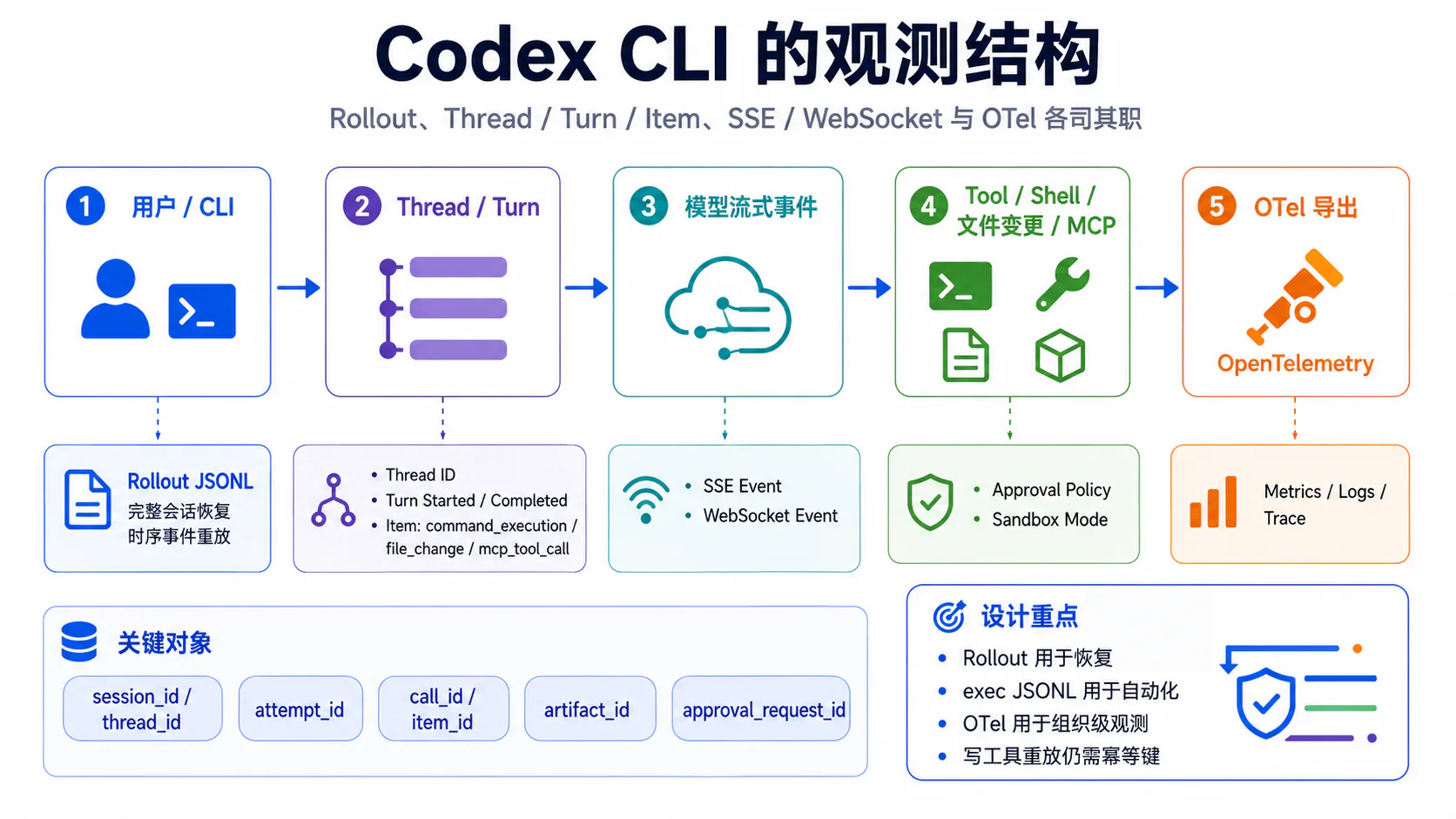
Codex 将本地 Session 持久化为 Rollout JSONL。当前官方源码显示:
SESSIONS_SUBDIR = sessionsARCHIVED_SESSIONS_SUBDIR = archived_sessions并围绕 Rollout 提供:
Thread ListSearchArchiveSession IndexState DBCompressionHistoryResumeFork / Parent ThreadRolloutRecorderParams 分为:
Create { ... }Resume { path }这说明 Session 创建和恢复是明确的两条初始化路径。6
后台 Writer
Recorder 通过 Channel 向后台 Writer 发送:
AddItemsPersistFlushShutdown这有两个工程含义。
第一,CLI 退出前需要显式 Flush,才能确定最后的 Rollout Item 已落盘。
第二,Writer Task 本身也需要可观测状态,例如:
terminal_failurequeue_depthflush_latencylast_persisted_ordinal否则用户看到的是“任务完成”,但 Session 尾部可能没有真正持久化。
Thread 与 Session
Codex TypeScript SDK 把:
Thread定义为一个可包含多个连续 Turn 的对话对象。thread.started 返回 thread_id,后续 run() 或 runStreamed() 可以继续使用同一 Thread。714
5.2 模型流式事件
Codex 至少有三种结构化流。
Provider / Runtime Stream
OTel 中可以看到:
codex.sse_eventcodex.websocket_requestcodex.websocket_event用于记录模型协议层的 Event Kind、Duration、Success 和 Error。
codex exec --json
面向脚本和 CI,输出:
thread.startedturn.starteditem.starteditem.updateditem.completedturn.completedturn.failederror其中:
thread.started.thread_id可用于恢复 Thread;turn.completed.usage 包含 Input、Cached Input、Cache Write、Output 和 Reasoning Token。37
Local Rollout JSONL
面向 Session Persistence 和 Resume,生命周期长于当前 stdout Stream。
三者分别回答:
Provider Stream:底层传输发生了什么Exec JSONL:当前自动化客户端收到了什么Rollout JSONL:以后恢复需要什么它们不能互相替代。
5.3 Shell 命令
当前 Exec Item:
command_execution可以记录:
idcommandaggregated_outputexit_codestatusStatus 当前包含:
in_progresscompletedfaileddeclined这使消费者可以观察:
item.started→ item.updated→ item.completed而不是只能等待最终大段文本。8
企业观测层建议补充:
cwdenvironment_idsandbox_profileapproval_request_idcommand_hashstdout_refstderr_reftimeout_mssignalside_effect_classShell Success 与业务成功分开
pytest 返回 exit_code=1应该解释为:
Command Execution 已完成Test Outcome 失败而不是网络或进程创建失败。
5.4 文件读取与补丁修改
当前 Exec Item:
file_change记录:
idchanges[]pathkind = add | delete | updatestatus文件读取可能通过 Shell、Function Tool 或 MCP 完成,具体载体不一定统一。企业层应归一化为:
artifact_idpath_hashpath_classcontent_hash_beforecontent_hash_afterdiff_refpatch_statusallowed_scopeforbidden_scope_violation为什么必须有 Environment Diff
Item 告诉你“Agent 认为应用了 Patch”。
Environment Diff 才能证明:
哪个文件真的发生变化是否出现额外改动是否修改了禁止目录是否能回滚5.5 Tool Approval
Codex 当前配置支持:
approval_policy = untrusted on-request never granularGranular Policy 可以分别控制:
sandbox_approvalrulesmcp_elicitationsrequest_permissionsskill_approval审批者可以是:
userauto_review当前源码进一步区分决策来源:
HookAutomated ReviewerUser并为以下 Action 构建 Approval Payload:
ShellExecCommandApplyPatchApproval Result 可能是:
ApprovedDeniedTimedOutAbortNetworkPolicyAmendment这说明 Codex 的 Approval 不是一个布尔值,而是策略、审查者、Action 和结果的组合。412
推荐统一字段
approval_request_idcall_idaction_typereviewerdecision_sourcedecisionwait_msjustificationrequested_permissionsapproved_permissionsarguments_diff5.6 Sandbox 与权限模式
Codex 当前公开 Sandbox Mode:
read-onlyworkspace-writedanger-full-accessworkspace-write 还可以配置:
writable_rootsnetwork_accesstmp exclusions新权限 Profile 可以进一步表达目录级:
readwritedenySandbox 与 Approval 解决不同问题。
Approval:逻辑上是否允许尝试该动作
Sandbox:操作系统和 Runtime 实际允许做到什么程度用户批准一条命令,并不代表 Sandbox 一定允许它访问任意路径或网络。
Codex OTel 当前还提供:
codex.sandbox_outcome可以记录:
tool_namecall_idoutcomeinitial_duration_msescalated_duration_ms这使系统可以区分:
工具自身失败Sandbox 拒绝发生权限升级升级后成功升级后仍失败5.7 OpenTelemetry 导出
Codex OTel 默认关闭。
基本配置:
[otel]environment = "staging"exporter = "otlp-http"log_user_prompt = false当前配置还允许:
otel.metrics_exporterotel.trace_exporterOTLP HTTP / gRPCHeadersTLS CAClient CertificatePrivate KeySpan AttributesW3C tracestateLogs / Events
当前文档列出:
codex.conversation_startscodex.api_requestcodex.sse_eventcodex.websocket_requestcodex.websocket_eventcodex.user_promptcodex.tool_decisioncodex.tool_resultMetrics
当前公开 Metric 包括:
API Request Count / DurationSSE Event Count / DurationWebSocket Request Count / DurationWebSocket Event Count / DurationTool Call Count / DurationTurn TTFTStartup Phase默认 Metadata Tag 包含:
auth_modeoriginatorsession_sourcemodelapp.versionTrace
codex-otel 提供独立 Trace Exporter、tracing_subscriber Layer 和 W3C Trace Context Helper。Session Event 可以同时写入 Log 与 Trace,但:
Codex Rollout≠OTel TraceRollout 用于恢复 Thread;Trace 用于关联运行和时延。
内容边界
log_user_prompt=false 时,Prompt 内容被 Redact。
源码中 Tool Result 的 Log 路径可能包含更详细 Output,而 Trace 路径更偏向:
arguments_lengthoutput_lengthoutput_line_countsuccesstool_origin因此生产部署仍要在 Collector 做二次 Redaction。511
6. OpenAI Agents SDK 的 Trace 模型
OpenAI Agents SDK 是独立的通用 Agent SDK。它可以帮助理解公开的 Agent Trace 抽象,但不能直接等同于 Codex CLI 的本地 Rollout 或内部 Span Schema。
当前 Python SDK 默认 Trace 层级包括:
Trace└── Task Span └── Turn Span └── Agent Span ├── Generation Span ├── Function Span ├── Guardrail Span ├── Handoff Span └── Custom SpanTrace 默认开启;可以关闭、替换 Processor 或添加额外 Processor。当前 Trace Context 通过 Python contextvar 传播;Batch Processor 在后台导出,短生命周期或需要立即可见时可以显式 Flush。15
6.1 Workflow Trace
Trace 表示一个端到端 Workflow。
核心字段:
workflow_nametrace_idgroup_idmetadatadisabledgroup_id 可以将同一 Conversation 下的多个 Trace 关联,例如:
group_id = coding-session-42一个 Workflow 可以包含多次 Runner.run():
with trace("Fix repository issue", group_id="session-42"): diagnosis = await Runner.run(diagnosis_agent, issue) result = await Runner.run(fix_agent, diagnosis.final_output)Workflow Trace 比单次模型请求更接近业务 Task。
6.2 Agent Span
Agent Span 表示某个 Agent 的执行。
可以记录:
nametoolshandoffsoutput_typeCoding 场景可以有:
Main Coding AgentTest AgentReview AgentDocumentation AgentAgent Span 是“哪个 Agent 获得控制权”的边界,内部仍可包含多个 Generation 和 Function。
6.3 Generation Span
Generation Span 表示一次模型生成。
通常包含:
inputoutputmodelmodel_configusage输入输出可能含:
- 用户 Prompt;
- 代码;
- Tool Result;
- 私有仓库内容。
Agents SDK 当前默认可能采集敏感 Input / Output,可以通过:
RunConfig.trace_include_sensitive_dataOPENAI_AGENTS_TRACE_INCLUDE_SENSITIVE_DATA关闭。15
这与 Claude Code 和 Codex CLI 的远程 OTel 默认更克制形成差异:使用通用 SDK 时,开发者必须主动确认敏感数据策略。
6.4 Function Tool Span
Function Span 表示一次函数工具调用:
nameinputoutputerrorduration它适合通用 Tool,但 Coding Agent 往往还需要扩展:
approval.waitsandboxshell processfile diffartifactstate before / afteridempotency因此 Function Span 是工具观测的骨架,不是完整 Coding Agent Audit Model。
6.5 Handoff Span
Handoff Span 记录:
from_agentto_agentHandoff 表示控制权发生变化,不应被当成普通 Function Call。
它会影响:
当前 AgentInstructionTool SetGuardrail任务责任后续 Parent SpanOpenAI Agents SDK 的 Handoff 还支持 Input Filter 和 Conversation History Mapper,因此观测层最好记录 Handoff 前后传递了哪些上下文类别,而不是只记目标 Agent 名。16
6.6 Guardrail Span
Guardrail Span 记录:
guardrail nametriggereddurationCoding 场景可以用于:
禁止修改 payments/阻止危险 Shell检测 Secret 外发校验 Tool Arguments检查最终 DiffGuardrail 与 Sandbox 不同:
Guardrail:应用级策略和语义验证Sandbox:操作系统级执行隔离Tool Guardrail、Agent Input Guardrail 和 Output Guardrail 的执行边界也不同,不能只用一个统一 blocked=true。17
6.7 Custom Span
custom_span() 用于 SDK 未预定义的操作:
context.compactioncheckpoint.persistapproval.waitgit.diff.verifyartifact.uploadenvironment.restore自定义 Span 应同时定义:
namespaceschema_versionownerdata_classificationcardinality_policy否则不同团队会产生:
approval_timepermission_waitwait_for_userhuman_block四套语义相同却无法统一查询的字段。
7. 网络故障与恢复记录
7.1 Stream Disconnect
Stream Disconnect 至少要区分发生阶段:
before_first_eventduring_text_deltaduring_tool_nameduring_tool_argumentsafter_complete_tool_callafter_finish_reasonbefore_usageClaude Code 可以结合:
client_request_idrequest_idapi_errorllm_request Spangen_ai.request.attempt定位。
Codex 可以结合:
codex.api_requestcodex.sse_eventcodex.websocket_eventattemptrequest_idThread Event定位。
统一故障快照建议:
{ "stream_phase": "during_tool_arguments", "attempt_id": "att_02", "received_event_count": 47, "last_sequence": 46, "partial_text_bytes": 1820, "complete_tool_call_ids": [], "incomplete_tool_call_ids": ["call_17"], "finish_received": false, "usage_received": false}如果 Tool Arguments 不完整,不应执行工具。
7.2 Retry Attempt
Claude Code 当前有两种 Retry 证据。
Trace
每次 Attempt 可以记录为:
gen_ai.request.attemptSpan Event。
Event
当一次 API Request 经多次尝试仍失败时,产生:
claude_code.api_retries_exhausted记录:
total_attemptstotal_retry_duration_msfinal_errorstatus_codeCodex 的:
codex.api_request记录:
attemptstatussuccessdurationerrorrequest_idrecovery_moderecovery_phase企业归一化模型应区分:
operation_id 逻辑模型操作attempt_id 物理请求request_id Provider 请求retry_reasonbackoff_msrecovery_status最终成功不能删除中间失败。
7.3 Model Fallback
需要严格区分:
Transport RetryTransport FallbackEndpoint FallbackModel FallbackClaude Code 官方文档提到某些 Retry 可能经过非流式 Fallback,此时 client_request_id 可能缺失。
这不等于模型发生变化。
Codex 也不能仅凭“第二次请求成功”就推断切换模型。
只有观察到:
from_provider / modelto_provider / modelroute policyfallback reason才能确认 Model Fallback。
推荐字段:
{ "fallback_id": "fb_03", "type": "model", "from_provider": "provider-a", "from_model": "model-a", "to_provider": "provider-b", "to_model": "model-b", "reason": "capacity", "policy_version": "router-v5"}7.4 Tool Execution 中断
Tool Execution 中断需要回答五个问题:
工具是否开始副作用是否发生结果是否产生结果是否持久化结果是否回填模型Claude Code 可联合:
tool_use_idtool_decisiontool_resulttool.execution SpanTranscriptCodex 可联合:
call_idtool_decisionsandbox_outcometool_resultRollout Item典型危险窗口:
工具已经创建 PR→ 网络或进程在返回 Result 前中断→ Session Resume→ Agent 重新执行 create_pr此时远端 Outcome 是 Unknown,不能盲目重试。
7.5 Resume 后避免重复副作用
Session Resume 只能恢复“Agent 认为发生了什么”,不能自动提供外部系统的 Exactly-once。
写工具必须使用:
operation_idattempt_ididempotency_keyarguments_hashtarget_resourceexecution_statusresult_refstate_after_version恢复算法:
def resume_side_effect(operation_id: str): record = ledger.get(operation_id)
if record.status == "succeeded": return reuse(record.result_ref)
if record.status == "unknown": remote = query_remote_state(record) if remote.confirmed: return persist_and_reuse(remote.result) return require_human_review(record)
if record.status == "not_started": return execute_new_attempt(record)
raise UnsafeResumeState(record.status)对以下操作尤其重要:
create_pull_requestgit_pushsend_messagedatabase_updatedeploymentpayment7.6 Usage 和成本缺失如何处理
Usage 可能因为:
Stream 在 Usage 前断开Provider 未返回 Usage第三方 Provider Schema 不一致Exporter 未 FlushTrace 被采样Session 尾部未持久化而缺失。
正确表示:
usage_status = missingcost_status = missing | estimated | reconciled错误表示:
input_tokens = 0output_tokens = 0cost = 0建议保存:
usage_sourceusage_completeprovider_request_idestimated_input_tokensestimated_output_tokensbilling_reconciliation_statusofficial_billing_cost数据来源优先级可以是:
Provider Response Usage→ Provider Billing / Usage API→ 本地 Tokenizer 估算→ Missing不同来源不能混成同一种精度。
8. Claude Code 与 Codex 的关键设计差异
8.1 本地 Session Record 优先还是平台 Trace 优先
两者都不是“平台 Trace 优先、没有本地状态”。
Claude Code
本地 Transcript 是用户直接可用的 Session 连续性底座。
OTel Trace 是可选 Beta 能力,主要服务组织级诊断。
Codex CLI
本地 Rollout 是 Thread、Resume、Fork、Search 和 State DB 的底座。
Exec JSONL 是自动化接口,OTel 是组织级观测接口。
OpenAI Agents SDK
平台 Trace 是 SDK 的工作流观测能力,但它不替代 Codex CLI 的 Rollout。
结论:
恢复状态 → Local Session Record实时自动化 → JSON / JSONL Event Stream组织监控 → OTel通用 Agent 工作流 → Agents SDK Trace8.2 Session Record 与 Distributed Trace 的关系
| 维度 | Session Record | Distributed Trace |
|---|---|---|
| 目标 | Resume、Fork、恢复上下文 | 因果、时延、错误传播 |
| 结构 | Journal / Message / Item | Trace / Span / Event |
| 生命周期 | 跨 CLI 重启 | 一次 Prompt、Turn 或 Workflow |
| Parent | Message / Thread Parent | Span Parent / Link |
| 内容 | 可较完整 | 默认应最小化 |
| 采样 | 通常不做普通 Trace 采样 | 可以 Head / Tail Sampling |
| 大对象 | 可以内嵌或引用 | 应优先引用 Artifact |
| 稳定性 | 产品内部格式 | OTel 外壳更标准 |
| 风险 | 源码、Prompt、命令落盘 | 远程传输和后端访问风险 |
正确架构是:
共享 ID而不是复制所有内容8.3 任务恢复能力
Claude Code
公开能力包括:
continueresumefrom-prbranch / forkcompactclear 后恢复checkpoint rewind结构化非交互 Resume恢复边界包括:
- 某些启动配置需要重新提供;
- 工作区可能已变化;
- 同一 Session 被两个 Terminal 恢复时,消息会交错写入同一 Transcript;
- Fork 才能稳定隔离并行分支。1
Codex
公开能力包括:
codex resumecodex exec resumecodex forkRollout JSONLThread IDParent / Fork MetadataState DBArchive / Search--ephemeral两者都需要额外验证:
Git RevisionWorkspace DiffTool SchemaMCP CapabilityPermissionPending Side Effect8.4 权限、Sandbox 和审批模型
Claude Code
主要对象:
Permission ModeTool DecisionDecision SourceHookblocked_on_usertool.executionCodex
主要对象:
approval_policyapprovals_reviewergranular approvalSandbox / Permission Profiletool_decisionsandbox_outcomeGuardian / User / Hook共同原则:
授权 ≠ Sandbox等待 ≠ 执行拒绝 ≠ 技术故障参数修改必须可追溯8.5 Metrics、Events 和 Trace 的覆盖范围
| 能力 | Claude Code | Codex CLI |
|---|---|---|
| 本地 Session | Transcript JSONL | Rollout JSONL + State DB / Index |
| 自动化流 | JSON / stream-json | exec --json JSONL |
| Event / Log | Prompt、API、Tool、Approval、MCP、Compaction、Retry | Conversation、API、SSE/WS、Prompt、Tool、Sandbox |
| Metric | Session、Token、Cost、代码、审批、活跃时间 | API、SSE/WS、Tool、TTFT、Startup |
| Trace | Interaction、LLM、Tool、Wait、Execution、Hook、Subagent | Trace Exporter + tracing Event / Span |
| Request Attempt | Attempt Span Event + Exhausted Event | codex.api_request.attempt |
| Tool 主键 | tool_use_id | call_id / Item ID |
| 内容默认 | 远程内容默认克制 | Prompt 默认 Redact,Tool Log 需二次治理 |
| 成本 | 近似 Cost Metric | Usage/Metric 为底层,企业自行计价 |
| 源码开放 | 产品闭源 | 核心 CLI 和 SDK 开源 |
8.6 评测数据接口
Claude Code 可以从:
Transcriptclaude -p JSON / stream-jsonOTel EventTraceHook PayloadGit DiffEnvironment Snapshot构造评测样本。
Codex 可以从:
Rollout JSONLexec JSONLTypeScript / Python SDK EventOTel Event / Metric / TraceCommand ItemFile Change ItemMCP ItemSandbox OutcomeEnvironment Snapshot构造评测样本。
但原始运行日志不是现成 Benchmark。仍需:
重建 Task冻结初始环境构造 Ground Truth去除内部和未来信息脱敏去重版本化防止训练 / 测试污染8.7 用户内容默认采集策略
Claude Code 远程 OTel
默认不完整导出:
User PromptAssistant ResponseTool ArgumentsTool Input / OutputRaw API Body可以用独立开关开启:
OTEL_LOG_USER_PROMPTSOTEL_LOG_ASSISTANT_RESPONSESOTEL_LOG_TOOL_DETAILSOTEL_LOG_TOOL_CONTENTOTEL_LOG_RAW_API_BODIES开启后可能包含完整历史、代码、命令和文件内容,必须在 Collector 和 Backend 做 Redaction、RBAC 和 Retention。2
Codex 远程 OTel
默认:
otel.log_user_prompt = falsePrompt 记录长度而非原文。
Tool Result 的具体内容边界要按当前版本检查;官方源码显示 Log 和 Trace 可能采用不同字段粒度,因此不能只凭配置名假设“所有 Tool Output 都安全”。511
本地记录
两者本地 Session 都可能包含:
Prompt模型回答Shell 命令文件路径Tool Output仓库代码MCP Result所以:
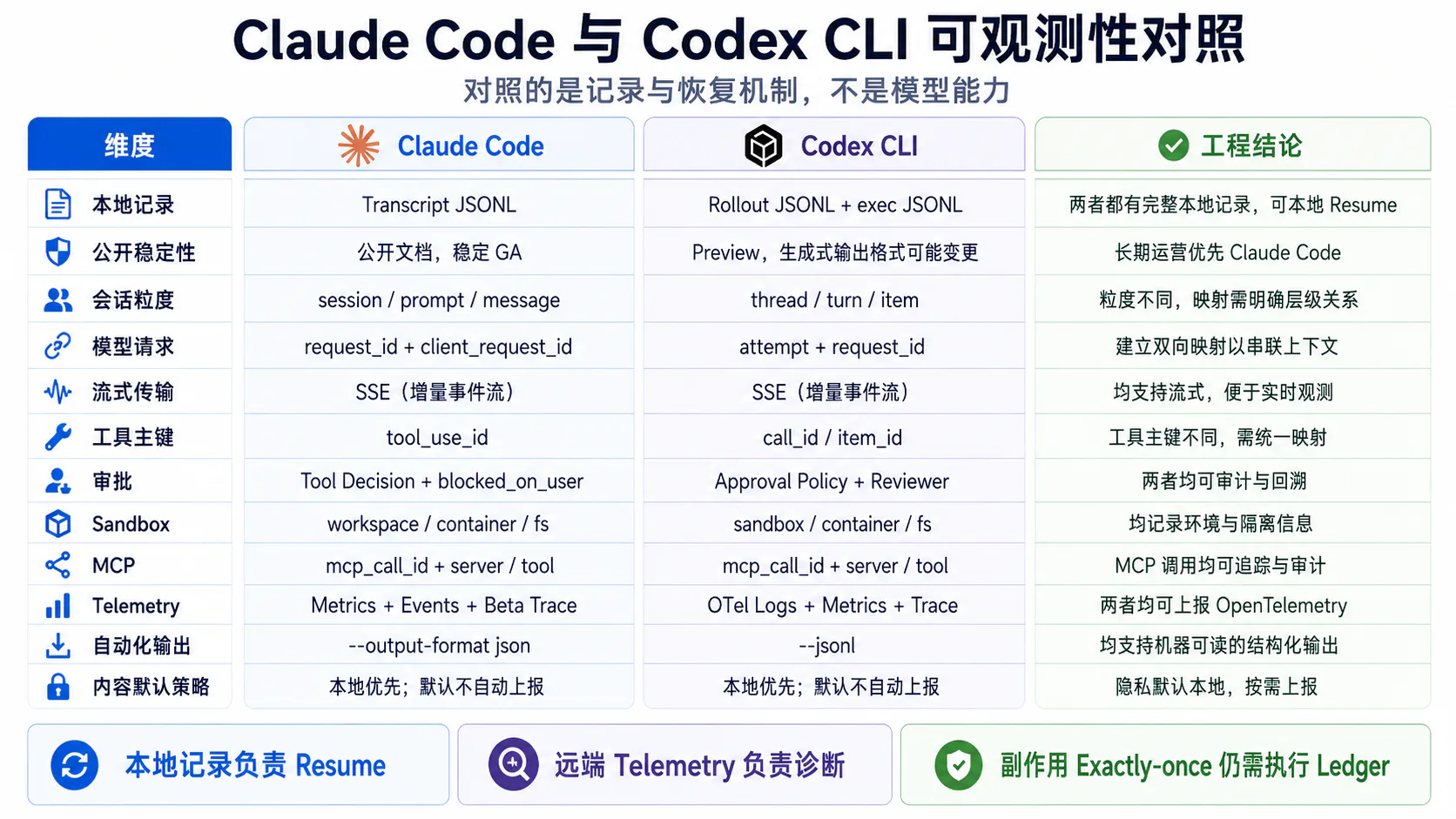
未导出到 OTel≠未被持久化Claude Code 与 Codex 观测模型总对照表
| 对照维度 | Claude Code | Codex CLI | 可复用结论 |
|---|---|---|---|
| 本地记录 | Project Transcript JSONL | Rollout JSONL + State DB | 本地记录是 Resume 底座 |
| Schema 稳定性 | 官方明确为内部格式 | 源码可见但仍属实现 | 解析器必须版本化 |
| 会话主键 | session.id | Thread / Session ID | 建立跨平台归一化 ID |
| Prompt / Turn | prompt.id | Turn Event | 不等于 Model Request |
| Message / Item | message.uuid | Item ID | 对话链与执行链分开 |
| 模型请求 | request_id、client_request_id | Attempt、Request ID、SSE/WS | 保留物理 Attempt |
| 工具主键 | tool_use_id | call_id / Item ID | Tool 生命周期必须稳定关联 |
| 权限 | Tool Decision + Hook + Wait Span | Approval Policy + Reviewer | 记录来源、等待和参数 Diff |
| Sandbox | Permission / Runtime / Hook | Sandbox Mode / Permission Profile | 授权与执行隔离分开 |
| MCP | Connection Event + Tool Lifecycle | MCP Item + Tool Result | 连接与调用分层 |
| Metric | Token、Cost、代码、Session | API、SSE/WS、Tool、TTFT | 低基数聚合 |
| Trace | Beta Interaction Tree | OTel Trace Export + tracing | Session Record 不等于 Trace |
| 自动化输出 | JSON / stream-json | Exec JSONL | 适合作为评测采集接口 |
| Prompt 默认 | Redacted | Redacted | 内容显式 Opt-in |
| Resume 风险 | 环境变化、并发恢复 | 环境变化、Rollout 尾部 | Exactly-once 需 Ledger |
9. 可复用的设计模式
9.1 本地完整记录,远端按需导出
推荐结构:
Local Session Journal├── Message / Turn / Item├── Tool Call / Result├── Compaction / Checkpoint├── Environment Revision└── Artifact Reference
Remote OTel├── Low-cardinality Metric├── Structured Event└── Trace Span治理建议:
- 本地和远程 Retention 分开;
- 原文和代码默认留在本地或受控 Artifact;
- OTel 默认只传 Shape、Hash、状态和 ID;
- 高风险字段在应用内先脱敏;
- Collector 再做第二次 Redaction;
- Backend 使用 RBAC 与访问审计。
9.2 Metric 与高基数 Trace 分离
适合 Metric Label:
serviceenvironmentprovidermodeltask_typetool_categorysuccesserror_typeagent_versionprompt_version不适合 Metric Label:
session_idprompt_idtrace_idtool_call_iduser_idraw_file_pathraw_promptfull_command这些字段应留在 Trace、Event、Log 或数据仓库。
9.3 Prompt、Tool 和 Artifact 使用稳定 ID 关联
推荐跨产品统一字段:
{ "session_id": "sess_42", "task_id": "task_fix_discount", "turn_id": "turn_07", "prompt_id": "prompt_17", "message_id": "msg_88", "model_operation_id": "modelop_03", "attempt_id": "att_02", "provider_request_id": "req_903", "tool_call_id": "tool_21", "artifact_id": "diff_01", "checkpoint_id": "cp_09", "evaluation_id": "eval_02"}同时保留产品原始 ID:
claude.prompt.idclaude.message.uuidclaude.tool_use_idcodex.thread_idcodex.item_idcodex.call_id归一化 ID 用于跨平台分析,原始 ID 用于回到产品事实。
9.4 Compaction 后保留逻辑父节点
至少保存:
compaction_idsummary_idderived_from_idsprevious_logical_tail_idretained_constraintsdropped_manifest_refcheckpoint_idpre_tokenspost_tokensCompaction 不是普通文本压缩,而是状态转换。
硬约束应单独形成 Task Contract:
{ "goal": "修复折扣计算", "must": ["相关测试通过"], "must_not": ["修改 payments/"], "allowed_scope": ["orders/**", "tests/orders/**"]}压缩后重新验证 Contract,而不是只比较摘要语义相似度。
9.5 审批等待时间独立建模
推荐:
tool.operation├── approval.evaluate├── approval.wait├── tool.execution└── side_effect.verify字段:
approval_request_idtool_call_idactordecision_sourcedecisionwait_msarguments_before_hasharguments_after_hashsandbox_outcome这使性能和审计可以分别回答:
用户批准慢还是工具执行慢9.6 Retry 与 Tool Side Effect 分离
模型网络 Retry:
model.operation├── attempt 1├── backoff└── attempt 2工具副作用:
tool.operation├── approval├── execution├── side_effect└── result_delivery模型 Retry 通常不产生外部业务副作用。
工具 Replay 可能重复写入。
只有满足:
idempotency_keyexecution_ledgerknown_remote_outcome时,写工具才适合自动重放。
10. 重建一次 Coding Agent 任务
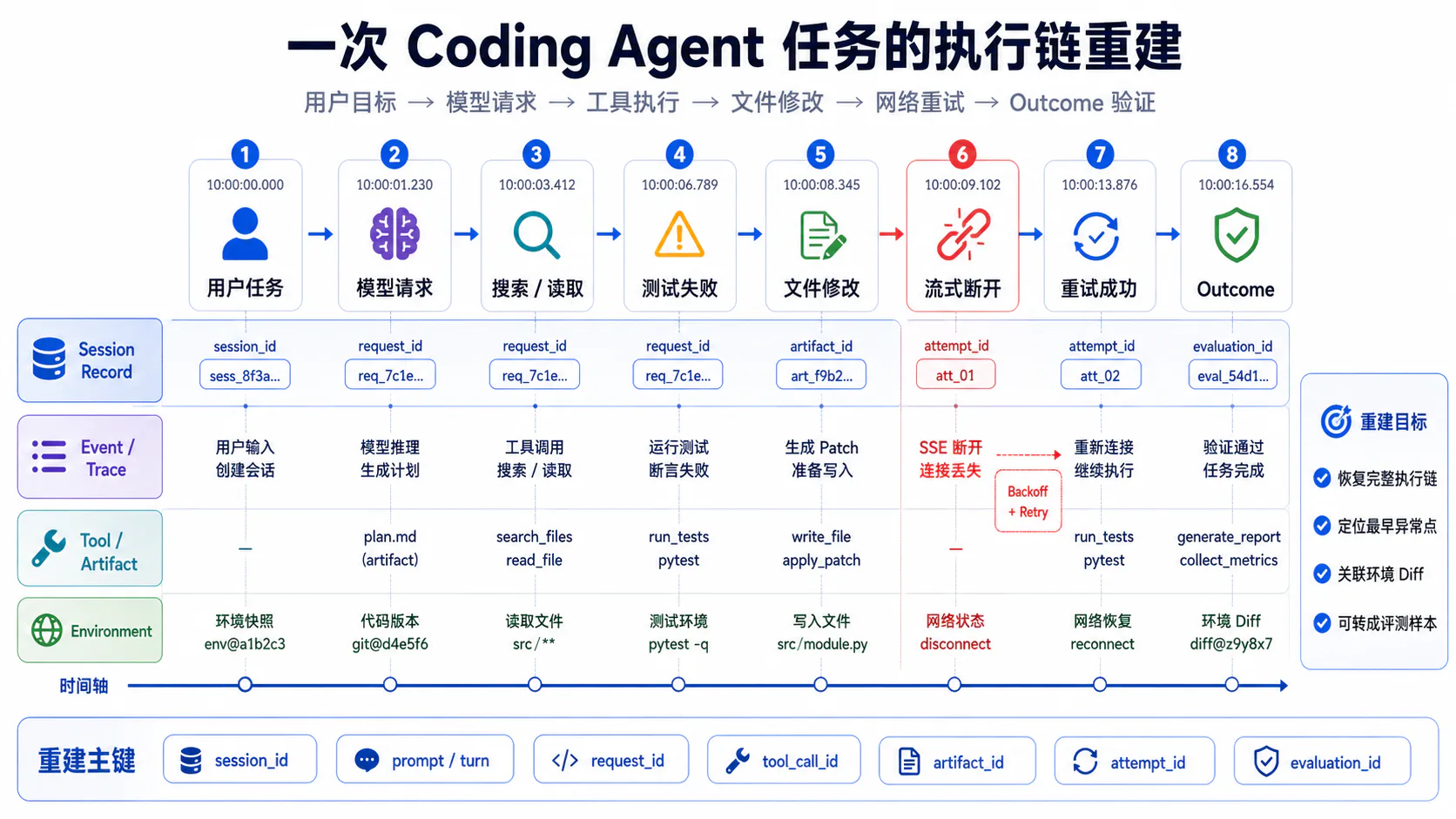
下面给出一个基于官方公开对象构造的完整示例。
它不是某个真实用户 Session,而是一份可复现实验设计。
10.1 用户任务
用户输入:
修复 orders/discount.py 的边界条件错误。只允许修改 orders/ 和 tests/orders/。不得修改 payments/。运行 tests/orders/test_discount.py。最终输出 Git Diff 和测试结果。统一任务对象:
{ "session_id": "sess_42", "task_id": "task_discount_bug", "turn_id": "turn_01", "task_contract": { "goal": "fix discount boundary condition", "allowed_paths": ["orders/**", "tests/orders/**"], "forbidden_paths": ["payments/**"], "required_checks": ["pytest tests/orders/test_discount.py"] }}Claude Code Event 可以表现为:
{ "event.name": "claude_code.user_prompt", "session.id": "sess_42", "prompt.id": "prompt_17", "message.uuid": "msg_u_001", "prompt_length": 143}Codex Exec Event 可以表现为:
{ "type": "thread.started", "thread_id": "thread_42"}随后:
{ "type": "turn.started"}10.2 模型请求
第一次逻辑模型操作:
{ "model_operation_id": "modelop_01", "attempt_id": "att_01", "provider": "provider-a", "request_model": "coding-model", "prompt_version": "planner-v4", "tool_schema_set_hash": "sha256:tools", "request_id": "req_901", "stop_reason": "tool_call", "status": "completed"}模型生成:
search_code("calculate_discount")read_file("orders/discount.py")Claude Code 用:
tool_use_id标识调用。
Codex Exec Item 用:
item.id / call_id标识调用生命周期。
10.3 仓库读取
搜索:
rg -n "calculate_discount|discount_rate" orders tests/orders读取:
orders/discount.pytests/orders/test_discount.py统一 Tool Record:
{ "tool_call_id": "call_read_01", "tool_name": "read_file", "arguments_hash": "sha256:args", "path_class": "workspace_file", "path_hash": "sha256:path", "approval_required": false, "execution_status": "completed", "result_ref": "artifact://tool-result/read_01", "result_size_bytes": 4821, "injected_into_model_operation": "modelop_02"}10.4 Shell 与搜索
Codex Exec JSONL 可以产生:
{ "type": "item.started", "item": { "id": "cmd_01", "type": "command_execution", "command": "pytest -q tests/orders/test_discount.py", "aggregated_output": "", "status": "in_progress" }}完成后:
{ "type": "item.completed", "item": { "id": "cmd_01", "type": "command_execution", "command": "pytest -q tests/orders/test_discount.py", "aggregated_output": "1 failed, 17 passed", "exit_code": 1, "status": "failed" }}这里的语义是:
Command 已运行Test Outcome 失败不是网络错误。
10.5 文件修改
模型生成:
edit_file( path = "orders/discount.py", patch = "...")Approval:
{ "approval_request_id": "apr_01", "tool_call_id": "call_edit_01", "action_type": "apply_patch", "reviewer": "user", "decision": "approved", "wait_ms": 4210}Sandbox:
{ "mode": "workspace-write", "allowed_roots": ["orders", "tests/orders"], "network_access": false}环境变化:
{ "artifact_id": "diff_01", "state_before": "git:abc123:clean", "state_after": "git:abc123:modified", "modified_paths": ["orders/discount.py"], "forbidden_paths_modified": [], "diff_ref": "artifact://git-diff/diff_01"}10.6 测试失败
第二次测试:
test_discount_zero_quantity FAILEDTrace / Event 应保留:
tool execution = completedexit_code = 1business outcome = tests_failedagent progress = partial模型分析后发现第一版 Patch 只修复了折扣上界,没有处理:
quantity = 0这类失败是正常迭代,不应统一计为 Tool Runtime Error。
10.7 网络重试
第三次模型请求发生 Stream Disconnect。
modelop_03├── att_01│ ├── client_request_id = creq_03a│ ├── stream_phase = text_delta│ ├── partial_output_bytes = 630│ └── error = stream_disconnected├── backoff = 1200ms└── att_02 ├── request_id = req_903 ├── usage_complete = true └── status = completed如果传输从流式切换为非流式:
transport_fallback = true只有实际 Model / Provider 变化时,才记录:
model_fallback = true10.8 最终结果与环境 Diff
最终测试:
18 passedOutcome Verifier:
{ "evaluation_id": "eval_01", "task_status": "success", "tests_passed": true, "modified_paths": [ "orders/discount.py", "tests/orders/test_discount.py" ], "forbidden_paths_modified": [], "unexpected_side_effects": false, "final_diff_ref": "artifact://git-diff/final", "usage_status": "complete"}执行链 Mermaid 重建图
sequenceDiagram autonumber participant U as User participant C as Coding Agent participant M as Model Provider participant R as Repo / Search participant S as Shell / Sandbox participant J as Session Journal participant O as OTel Backend
U->>C: 修复折扣边界错误 + 作用域约束 C->>J: append user message / turn C->>O: user_prompt / interaction
C->>M: modelop_01 M-->>C: Tool Calls: search_code, read_file C->>R: search / read R-->>C: code and test files C->>J: append tool results C->>O: tool spans / events
C->>S: pytest S-->>C: 1 failed, 17 passed C->>M: modelop_02 + test result M-->>C: edit_file patch C->>O: approval.wait U-->>C: approve C->>S: apply patch S-->>C: diff_01 C->>J: append file change
C->>S: pytest S-->>C: zero_quantity still failed C->>M: modelop_03 attempt 1 M--xC: Stream disconnect C->>O: attempt failure + backoff C->>M: modelop_03 attempt 2 M-->>C: second patch C->>S: apply patch + pytest S-->>C: 18 passed
C->>J: persist final state C->>O: final spans / usage C-->>U: Result + Git Diff统一时间线
| 时间 | 层 | 对象 | 关键 ID | 结果 |
|---|---|---|---|---|
| 10:00:00 | Session | User Message | msg_u_001 | Task 进入 |
| 10:00:01 | Event | User Prompt | prompt_17 | 本轮开始 |
| 10:00:02 | Trace | Model Request | modelop_01 | 生成 Search / Read |
| 10:00:05 | Tool | Search / Read | call_read_01 | 成功 |
| 10:00:10 | Tool | Pytest | cmd_01 | 1 Failed |
| 10:00:16 | Approval | Edit | apr_01 | 等待 4.2 秒后批准 |
| 10:00:18 | Artifact | Git Diff | diff_01 | 修改订单模块 |
| 10:00:24 | Tool | Pytest | cmd_02 | 仍失败 |
| 10:00:27 | Network | Model Attempt | att_01 | Stream Disconnect |
| 10:00:29 | Network | Retry Attempt | att_02 | 成功 |
| 10:00:35 | Tool | Edit | call_edit_02 | 第二次修复 |
| 10:00:42 | Tool | Pytest | cmd_03 | 18 Passed |
| 10:00:44 | Outcome | Environment Verify | eval_01 | Success |
重建程序骨架
def reconstruct_run( session_rows, events, spans, artifacts, state_snapshots,): messages = index_by(session_rows, "message_id") events_by_prompt = group_by(events, "prompt_id") events_by_request = group_by_any( events, ["request_id", "client_request_id"], ) events_by_tool = group_by_any( events, ["tool_use_id", "call_id"], ) spans_by_id = index_by(spans, "span_id")
graph = build_message_or_item_graph(messages)
attach_prompt_groups( graph, events_by_prompt, )
attach_model_operations( graph, events_by_request, spans_by_id, )
attach_tool_lifecycle( graph, events_by_tool, spans_by_id, )
attach_artifacts( graph, artifacts, state_snapshots, )
verify_task_contract(graph) derive_environment_outcome(graph)
return graph重建系统的 Join 优先级应为:
稳定 ID→ Parent / Link→ Event Sequence→ 时间窗口本篇产物
本文已将四项产物直接嵌入对应章节:
- Claude Code 与 Codex 观测模型对照表:第 8.7 节;
- Coding Agent 四层记录架构图:第 2.4 节 Mermaid;
- Session Record 到 Trace 的映射表:第 4.5 节;
- 一次 Coding Agent 任务的执行链重建示例:第 10 节。
结语
Claude Code 与 Codex 的实现开放程度、字段命名和产品结构不同,但它们面对的是同一组工程问题:
如何保存本地连续性如何表达 Prompt / Turn如何关联模型和工具如何记录审批和 Sandbox如何从网络失败中恢复如何避免重复副作用如何将本地事实映射到远程 Trace如何在不默认泄露内容的前提下做组织级监控最值得复用的不是某个产品当前版本的私有字段,而是六条稳定原则。
第一,本地 Session Record 与远程 Telemetry 分工
Session Record:Resume、Fork、上下文恢复OTel:监控、审计、因果和 SLO第二,Message Parent 与 Span Parent 分开
Message Parent:对话连续性Span Parent:运行因果关系第三,所有关键对象使用稳定 ID
PromptRequestAttemptTool CallArtifactCheckpointEvaluation第四,Metric 拒绝高基数和原始内容
高基数 ID 留在 Event / Trace;代码、Prompt 和 Tool Output 进入受控 Artifact。
第五,Approval、Execution 与 Side Effect 分开
等待用户、工具运行和环境变化不是同一段时间,也不是同一种责任。
第六,Resume 不等于 Exactly-once
Session 能恢复对话,不代表写工具可以安全重放。外部副作用仍需:
Idempotency KeyExecution LedgerState QueryCompensationHuman Review一个真正可运营的 Coding Agent 观测系统,最终应该能够回答:
用户的任务从哪条消息开始经过了哪些模型请求和 Attempt调用了哪些工具谁批准了写操作Shell 和文件环境发生了什么变化网络中断后如何恢复是否发生重复副作用最终 Outcome 是否被环境验证这条链能否安全重放并转成评测样本当这些问题都有结构化证据时,本地 Session、JSON Event Stream、OpenTelemetry Trace 和环境 Artifact 才真正构成完整的 Coding Agent 运行记录。
参考资料
Footnotes
-
Claude Code Docs — Monitoring and OpenTelemetry ↩ ↩2 ↩3 ↩4 ↩5 ↩6 ↩7 ↩8 ↩9
-
OpenAI Codex TypeScript SDK — Thread events, commit f2d8255 ↩ ↩2 ↩3
-
OpenAI Codex — Exec JSONL event types, commit f2d8255 ↩ ↩2 ↩3
-
OpenAI Codex TypeScript SDK — Thread items, commit f2d8255 ↩
-
Community snapshot — How Claude Code Works: Observability, commit 4a1fe85 ↩