
本文在专栏中的位置
上一篇已经回答了一个架构层问题:Nginx 为什么经常位于 Spring Boot、Node.js 或其他应用服务之前。我们理解了 Nginx 作为统一入口、反向代理、静态资源服务器和负载均衡器的价值,也理解了客户端到 Nginx 与 Nginx 到后端是两条独立连接。
但仅仅知道 Nginx 能做什么,还不足以正确配置它。
生产环境里大量 Nginx 问题并不是“服务挂了”,而是请求被配置系统导向了一个意料之外的位置:
- 请求进入了错误的虚拟主机;
server_name没匹配,落到了默认server;- 普通前缀
location被后面的正则location抢走; root与alias映射到了不同文件路径;try_files触发内部重定向,重新执行了location匹配;rewrite ... last造成重复跳转;- 修改了一个配置文件,但运行中的 Nginx 根本没有加载它;
- 在父级配置了指令,却错误地假设所有子级都自动继承。
因此,第二篇不急着深入 proxy_pass,而是先建立 Nginx 最重要的基础能力:
拿到任意一个请求和一份 Nginx 配置,能够沿着确定的规则推导:它先命中哪个
server,再命中哪个location,最后如何映射 URI、文件路径或后端地址。
下一篇将在此基础上深入反向代理。届时,proxy_pass 尾部斜杠、URI 替换和变量行为都会依赖本文建立的匹配模型。
学习目标
学完本文后,你应当能够:
- 解释
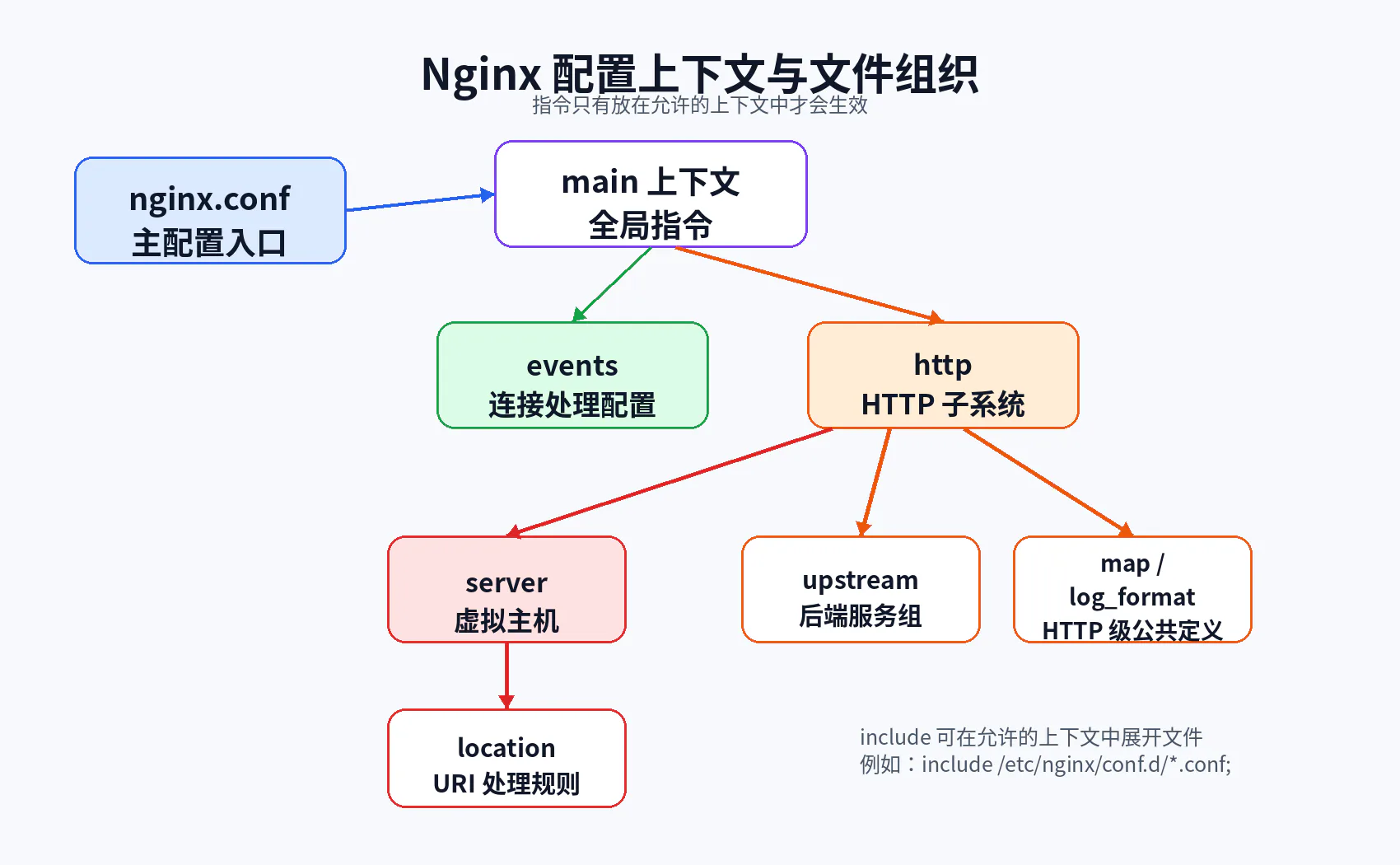
main、events、http、server、location等上下文的层级关系; - 判断一个指令可以写在哪些上下文中,并理解“配置继承”不是统一规则;
- 使用
nginx -t和nginx -T判断运行实例实际加载了哪些配置; - 根据目标 IP、端口和
Host推导最终选中的虚拟主机; - 区分精确域名、通配符域名、正则域名与
default_server; - 正确推导
location =、普通前缀、^~、~、~*和命名location的匹配结果; - 区分
$request_uri、$uri、$args、$host与$http_host; - 正确解释
root与alias如何生成文件系统路径; - 判断
try_files、index、rewrite和error_page是否会触发内部跳转; - 区分
rewrite ... last与rewrite ... break; - 使用
curl --resolve、响应头和日志构造可重复的匹配实验; - 对“为什么请求进错 location”建立一套系统化排查流程。
一、为什么 Nginx 配置经常“看起来对,实际却不生效”
1.1 Nginx 配置不是从上到下逐行执行的脚本
很多初学者看到 nginx.conf 后,会自然地把它当成 Shell、Python 或 Java 代码:认为请求到来后,Nginx 会从文件第一行开始,顺序执行到最后一行。
这是错误模型。
Nginx 配置主要描述的是:
- 进程如何运行;
- 哪些地址和端口要监听;
- 有哪些虚拟主机;
- 某类 URI 应由哪个处理器处理;
- 哪些模块参数应该应用到某个上下文;
- 当发生内部跳转时应该重新进入哪一套规则。
Nginx 在启动或 reload 时读取配置,解析为内部配置结构。真正处理请求时,它不会再次逐行读取配置文件,而是根据当前请求状态查找已经构建好的配置对象。
因此,理解 Nginx 配置需要同时建立两个阶段:
配置加载阶段
读取 nginx.conf→ 展开 include→ 识别上下文→ 各模块解析自己的指令→ 创建并合并配置对象→ 检查语法及引用资源→ 新 Worker 使用新配置请求运行阶段
请求到达监听 Socket→ 选择 server→ 规范化 URI→ 选择 location→ 执行该 location 对应的内容处理器→ 可能发生内部跳转并重新匹配→ 返回响应如果把这两个阶段混在一起,就很容易产生以下误区:
- 认为
include是请求阶段动态加载; - 认为修改文件后请求会自动使用新配置;
- 认为写在后面的
location一定覆盖前面的; - 认为所有父级指令都能被子级继承;
- 认为一个请求只会匹配一次
location。
1.2 请求匹配问题的本质
当一个请求返回错误结果时,第一反应不应该只是“是不是 proxy_pass 写错了”,而应该先回答四个问题:
- 请求到达的是哪一个监听地址与端口?
- 该地址端口下选中了哪一个
server? - 在该
server内选中了哪一个location? - 处理过程中 URI 是否发生变化,从而触发了重新匹配?
只要这四步没有推导清楚,后面的代理、缓存、限流和日志分析都可能建立在错误前提上。
二、Nginx 配置文件体系
2.1 主配置文件在哪里
Nginx 默认主配置文件通常名为 nginx.conf。具体路径取决于安装方式:
- 官方 Linux 包常见:
/etc/nginx/nginx.conf; - 源码默认前缀安装常见:
/usr/local/nginx/conf/nginx.conf; - Homebrew 等环境可能使用其他前缀;
- Docker 官方镜像默认使用
/etc/nginx/nginx.conf。
不要只凭经验猜路径,可以使用:
nginx -V 2>&1 | tr ' ' '\n' | grep conf-path典型输出:
--conf-path=/etc/nginx/nginx.conf也可以通过 -c 指定其他主配置:
nginx -c /opt/nginx/nginx.conf但在生产环境中,使用自定义配置路径时必须确保:
- 启动命令、systemd Unit 和运维脚本使用同一配置;
nginx -t检查的是同一配置;- reload 操作发送给同一个 Master 进程;
- 容器挂载路径与镜像内路径一致。
2.2 一个典型的配置目录
/etc/nginx/├── nginx.conf├── mime.types├── conf.d/│ ├── api.conf│ ├── static.conf│ └── default.conf├── snippets/│ ├── proxy-common.conf│ └── security-headers.conf├── sites-available/└── sites-enabled/需要注意:
nginx.conf是 Nginx 概念;include是 Nginx 指令;conf.d只是常见目录约定;sites-available/sites-enabled是 Debian/Ubuntu 生态常见组织方式,并不是 Nginx 强制标准;- Nginx 不会因为目录名字叫
conf.d就自动加载它,必须存在对应的include。
例如:
http { include /etc/nginx/mime.types; include /etc/nginx/conf.d/*.conf;}如果删掉第二个 include,即使 conf.d/default.conf 文件仍然存在,它也不会进入有效配置。
2.3 include 到底做了什么
include 会在配置解析阶段读取匹配文件,并把其中指令放入当前上下文中解析。
例如:
http { include /etc/nginx/conf.d/*.conf;}如果 api.conf 内容是:
server { listen 80; server_name api.example.com;}那么逻辑上它相当于:
http { server { listen 80; server_name api.example.com; }}这意味着被包含文件中的内容必须适合当前上下文。
错误示例:
server { include /etc/nginx/http-level.conf;}而 http-level.conf 中包含:
map $http_upgrade $connection_upgrade { default upgrade; '' close;}map 只允许出现在 http 上下文,因此 Nginx 会报类似:
"map" directive is not allowed here2.4 不要依赖通配符文件的“视觉顺序”
不同文件系统、构建环境和部署工具可能让配置文件排列方式与你在 IDE 中看到的不完全一致。对于必须有确定顺序的正则 location、map 或其他规则,建议:
- 使用数字前缀:
10-base.conf、20-api.conf、90-default.conf; - 或在主配置中显式逐个
include; - 不要让“谁先加载”成为隐含业务逻辑;
- 使用
nginx -T查看最终展开顺序。
三、配置上下文与层级结构
3.1 简单指令与块指令
Nginx 指令大体分为两种形式。
简单指令
以分号结尾:
worker_processes auto;server_tokens off;root /srv/www;块指令
使用大括号包含其他指令:
http { server { location /api/ { proxy_pass http://backend; } }}能够包含其他指令的块,也称为上下文。
3.2 main 上下文
配置文件中不属于任何大括号块的指令位于 main 上下文,例如:
user nginx;worker_processes auto;pid /var/run/nginx.pid;error_log /var/log/nginx/error.log warn;这一层主要控制:
- Master/Worker 进程;
- 运行用户;
- PID;
- 动态模块加载;
- 全局错误日志;
- 资源限制等。
main 不是一个需要显式写出来的块,不能这样写:
main { worker_processes auto;}3.3 events 上下文
events { worker_connections 1024;}这一层主要与事件模型、连接处理和 Worker 可接受连接数有关。
events 位于 main 下,不能放进 http 或 server。
3.4 http 上下文
http { include mime.types; default_type application/octet-stream; sendfile on;
server { listen 80; }}http 是 HTTP 子系统的顶层上下文。常见内容包括:
server;upstream;map;log_format;- MIME 类型;
- HTTP 级超时、压缩、缓存和代理默认值。
一个 Nginx 配置可以包含多个 server,它们共同构成虚拟主机集合。
3.5 server 上下文
server { listen 80; server_name api.example.com;
location /api/ { proxy_pass http://backend; }}server 用来描述一个虚拟服务器。它并不必然对应一台物理服务器,也不必然对应一个独立进程。
多个 server 可以:
- 监听同一个 IP 和端口;
- 通过不同
server_name区分; - 监听不同端口;
- 绑定不同本地地址;
- 各自拥有不同的
location、证书和日志。
3.6 location 上下文
location /api/ { proxy_pass http://backend;}location 的核心作用是:
根据规范化后的请求 URI,选择一套请求处理配置。
它可能决定:
- 返回固定响应;
- 读取静态文件;
- 代理到后端;
- 执行 FastCGI/gRPC;
- 进行内部跳转;
- 应用访问控制、缓存或限流。
location 不负责选择域名。域名选择发生在 server 阶段。
3.7 upstream、map 和 log_format 为什么不能随便放
例如:
http { upstream backend { server app:8080; }
map $http_upgrade $connection_upgrade { default upgrade; '' close; }
log_format main '$remote_addr $request $status';}这些指令属于 HTTP 级定义,通常需要被多个 server 复用,因此位于 http 上下文。
错误写法:
server { upstream backend { server app:8080; }}Nginx 会直接拒绝加载,因为 upstream 不允许出现在 server 中。
四、配置加载、合并、继承与覆盖
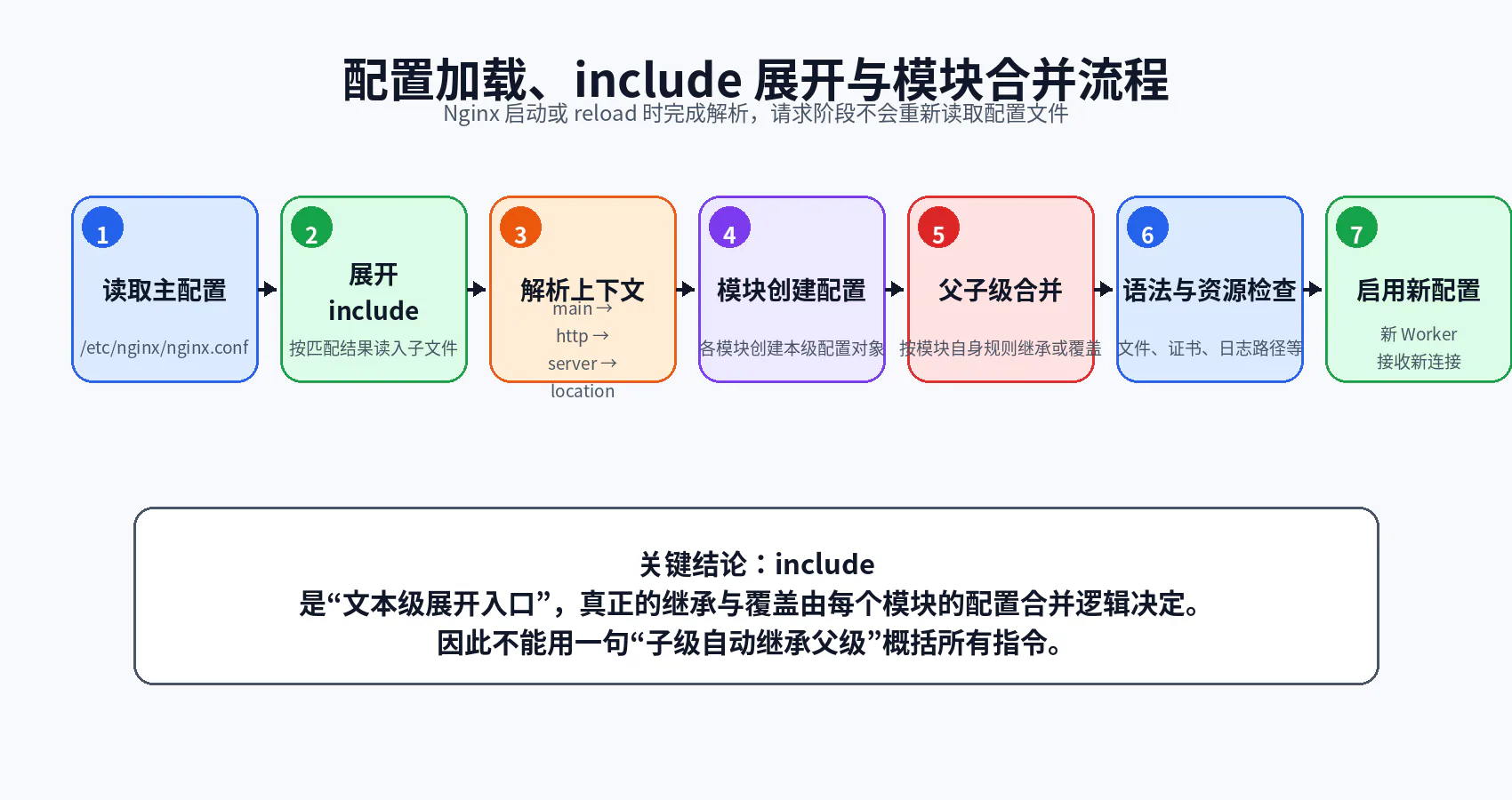
4.1 修改配置后为什么不会立即生效
配置只会在以下时机被读取:
- Nginx 启动;
- Nginx reload;
- 通过其他管理机制触发配置重新加载。
编辑磁盘上的 .conf 文件不会自动修改运行中 Worker 的配置。
标准流程:
nginx -tnginx -s reload在 Docker 中:
docker compose exec nginx nginx -tdocker compose exec nginx nginx -s reloadMaster 收到 reload 后会:
- 读取新配置;
- 校验语法;
- 尝试打开配置中引用的文件;
- 如果成功,启动新 Worker;
- 让旧 Worker 停止接收新连接并处理完已有请求;
- 如果失败,继续保留旧配置。
因此“reload 命令执行了”并不代表新配置一定生效,必须检查输出与错误日志。
4.2 nginx -t 与 nginx -T
nginx -t
nginx -t它会:
- 检查配置语法;
- 尝试打开配置引用的文件;
- 检查证书、日志等资源是否可访问。
典型成功输出:
nginx: the configuration file /etc/nginx/nginx.conf syntax is oknginx: configuration file /etc/nginx/nginx.conf test is successfulnginx -T
nginx -T它在 -t 基础上,还会输出展开后的完整配置。
这是排查以下问题最有效的命令之一:
- 到底加载了哪个
nginx.conf; include是否命中目标文件;- 同一域名是否在多个文件中重复定义;
- 正则
location的真实先后顺序; - 容器挂载是否覆盖了镜像内文件;
- 某个配置是否只是存在于宿主机,却没进入容器。
4.3 为什么不能简单说“子级继承父级”
Nginx 是模块化架构。每个模块负责定义自己的指令,也负责创建和合并不同上下文的配置。
因此,不同指令的继承行为可能不同:
- 有些标量指令在子级未配置时采用父级值;
- 有些数组型指令在子级一旦定义,就不再继承父级同类项;
- 有些指令只允许出现在固定上下文,不存在继承问题;
- 有些指令会在配置解析阶段生成结构,而不是简单存一个值;
- 有些配置会因
location重新选择而切换到另一套上下文。
例如,下面的思维方式是不可靠的:
“我在 http 里写过,所以所有 location 一定都有。”正确做法是:
- 查看该指令官方文档中的
Context; - 查看其
Default; - 查看文档是否明确说明继承条件;
- 通过最小实验和
nginx -T验证; - 对关键配置避免依赖复杂隐式继承。
4.4 一个典型覆盖示例
http { root /srv/default;
server { root /srv/site;
location /images/ { # 未配置 root 时,通常使用 server 层 root }
location /downloads/ { root /srv/files; } }}对于 /images/logo.png,文件路径会基于 /srv/site。
对于 /downloads/a.zip,使用 /srv/files。
但不要由此推广出“所有指令都像 root 一样覆盖”。每个模块必须单独判断。
五、一次请求的完整匹配流程
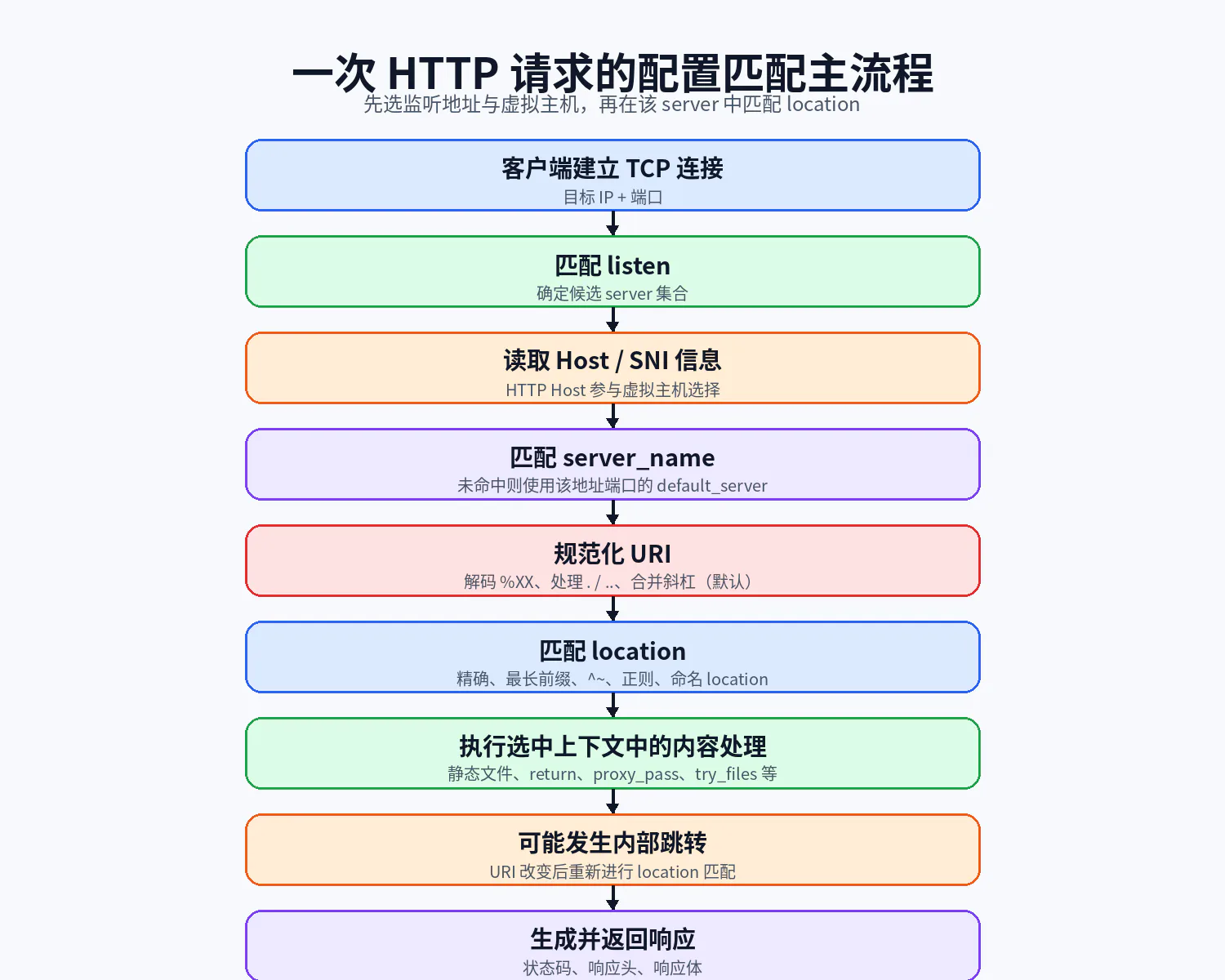
从宏观上看,一次 HTTP 请求经过以下阶段:
连接到 IP:Port→ 选择候选监听配置→ 根据 Host 选择 server→ 规范化 URI→ 在 server 中选择 location→ 执行内容处理→ 如有内部跳转则重新匹配 location→ 返回响应这里必须特别区分:
server匹配主要受地址、端口和主机名影响;location匹配主要受 URI 路径影响;- 查询参数通常不参与
location匹配; - URI 在处理过程中可能变化;
- 同一请求可能经历多次
location选择。
六、虚拟主机 server 的选择规则
6.1 第一步:先看 listen
假设有以下配置:
server { listen 10.0.0.8:80; server_name api.example.com;}
server { listen 10.0.0.9:80; server_name api.example.com;}
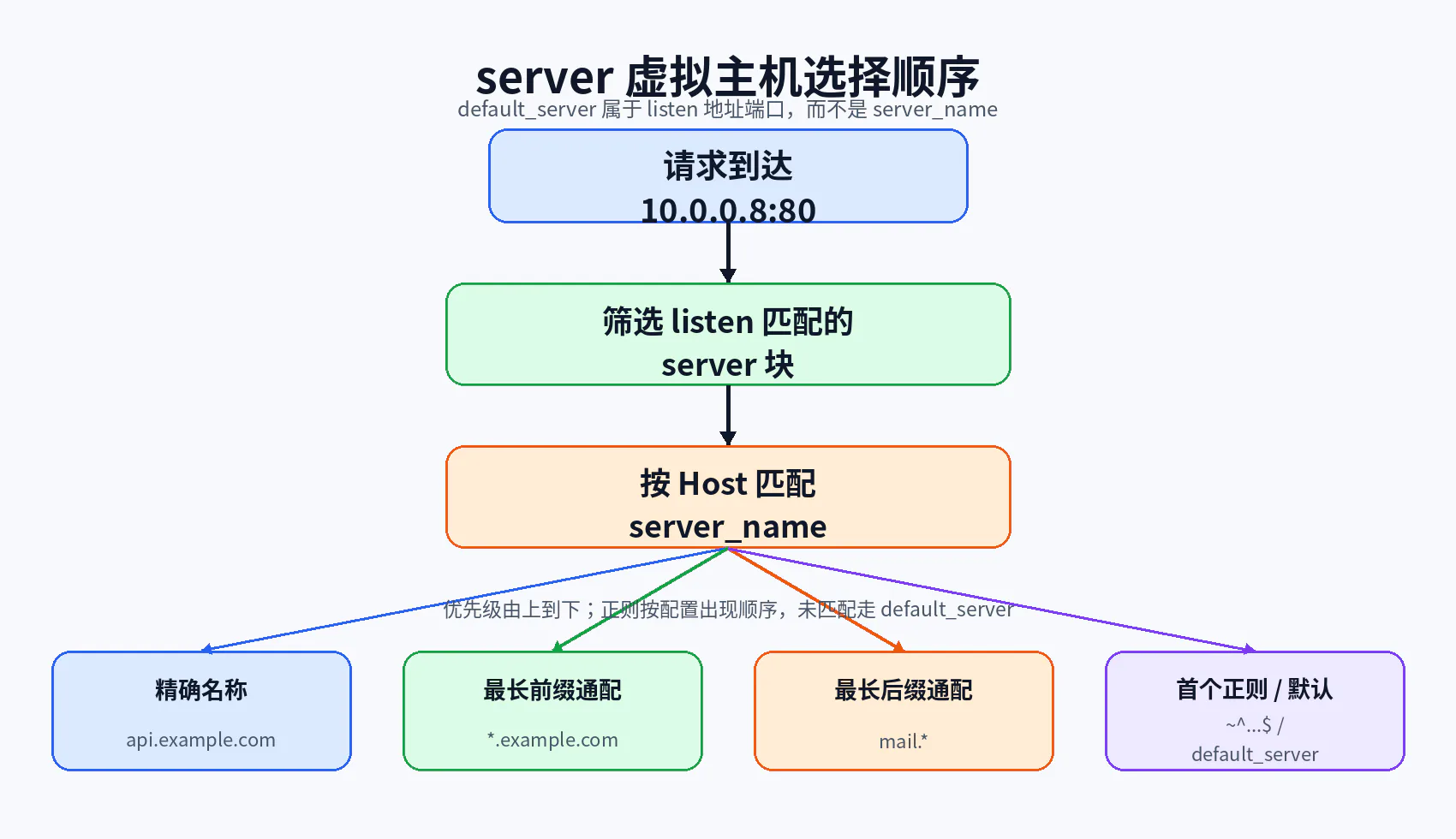
server { listen 10.0.0.8:8080; server_name api.example.com;}请求连接到 10.0.0.8:80 时,只有第一个 server 属于候选集合。即使另外两个 server_name 完全相同,也不会参与该连接的选择。
因此,虚拟主机选择不是单纯“拿 Host 遍历所有 server_name”,而是:
先筛选监听地址与端口→ 再在候选 server 中匹配主机名6.2 第二步:再看 Host
在同一个地址端口下,可以有多个虚拟主机:
server { listen 80; server_name api.example.com;}
server { listen 80; server_name static.example.com;}请求:
GET / HTTP/1.1Host: api.example.com会进入第一个 server。
请求:
GET / HTTP/1.1Host: static.example.com会进入第二个。
6.3 server_name 的优先级
官方匹配顺序可以概括为:
- 精确名称;
- 以
*开头的最长通配符,例如*.example.com; - 以
*结尾的最长通配符,例如mail.*; - 按配置出现顺序,第一个命中的正则表达式。
示例:
server_name api.example.com;server_name *.example.com;server_name mail.*;server_name ~^(?<tenant>.+)\.tenant\.example\.net$;注意:这些通常不是写在同一 server 中互相竞争,而是用于理解多个 server 的选择优先级。
6.4 default_server 属于端口,不属于域名
server { listen 80 default_server; server_name _; return 404;}这里真正使该虚拟主机成为默认入口的是:
listen 80 default_server;而不是:
server_name _;_ 只是一个通常不会被正常域名命中的普通名称约定,并不具有“通配所有域名”的语义。
如果没有显式 default_server,同一地址端口下第一个被加载的 server 通常成为默认虚拟主机。这也是为什么依赖文件加载顺序很危险。
建议生产配置显式定义默认入口:
server { listen 80 default_server; server_name ""; return 444;}是否使用非标准状态码 444 取决于业务策略。调试和通用 API 场景中,返回明确的 400 或 404 往往更便于观察。
6.5 $host 与 $http_host
两者经常被混淆。
$http_host
表示客户端发送的原始 Host 请求头值,可能:
- 包含端口;
- 为空;
- 使用非规范大小写;
- 来自不可信客户端输入。
例如:
Host: API.EXAMPLE.COM:8088$http_host 可能保留类似值。
$host
Nginx 按优先级获取:
- 请求行中的主机名;
Host请求头;- 匹配请求的
server_name。
因此 $host 更适合用作规范化的代理 Host 或日志字段,但仍不能把它当成业务鉴权依据。
6.6 如何不改本机 DNS 测试虚拟主机
推荐使用:
curl --resolve api.local.test:8088:127.0.0.1 \ http://api.local.test:8088/debug/server--resolve 同时控制:
- TCP 连接目标地址;
- URL 中的域名;
- HTTP
Host; - HTTPS 场景中的 SNI。
只写:
curl -H 'Host: api.local.test' http://127.0.0.1:8088/也可以测试 HTTP Host,但在 HTTPS 场景下无法完整模拟证书和 SNI 行为。
七、location 匹配规则
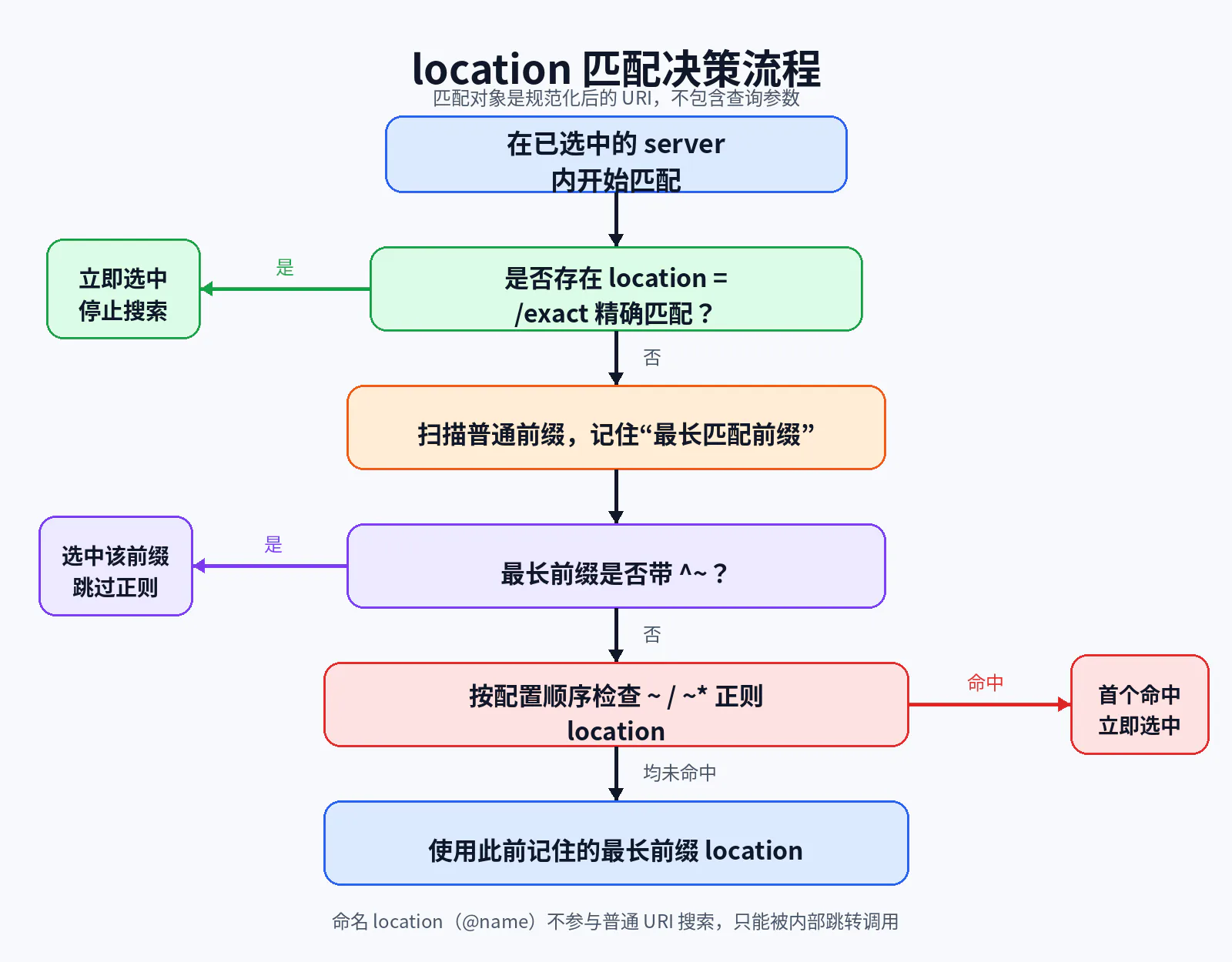
7.1 匹配对象是规范化后的 URI
location 不是针对完整 URL,也不直接针对查询字符串。
请求:
https://api.example.com/images/logo.png?v=2通常参与 location 匹配的是:
/images/logo.png而不是:
https://api.example.com/images/logo.png?v=2Nginx 会对 URI 做规范化处理,包括:
- 解码
%XX编码; - 处理相对路径组件
.和..; - 在默认配置下合并连续斜杠;
- 生成当前
$uri。
查询参数在 $args 中,不参与普通 location 路径匹配。
7.2 精确匹配 location =
location = /health { return 200 'ok';}只有 URI 恰好等于 /health 才命中。
以下请求不会命中:
/health//health/check/Health精确匹配一旦成功,搜索立即终止。
适合:
- 高频根路径;
- 健康检查;
- 明确固定接口;
- 防止被其他正则规则覆盖。
7.3 普通前缀匹配
location /api/ { proxy_pass http://backend;}它匹配所有以 /api/ 开头的 URI:
/api/users/api/orders/1/api/多个普通前缀同时匹配时,Nginx 先记住最长前缀。
location / { return 200 'root';}
location /api/ { return 200 'api';}
location /api/admin/ { return 200 'admin';}请求 /api/admin/users 的最长前缀是 /api/admin/。
但是,记住最长前缀后,Nginx 默认仍可能继续检查正则 location。
7.4 ^~ 前缀匹配
location ^~ /assets/ { root /srv/www;}^~ 仍然是前缀匹配,不是正则。
它的作用是:
如果它成为最长前缀匹配,则跳过后续正则
location检查。
常用于:
- 静态资源目录;
- 不希望被通用扩展名正则抢走的路径;
- 需要保证路径规则优先的场景。
7.5 正则匹配 ~ 与 ~*
区分大小写
location ~ \.php$ { return 403;}不区分大小写
location ~* \.(jpg|jpeg|png|gif)$ { expires 30d;}正则 location 按配置出现顺序检查,第一个命中即停止。
这意味着正则规则的顺序具有语义:
location ~* ^/images/private/ { return 403;}
location ~* \.(jpg|png)$ { root /srv/public;}如果把通用图片规则写在前面,请求 /images/private/a.png 可能先命中通用规则,从而绕过预期的私有目录限制。
7.6 命名 location
location @backend_fallback { proxy_pass http://backend;}命名 location:
- 以
@开头; - 不参与普通 URI 匹配;
- 只能通过
try_files、error_page等内部机制跳转进入; - 适合定义回退处理器。
例如:
location / { try_files $uri $uri/ @backend_fallback;}7.7 一套完整配置推导
location = / { return 200 'exact-root';}
location / { return 200 'prefix-root';}
location /documents/ { return 200 'documents';}
location ^~ /images/ { return 200 'images-prefix';}
location ~* \.(gif|jpg|jpeg|png)$ { return 200 'image-regex';}
location ~ ^/documents/private/ { return 200 'private-regex';}推导结果:
| 请求 URI | 最终匹配 | 原因 |
|---|---|---|
/ | location = / | 精确匹配立即结束 |
/index.html | location / | 只有根前缀匹配 |
/documents/readme.txt | location /documents/ | 最长普通前缀,正则未命中 |
/documents/a.jpg | 图片正则 | 普通前缀被记住,但正则随后命中 |
/images/a.jpg | location ^~ /images/ | 最长前缀带 ^~,跳过正则 |
/documents/private/a.txt | 私有正则 | 正则命中并覆盖普通前缀 |
/documents/private/a.jpg | 图片正则或私有正则 | 取决于两个正则在配置中的先后顺序 |
/IMAGES/a.JPG | 图片正则 | /images/ 前缀大小写不匹配,~* 正则命中 |
/images | 可能不匹配 /images/ | 缺少尾部斜杠;需要单独处理 |
/unknown | location / | 根前缀兜底 |
7.8 尾部斜杠带来的边界
下面两个 URI 不相同:
/api/api/下面两个前缀也不相同:
location /api { ... }location /api/ { ... }location /api 还可能匹配:
/apix/api-v2生产中通常更推荐:
location = /api { return 308 /api/;}
location /api/ { proxy_pass http://backend;}这样边界更清楚。
7.9 嵌套 location 的复杂性
Nginx 支持部分 location 嵌套,但嵌套规则与正则优先级容易造成认知负担。除非确有必要,生产配置更推荐:
- 扁平化
location; - 使用明确的 URI 前缀;
- 通过
include复用公共指令; - 避免依赖难以口头解释的嵌套正则行为。
如果一个配置必须画复杂树才能判断命中结果,它往往已经超出了可维护边界。
八、URI、变量与文件系统路径
8.1 $request_uri
$request_uri 保留客户端原始请求 URI,通常包含查询参数。
请求:
/api/users?id=42可能得到:
$request_uri = /api/users?id=42它适合:
- 原始请求日志;
- 保留客户端原始编码形式;
- 某些跳转和签名校验场景。
但不要把它直接当作规范化路径进行文件映射。
8.2 $uri
$uri 是当前规范化 URI,不包含查询参数。
$uri = /api/users并且 $uri 可能在请求处理中改变,例如:
rewrite改写;try_files内部重定向;index处理;error_page内部跳转。
因此,在同一请求的不同时刻,$uri 可能不同,而 $request_uri 通常保持原始值。
8.3 $args 与 $arg_name
/api/users?id=42&sort=name对应:
$args = id=42&sort=name$arg_id = 42$arg_sort = name查询参数不参与 location 匹配。如果需要根据参数做路由,通常可使用:
map;- 应用层路由;
- 有限且可验证的条件逻辑。
不要试图写一个 location /api?id=42,它不会按预期工作。
8.4 $document_root 与 $request_filename
$document_root:当前请求使用的root或alias值;$request_filename:根据当前root/alias与 URI 生成的文件路径。
它们常用于日志和 FastCGI 配置,但必须注意内部跳转后值可能变化。
九、root 与 alias
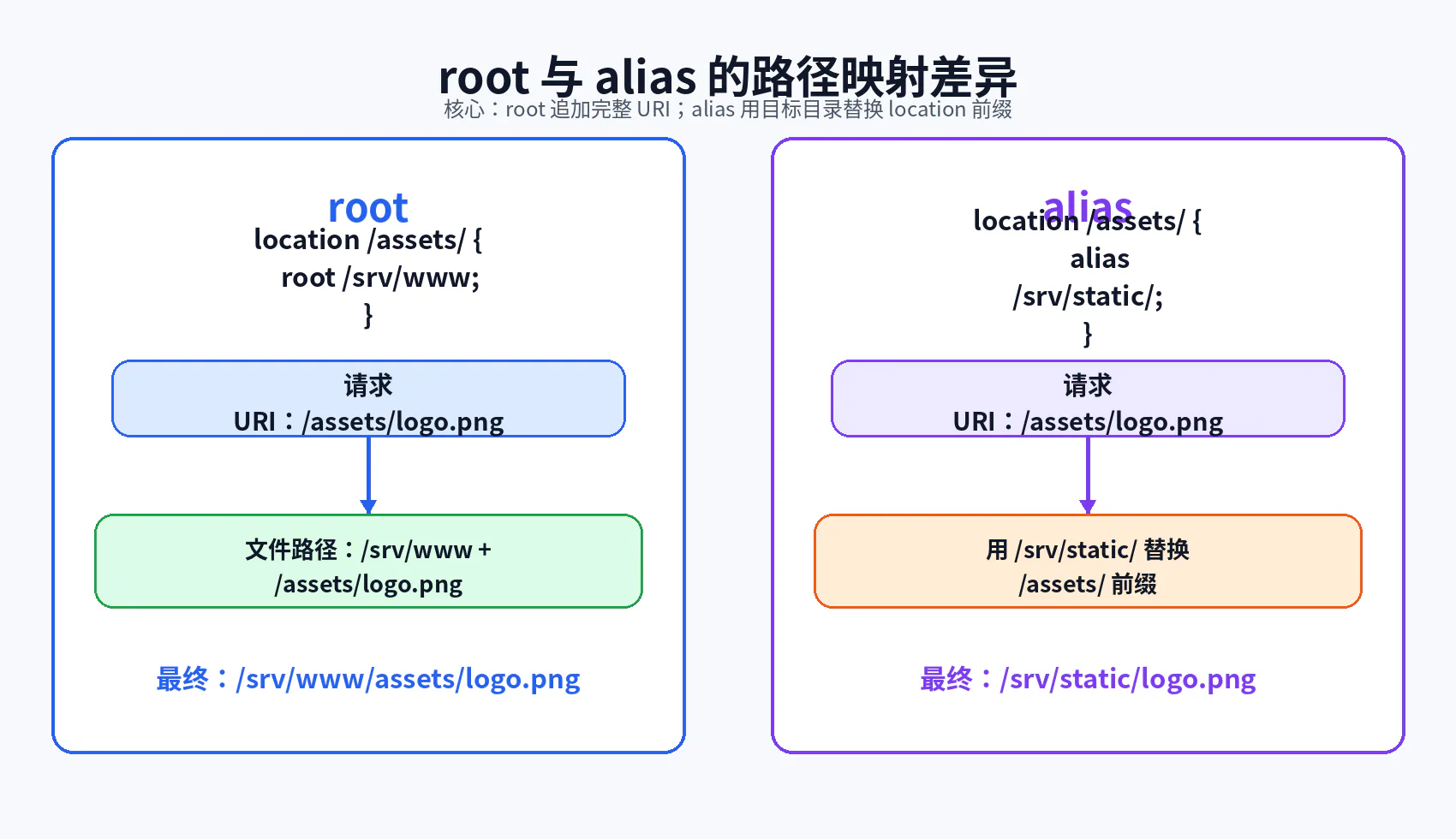
9.1 root:追加 URI
location /assets/ { root /srv/www;}请求:
/assets/logo.png文件路径:
/srv/www/assets/logo.png可以理解为:
root 值 + 当前 URI9.2 alias:替换 location 前缀
location /assets/ { alias /srv/static/;}请求:
/assets/logo.png文件路径:
/srv/static/logo.png可以理解为:
用 alias 目录替换匹配到的 location 前缀9.3 常见尾斜杠错误
推荐保持对应关系:
location /downloads/ { alias /srv/files/;}不一致的斜杠容易生成意外路径:
location /downloads/ { alias /srv/files;}虽然具体行为取决于拼接方式,但这类配置非常容易造成:
- 路径少一个
/; - 请求映射到错误目录;
- 文件存在却返回 404;
- 安全边界难以审计。
9.4 正则 location 中使用 alias
在正则 location 中使用 alias 时,应使用正则捕获来构造目标路径。
例如:
location ~ ^/users/(.+\.(?:gif|jpe?g|png))$ { alias /data/w3/images/$1;}这种配置虽然可用,但可读性和安全审计成本较高。能使用清晰前缀映射时,优先使用普通前缀 location。
9.5 如何验证真实文件路径
可以临时增加调试响应头:
add_header X-Debug-Uri $uri always;add_header X-Debug-Document-Root $document_root always;add_header X-Debug-Request-Filename $request_filename always;然后:
curl -I http://example.com/assets/logo.png调试完成后,应移除可能暴露服务器目录结构的响应头。
十、index 与 try_files
10.1 index 可能触发内部重定向
location /docs/ { root /srv/www; index index.html;}请求:
/docs/可能被内部处理为:
/docs/index.html此时 URI 变化后,Nginx 可能重新执行 location 匹配。
因此,如果存在:
location ~ \.html$ { add_header X-HTML yes;}最终响应可能使用正则 location 中的配置,而不是只停留在 /docs/ 前缀配置。
10.2 try_files 的工作模型
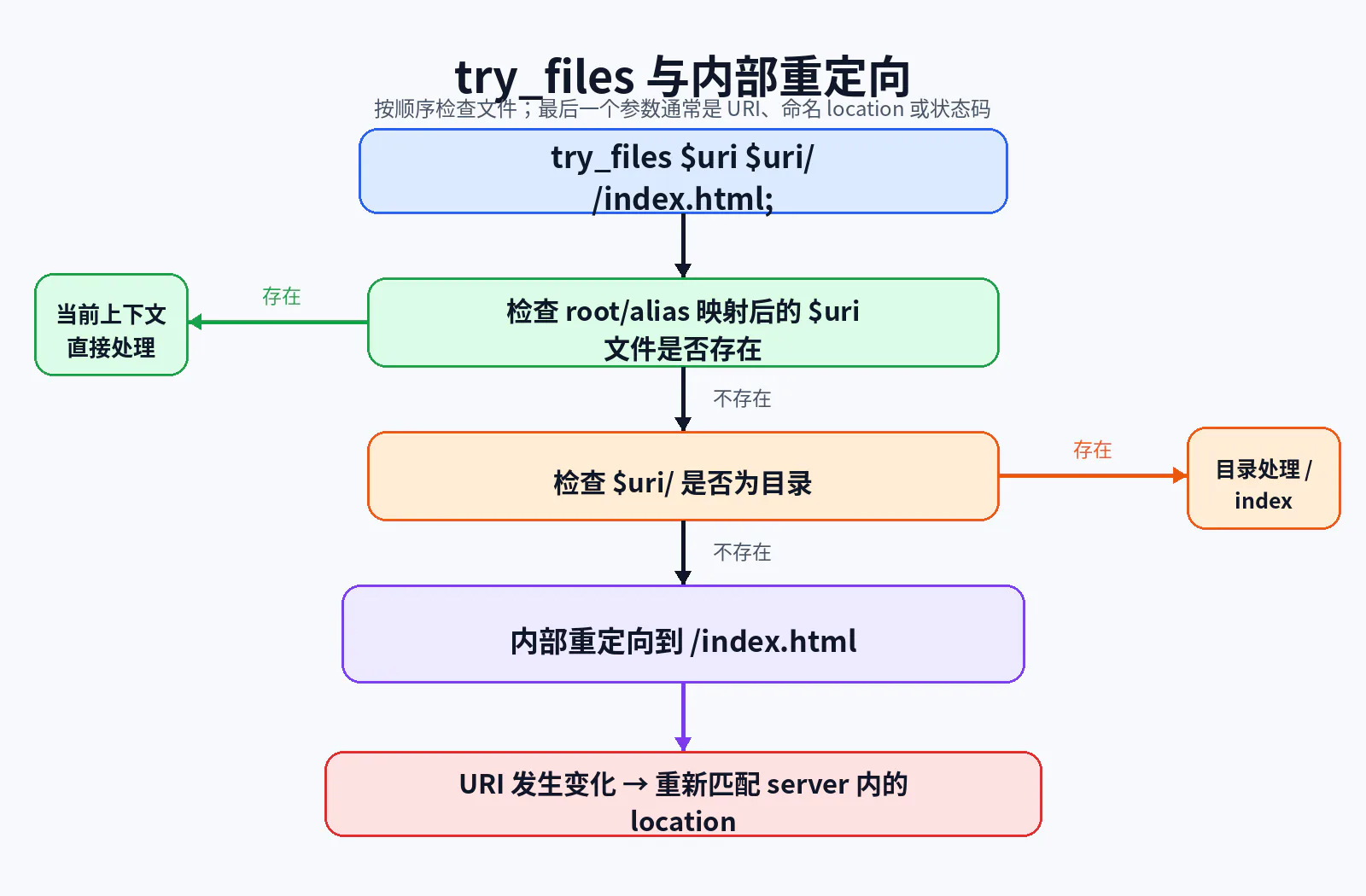
location / { try_files $uri $uri/ /index.html;}Nginx 依次检查:
- 当前 URI 对应的文件;
- 当前 URI 对应的目录;
- 如果都不存在,内部重定向到
/index.html。
最后一个参数不是普通“备用文件字符串”,而通常具有控制流含义。
返回状态码
try_files $uri =404;跳转到命名 location
try_files $uri $uri/ @backend;内部重定向到 URI
try_files $uri /index.html;10.3 SPA 路由为什么使用 try_files
Vue、React 等前端 History 路由常使用:
location / { root /usr/share/nginx/html; try_files $uri $uri/ /index.html;}请求 /dashboard/users 时,磁盘上通常没有:
/usr/share/nginx/html/dashboard/users于是 Nginx 内部跳转到 /index.html,由浏览器中的前端路由接管。
但如果将 API 也放在根路径并缺少更具体规则:
location / { try_files $uri $uri/ /index.html;}那么错误的 /api/orders 请求可能返回 HTML,而不是 API 404。
正确做法是明确分层:
location /api/ { proxy_pass http://backend;}
location / { root /usr/share/nginx/html; try_files $uri $uri/ /index.html;}10.4 内部重定向循环
例如:
location / { try_files $uri /index.html;}
location = /index.html { try_files $uri /index.html;}如果 /index.html 实际不存在,可能形成循环。Nginx 对内部跳转次数有限制,超过后返回 500,并在错误日志中出现类似:
rewrite or internal redirection cycle十一、return、rewrite、last 与 break
11.1 简单跳转优先使用 return
如果目标是固定返回或重定向:
location = /old-page { return 308 /new-page;}通常比正则 rewrite 更清晰:
rewrite ^/old-page$ /new-page permanent;return 的优点:
- 语义直接;
- 无需正则;
- 不容易产生循环;
- 更容易审计;
- 更适合固定状态码和固定目标。
11.2 rewrite 的处理顺序
ngx_http_rewrite_module 中的指令在运行时按特定顺序执行:
server层 rewrite 模块指令顺序执行;- 根据当前 URI 搜索
location; - 执行该
location内的 rewrite 模块指令; - 如果 URI 被改写并要求重新搜索,则重复;
- 内部循环有次数上限。
这说明 rewrite 不是简单文本替换,而是可能改变后续路由控制流。
11.3 last 与 break
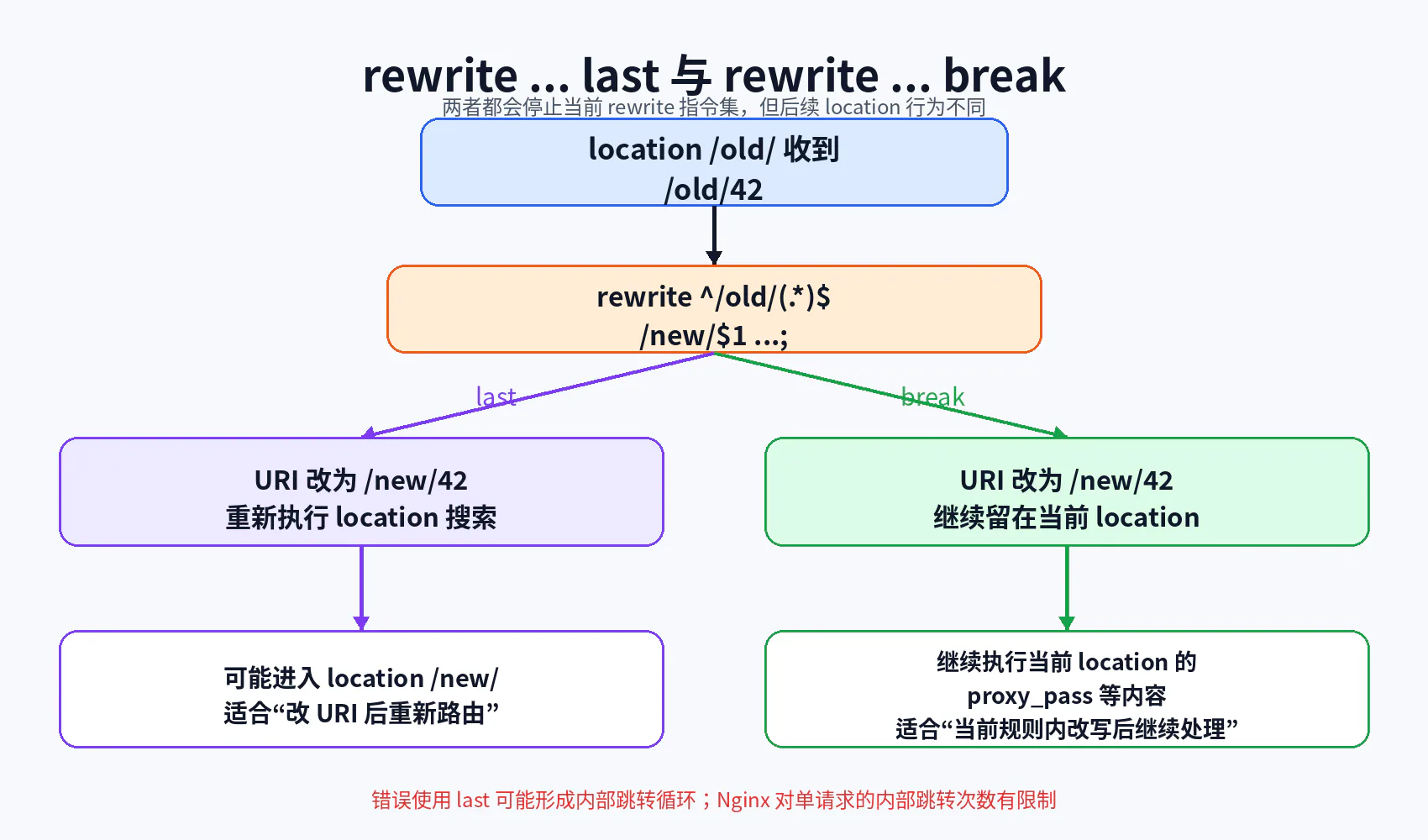
last
location /old/ { rewrite ^/old/(.*)$ /new/$1 last;}它会:
- 修改 URI;
- 停止当前 rewrite 指令集;
- 使用新 URI 重新执行
location匹配。
适合:
- 从旧路由迁移到另一套 location;
- 希望新 URI 使用目标 location 的完整配置。
break
location /old/ { rewrite ^/old/(.*)$ /new/$1 break; proxy_pass http://backend;}它会:
- 修改 URI;
- 停止当前 rewrite 指令集;
- 继续留在当前
location处理。
适合:
- 在当前代理规则内改变传给后端的 URI;
- 不希望重新进入另一套 location。
11.4 一个典型循环错误
location /download/ { rewrite ^/download/(.*)$ /download/$1 last;}改写前后 URI 相同,却使用 last 要求重新匹配,可能造成循环。
修复方式可能是:
- 删除无意义 rewrite;
- 改用
break; - 改写到真正不同的目标 URI;
- 使用
return做外部重定向; - 简化 location 结构。
11.5 if 为什么容易出问题
Nginx 的 if 属于 rewrite 模块,不是通用编程语言控制结构。很多指令并不适合放在 if 中。
相对安全、常见的用途包括:
if ($request_method = POST) { return 405;}但复杂路由判断更推荐:
map;- 精确或前缀
location; - 应用层业务逻辑;
- 独立网关策略。
不要写出多层 if 模拟业务编程语言。
十二、变量模型与 map
12.1 变量不是全局可变内存
Nginx 变量通常代表:
- 当前请求属性;
- 模块计算结果;
- 请求头或查询参数;
- 正则捕获;
- 当前配置上下文派生值。
它们属于请求处理上下文,不是跨请求共享的普通全局变量。
12.2 常用变量
| 变量 | 含义 | 常见用途 |
|---|---|---|
$request_uri | 原始 URI,通常含查询参数 | 日志、保留原请求 |
$uri | 当前规范化 URI,不含参数 | 路由、文件检查 |
$args | 当前查询字符串 | 参数传递与改写 |
$arg_name | 指定查询参数 | 条件映射 |
$host | 规范化主机名来源 | 代理 Host、日志 |
$http_host | 原始 Host 请求头 | 原始请求观察 |
$server_name | 当前匹配 server 的名称 | 日志、调试 |
$remote_addr | 当前连接对端 IP | 日志、访问控制 |
$request_method | HTTP 方法 | 方法限制 |
$request_filename | 映射后的文件路径 | 静态文件排错 |
$request_id | Nginx 生成的请求标识 | 日志关联 |
12.3 set
set $backend_name default;set 创建并赋值变量,但复杂分支中大量使用 set 往往会使控制流难以维护。
不要把它当成完整脚本语言中的普通变量赋值机制。
12.4 map
map $http_upgrade $connection_upgrade { default upgrade; '' close;}map 位于 http 上下文,根据一个或多个源值生成新变量。
优点:
- 映射关系集中;
- 比多层
if清楚; - 支持字符串、通配和正则;
- 变量通常按使用时求值,声明大量未使用的 map 不会为每个请求都主动计算。
例如,根据 URI 决定日志采样:
map $uri $loggable { default 1; /health 0;}然后:
access_log /var/log/nginx/access.log main if=$loggable;12.5 变量参与 proxy_pass 的行为变化
下一篇会详细展开,这里先建立警觉:
proxy_pass http://backend;与:
proxy_pass http://$backend;不是简单等价替换。
使用变量可能带来:
- 运行时名称解析;
- 需要配置
resolver; - URI 传递规则变化;
- 无法按静态 upstream 方式优化;
- 错误更晚暴露到请求阶段。
所以不要为了“动态”而无条件把静态地址改成变量。
十三、最小可运行实验
本实验会同时验证:
- 多个
server的 Host 匹配; default_server;- 精确、前缀、
^~和正则location; root与alias;try_files;rewrite last;- 命名 location;
$request_uri与$uri;nginx -t和nginx -T。
13.1 实验请求链路
curl → 宿主机 127.0.0.1:8088 → Nginx 容器 8080 → 根据 Host 选择 server → 根据 URI 选择 location → 静态文件 / return / Spring Boot13.2 目录结构
nginx-config-matching-lab/├── docker-compose.yml├── nginx/│ ├── nginx.conf│ ├── conf.d/│ │ ├── 00-default.conf│ │ ├── 10-api.conf│ │ └── 20-static.conf│ └── html/│ ├── index.html│ ├── app/│ │ └── index.html│ ├── assets/│ │ └── logo.txt│ └── public-files/│ └── manual.txt└── backend/ ├── Dockerfile ├── pom.xml └── src/main/java/com/example/demo/ ├── DemoApplication.java └── DebugController.java13.3 docker-compose.yml
services: backend: build: context: ./backend expose: - "8080" environment: INSTANCE_ID: backend-a networks: - lab-net
nginx: image: nginx:1.30.3-alpine depends_on: - backend ports: - "8088:8080" volumes: - ./nginx/nginx.conf:/etc/nginx/nginx.conf:ro - ./nginx/conf.d:/etc/nginx/conf.d:ro - ./nginx/html:/srv/www:ro networks: - lab-net
networks: lab-net: driver: bridgedepends_on 只控制启动顺序,不保证 Spring Boot 已经完成启动。真实生产环境应结合健康检查、重试或编排平台就绪探针。
13.4 nginx/nginx.conf
user nginx;worker_processes auto;
error_log /var/log/nginx/error.log notice;pid /var/run/nginx.pid;
events { worker_connections 1024;}
http { include /etc/nginx/mime.types; default_type application/octet-stream;
log_format matching '$remote_addr host=$host http_host=$http_host ' 'server=$server_name request="$request" ' 'uri=$uri request_uri=$request_uri status=$status';
access_log /var/log/nginx/access.log matching;
sendfile on; keepalive_timeout 65s;
map $uri $is_health { default 0; /health 1; }
include /etc/nginx/conf.d/*.conf;}13.5 00-default.conf
server { listen 8080 default_server; server_name "";
add_header X-Debug-Server default always;
location / { return 404 "unknown host\n"; }}13.6 10-api.conf
server { listen 8080; server_name api.local.test;
add_header X-Debug-Server api always;
location = / { return 200 "api exact root\n"; }
location = /health { add_header X-Is-Health $is_health always; return 200 "ok\n"; }
location = /debug/server { default_type text/plain; return 200 "server_name=$server_name\nhost=$host\nhttp_host=$http_host\nrequest_uri=$request_uri\nuri=$uri\nargs=$args\n"; }
location ^~ /api/static/ { return 200 "api static prefix\n"; }
location /api/ { proxy_set_header Host $host; proxy_set_header X-Original-URI $request_uri; proxy_set_header X-Nginx-URI $uri; proxy_pass http://backend:8080; }
location ~* \.(jpg|jpeg|png)$ { return 200 "api image regex\n"; }
location /legacy/ { rewrite ^/legacy/(.*)$ /api/echo/$1 last; }}13.7 20-static.conf
server { listen 8080; server_name static.local.test;
root /srv/www; add_header X-Debug-Server static always;
location = / { try_files /index.html =404; }
location ^~ /assets/ { try_files $uri =404; }
location ^~ /downloads/ { alias /srv/www/public-files/; }
location /app/ { try_files $uri $uri/ /app/index.html; }
location ~* \.(txt)$ { add_header X-Debug-Location txt-regex always; try_files $uri =404; }
location /fallback/ { try_files $uri @backend_fallback; }
location @backend_fallback { proxy_set_header Host $host; proxy_set_header X-Original-URI $request_uri; proxy_set_header X-Nginx-URI $uri; proxy_pass http://backend:8080; }}/downloads/ 使用 alias,并通过 ^~ 保证该目录不会被后面的 .txt 正则规则抢走。请求 /downloads/manual.txt 会映射到 /srv/www/public-files/manual.txt。如果确实需要把 try_files 与 alias 组合使用,应先通过最小实验核验最终路径;不要直接套用基于 root 的写法。
13.8 静态文件
nginx/html/index.html:
<!doctype html><html lang="zh-CN"><head> <meta charset="UTF-8"> <title>Nginx Config Matching Lab</title></head><body> <h1>static.local.test</h1></body></html>nginx/html/app/index.html:
<!doctype html><html lang="zh-CN"><head> <meta charset="UTF-8"> <title>SPA Fallback</title></head><body> <h1>SPA index fallback</h1></body></html>nginx/html/assets/logo.txt:
asset from root mappingnginx/html/public-files/manual.txt:
manual from alias mapping13.9 backend/pom.xml
<?xml version="1.0" encoding="UTF-8"?><project xmlns="http://maven.apache.org/POM/4.0.0" xmlns:xsi="http://www.w3.org/2001/XMLSchema-instance" xsi:schemaLocation="http://maven.apache.org/POM/4.0.0 https://maven.apache.org/xsd/maven-4.0.0.xsd"> <modelVersion>4.0.0</modelVersion>
<parent> <groupId>org.springframework.boot</groupId> <artifactId>spring-boot-starter-parent</artifactId> <version>3.5.16</version> <relativePath/> </parent>
<groupId>com.example</groupId> <artifactId>nginx-matching-demo</artifactId> <version>1.0.0</version>
<properties> <java.version>21</java.version> </properties>
<dependencies> <dependency> <groupId>org.springframework.boot</groupId> <artifactId>spring-boot-starter-web</artifactId> </dependency> </dependencies>
<build> <plugins> <plugin> <groupId>org.springframework.boot</groupId> <artifactId>spring-boot-maven-plugin</artifactId> </plugin> </plugins> </build></project>13.10 DemoApplication.java
package com.example.demo;
import org.springframework.boot.SpringApplication;import org.springframework.boot.autoconfigure.SpringBootApplication;
@SpringBootApplicationpublic class DemoApplication { public static void main(String[] args) { SpringApplication.run(DemoApplication.class, args); }}13.11 DebugController.java
package com.example.demo;
import jakarta.servlet.http.HttpServletRequest;import org.springframework.beans.factory.annotation.Value;import org.springframework.http.MediaType;import org.springframework.web.bind.annotation.GetMapping;import org.springframework.web.bind.annotation.PathVariable;import org.springframework.web.bind.annotation.RequestMapping;import org.springframework.web.bind.annotation.RestController;
import java.util.LinkedHashMap;import java.util.Map;
@RestController@RequestMapping(produces = MediaType.APPLICATION_JSON_VALUE)public class DebugController {
@Value("${INSTANCE_ID:local}") private String instanceId;
@GetMapping("/api/echo/{value}") public Map<String, Object> echo( @PathVariable String value, HttpServletRequest request) {
Map<String, Object> result = new LinkedHashMap<>(); result.put("instanceId", instanceId); result.put("value", value); result.put("requestUri", request.getRequestURI()); result.put("queryString", request.getQueryString()); result.put("host", request.getHeader("Host")); result.put("xOriginalUri", request.getHeader("X-Original-URI")); result.put("xNginxUri", request.getHeader("X-Nginx-URI")); return result; }
@GetMapping("/fallback/**") public Map<String, Object> fallback(HttpServletRequest request) { Map<String, Object> result = new LinkedHashMap<>(); result.put("instanceId", instanceId); result.put("fallback", true); result.put("requestUri", request.getRequestURI()); result.put("xOriginalUri", request.getHeader("X-Original-URI")); result.put("xNginxUri", request.getHeader("X-Nginx-URI")); return result; }}13.12 backend/Dockerfile
FROM maven:3.9.11-eclipse-temurin-21-alpine AS builderWORKDIR /workspaceCOPY pom.xml .RUN mvn -q -DskipTests dependency:go-offlineCOPY src ./srcRUN mvn -q -DskipTests package
FROM eclipse-temurin:21-jre-alpineWORKDIR /appCOPY --from=builder /workspace/target/*.jar app.jarEXPOSE 8080ENTRYPOINT ["java", "-jar", "/app/app.jar"]13.13 启动
docker compose up -d --build查看状态:
docker compose ps13.14 检查配置
docker compose exec nginx nginx -t输出完整配置:
docker compose exec nginx nginx -T > effective-nginx.conf搜索虚拟主机:
grep -n 'server_name' effective-nginx.conf13.15 验证默认 server
curl -i http://127.0.0.1:8088/预期:
HTTP/1.1 404 Not FoundX-Debug-Server: default
unknown host因为直接使用 IP,Host 不匹配两个具名虚拟主机,最终进入 default_server。
13.16 验证 API 虚拟主机
curl --resolve api.local.test:8088:127.0.0.1 \ -i http://api.local.test:8088/预期命中:
location = /返回:
api exact root13.17 验证变量
curl --resolve api.local.test:8088:127.0.0.1 \ 'http://api.local.test:8088/debug/server?id=42'重点观察:
server_name=api.local.testhost=api.local.testhttp_host=api.local.test:8088request_uri=/debug/server?id=42uri=/debug/serverargs=id=4213.18 验证 ^~ 跳过正则
curl --resolve api.local.test:8088:127.0.0.1 \ http://api.local.test:8088/api/static/logo.png虽然 URI 以 .png 结尾,但最长前缀为:
location ^~ /api/static/因此不会进入图片正则,返回:
api static prefix13.19 验证普通前缀可能被正则覆盖
curl --resolve api.local.test:8088:127.0.0.1 \ http://api.local.test:8088/api/images/logo.png/api/ 是普通前缀,随后图片正则命中,因此返回:
api image regex13.20 验证 rewrite ... last
curl --resolve api.local.test:8088:127.0.0.1 \ http://api.local.test:8088/legacy/42过程:
/legacy/42→ 命中 location /legacy/→ rewrite 为 /api/echo/42 last→ 重新匹配 location→ 命中 location /api/→ 转发 Spring Boot后端返回 JSON,其中:
{ "value": "42", "requestUri": "/api/echo/42", "xOriginalUri": "/legacy/42", "xNginxUri": "/api/echo/42"}13.21 验证静态虚拟主机
curl --resolve static.local.test:8088:127.0.0.1 \ http://static.local.test:8088/预期返回 index.html。
13.22 验证 alias 路径映射
curl --resolve static.local.test:8088:127.0.0.1 \ http://static.local.test:8088/downloads/manual.txt请求中的 /downloads/ 前缀被 alias /srv/www/public-files/ 替换,最终读取:
/srv/www/public-files/manual.txt预期返回:
manual from alias mapping13.23 验证 SPA 回退
curl --resolve static.local.test:8088:127.0.0.1 \ http://static.local.test:8088/app/dashboard/users磁盘不存在对应路径,try_files 内部重定向到:
/app/index.html预期返回 SPA 页面。
13.24 验证命名 location 回退
curl --resolve static.local.test:8088:127.0.0.1 \ http://static.local.test:8088/fallback/not-found文件不存在后进入:
location @backend_fallback并由 Spring Boot 返回 JSON。
13.25 查看日志
docker compose logs -f nginx或:
docker compose exec nginx tail -f /var/log/nginx/access.log重点字段:
host=http_host=server=uri=request_uri=status=13.26 停止与清理
docker compose down -v十四、配置逐段解释:请求到底经历了什么
14.1 请求 http://api.local.test:8088/legacy/42
第一步:TCP 连接
curl --resolve 将域名解析到 127.0.0.1,连接宿主机端口 8088,再由 Docker 映射到容器 8080。
第二步:选择 server
候选 server 都监听容器端口 8080。Host 为 api.local.test:8088,Nginx 使用主机名部分匹配:
server_name api.local.test;因此进入 API 虚拟主机。
第三步:匹配初始 location
URI 为:
/legacy/42命中最长前缀:
location /legacy/第四步:rewrite
rewrite ^/legacy/(.*)$ /api/echo/$1 last;当前 URI 变为:
/api/echo/42last 要求重新搜索 location。
第五步:第二次 location 匹配
新 URI 命中:
location /api/然后进入 proxy_pass。
第六步:后端观察到的 URI
由于本例 proxy_pass 不带 URI 部分:
proxy_pass http://backend:8080;后端收到当前改写后的 URI:
/api/echo/42这也为下一篇 proxy_pass URI 规则埋下基础。
14.2 请求 /api/images/logo.png
候选匹配:
- 普通前缀
/api/; - 正则
~* \.(jpg|jpeg|png)$。
Nginx 先记住 /api/,然后检查正则。图片正则命中,因此最终不进入后端,而直接返回:
api image regex14.3 请求 /api/static/logo.png
候选匹配:
^~ /api/static/;/api/;- 图片正则。
最长前缀是 /api/static/,并且带 ^~,因此跳过正则,直接返回:
api static prefix十五、从开发配置升级到生产配置
15.1 第一阶段:能运行
开发阶段通常只有一个配置文件:
server { listen 80;
location / { proxy_pass http://localhost:8080; }}问题是:
- 没有明确默认虚拟主机;
- 没有域名边界;
- 没有统一日志;
- 无法区分静态、API 和管理接口;
- 配置逐渐膨胀后难以维护。
15.2 第二阶段:按职责拆分
nginx.conf├── http 公共配置├── conf.d/00-default.conf├── conf.d/10-api.conf├── conf.d/20-static.conf└── snippets/拆分原则:
- 按虚拟主机拆分,而不是随意按指令拆分;
- 通用代理头放入 snippet;
map、upstream、log_format保持 HTTP 级集中管理;- 文件名使用明确顺序;
- 每个文件有清晰所有者。
15.3 第三阶段:显式默认入口
server { listen 80 default_server; server_name ""; return 404;}收益:
- 未知 Host 不会误入业务域名;
- 新增配置文件不会改变默认行为;
- 域名配置错误更容易暴露;
- 降低 Host 混淆风险。
15.4 第四阶段:减少复杂 rewrite
优先级建议:
- 精确
location; - 前缀
location; return;try_files;map;- 必要时使用
rewrite; - 极少使用多层
if。
配置越接近声明式映射,越容易审计。
15.5 第五阶段:可观察匹配结果
在非生产或受控调试环境,可增加:
add_header X-Debug-Server $server_name always;add_header X-Debug-Uri $uri always;生产中更推荐将信息写入日志:
log_format routing '$remote_addr host=$host server=$server_name ' 'request_uri=$request_uri uri=$uri status=$status';避免长期向外部客户端暴露内部文件路径、upstream 名称或敏感拓扑。
15.6 第六阶段:配置发布与回滚
建议发布流程:
代码评审→ 静态检查→ 容器内 nginx -t→ 测试环境 curl 用例→ 保存当前有效配置→ reload→ 检查错误日志与关键接口→ 异常时恢复上一个配置并 reload可以将以下内容纳入 CI:
docker run --rm \ -v "$PWD/nginx/nginx.conf:/etc/nginx/nginx.conf:ro" \ -v "$PWD/nginx/conf.d:/etc/nginx/conf.d:ro" \ nginx:1.30.3-alpine nginx -t十六、常见错误与反例
16.1 错误一:配置文件存在,但没有被 include
错误现象
修改 conf.d/api.conf 后,reload 成功,但请求行为完全不变。
根本原因
主配置中没有:
include /etc/nginx/conf.d/*.conf;或者容器实际挂载到了其他目录。
修复方案
nginx -T | grep -n 'api.example.com'确认目标配置出现在有效配置中。
验证方法
给目标 server 临时添加独特响应头,再使用 curl -I 验证。
16.2 错误二:把 server_name _ 当成通配符
错误现象
认为 _ 能匹配所有域名,但请求却进入其他 server。
根本原因
_ 没有特殊通配语义。默认服务器由 listen ... default_server 决定。
修复方案
listen 80 default_server;server_name "";验证方法
curl -i -H 'Host: unknown.example' http://127.0.0.1/16.3 错误三:认为最长前缀一定最终胜出
错误现象
/api/ 已经是最长前缀,但 .png 请求却进入图片正则。
根本原因
普通最长前缀只是先被记住,随后仍会检查正则。
修复方案
需要保证前缀优先时使用:
location ^~ /api/ { ...}但要确认跳过全部正则是否符合业务预期。
验证方法
在不同 location 添加临时 X-Debug-Location 响应头。
16.4 错误四:正则 location 顺序错误
错误现象
私有图片目录被公共图片规则处理。
错误配置
location ~* \.(jpg|png)$ { root /srv/public;}
location ~* ^/private/ { return 403;}根本原因
正则按配置出现顺序,第一个命中停止。
修复方案
将更具体规则放在前面,或改用明确前缀和 ^~。
验证方法
逐个构造边界 URI 测试,而不是只测试正常路径。
16.5 错误五:root 与 alias 混淆
错误现象
文件明明存在,Nginx 返回 404。
根本原因
错误地认为二者都只是“指定目录”。
修复方案
手工写出映射公式:
root: root 值 + 完整 URIalias: alias 值 + 去掉 location 前缀后的剩余 URI验证方法
查看 error log 中尝试打开的完整文件路径,或临时输出 $request_filename。
16.6 错误六:把查询参数写进 location
错误配置
location /api/users?id=1 { ...}根本原因
查询参数不参与普通 location 匹配。
修复方案
使用 map $arg_id ...,或交给应用层处理。
验证方法
输出 $uri 与 $args,观察二者分离。
16.7 错误七:rewrite last 形成循环
错误现象
请求返回 500,错误日志出现:
rewrite or internal redirection cycle根本原因
URI 改写后重新进入同一规则,或目标文件不存在导致 try_files 反复跳转。
修复方案
- 确保改写前后 URI 有真实变化;
- 使用
break; - 使用精确
location; - 对 fallback 文件保证存在;
- 使用
return替代不必要的 rewrite。
16.8 错误八:只执行 reload,不看结果
错误现象
运维脚本显示 reload 命令执行完成,但新规则未生效。
根本原因
新配置校验失败,Master 继续使用旧配置。
修复方案
发布脚本必须:
nginx -t && nginx -s reload并检查退出码和错误日志。
16.9 错误九:依赖隐式继承
错误现象
在 http 中配置了响应头、缓存或代理参数,进入某个子 location 后缺失。
根本原因
不同模块的继承规则不同,子级定义同类指令后可能替换父级集合。
修复方案
- 查询该指令官方继承规则;
- 将关键公共配置放入
includesnippet; - 通过集成测试验证实际响应。
十七、故障排查流程
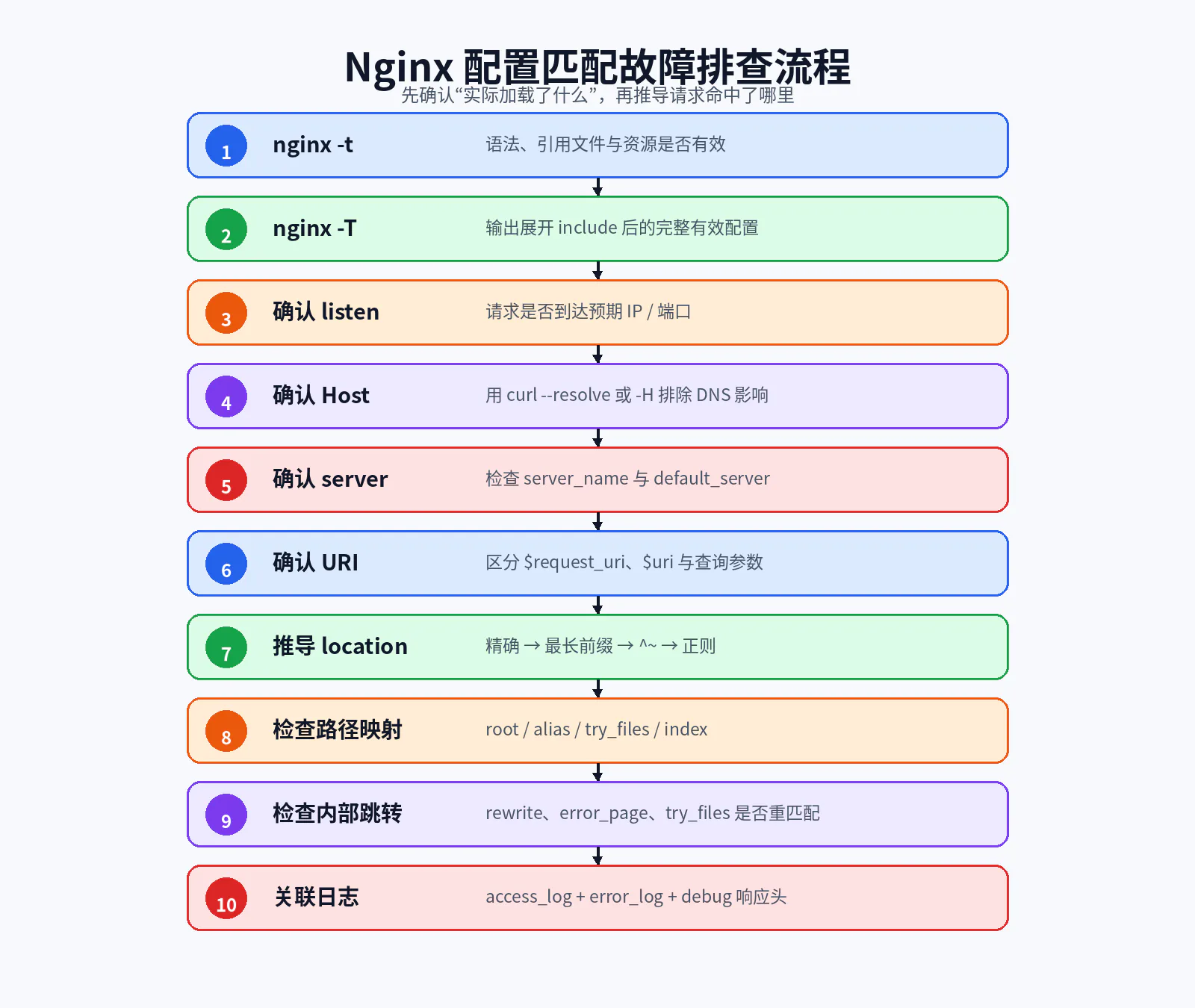
17.1 第一步:确认语法和引用资源
nginx -t不要跳过。很多所谓“规则没生效”,实际上新配置从未成功加载。
17.2 第二步:确认实际有效配置
nginx -T > /tmp/effective.conf检查:
grep -n 'server_name api.example.com' /tmp/effective.confgrep -n 'location /api/' /tmp/effective.conf17.3 第三步:确认请求到达哪个 IP 和端口
curl -v http://127.0.0.1:8088/ss -lntp | grep 8088容器环境还要确认端口映射:
docker compose ps17.4 第四步:固定 Host,排除 DNS 干扰
curl --resolve api.local.test:8088:127.0.0.1 \ -v http://api.local.test:8088/debug/server17.5 第五步:确认命中的 server
可通过:
- 不同访问日志文件;
$server_name日志字段;- 临时响应头;
- 固定调试接口。
17.6 第六步:确认当前 URI
同时记录:
$request_uri$uri$args如果二者不一致,说明请求可能经过 rewrite 或内部跳转。
17.7 第七步:手工推导 location
按照固定顺序:
- 精确匹配;
- 找最长前缀;
- 检查最长前缀是否
^~; - 按顺序检查正则;
- 正则均未命中则使用最长前缀。
17.8 第八步:检查静态文件映射
手工写出:
请求 URIlocation 前缀root/alias 值最终文件路径再进入容器检查:
docker compose exec nginx ls -l /srv/www/assets/logo.txt17.9 第九步:检查内部跳转
搜索:
grep -nE 'rewrite|try_files|error_page|index' /tmp/effective.conf关注 URI 是否在处理过程中变化。
17.10 第十步:关联 access log 与 error log
tail -f /var/log/nginx/access.log /var/log/nginx/error.log错误日志常会直接显示:
- 尝试打开的文件路径;
- rewrite 循环;
- 配置文件与行号;
- upstream 解析或连接错误。
十八、生产实践与能力边界
18.1 配置应当能被“人工确定性推导”
一个好的 Nginx 配置应满足:
- 看见 Host 能确定
server; - 看见 URI 能确定
location; - 看见
root/alias能写出完整文件路径; - 看见 rewrite 能确定是否重新匹配;
- 配置顺序不会因新增无关文件而改变核心行为。
如果需要依靠反复试错才能知道请求去哪,说明配置可维护性已经不足。
18.2 不要把业务路由全部塞进 Nginx
Nginx 适合处理:
- 域名;
- 路径前缀;
- 协议与静态资源;
- 基础代理;
- 少量确定性重定向;
- 通用入口规则。
不适合承担复杂业务判断:
- 用户权限;
- 订单状态;
- 多步骤工作流;
- 高复杂度 AB 实验逻辑;
- 需要访问数据库的路由;
- 频繁变化的产品规则。
这些应交给 API Gateway、应用服务或专门的流量治理平台。
18.3 正则不是越多越灵活
正则规则会增加:
- 顺序依赖;
- 性能与可读性成本;
- 边界冲突;
- 安全审计难度;
- 迁移成本。
能使用精确匹配和前缀匹配时,优先不用正则。
18.4 配置文件拆分不能牺牲全局可见性
把一个大文件拆成 30 个小文件并不自动提升可维护性。
需要同时具备:
- 清晰命名;
- 明确 include 入口;
- 固定加载顺序;
- 每个虚拟主机独立文件;
nginx -T快照;- 自动化测试。
18.5 修改配置对现有连接的影响
正常 reload 时:
- 新 Worker 使用新配置接收新连接;
- 旧 Worker 继续处理已有连接;
- 长连接可能让旧 Worker 存活较久;
- 配置错误时旧配置继续工作。
因此,不能仅通过“进程还在”判断新配置已经生效。应通过新请求、Worker PID、日志和响应验证。
十九、配置选择决策表
| 目标 | 首选机制 | 避免的做法 |
|---|---|---|
| 固定路径返回 | location = + return | 复杂 rewrite |
| 路径树路由 | 普通前缀 location | 大量重叠正则 |
| 前缀必须压过正则 | location ^~ | 假设最长前缀自动胜出 |
| 静态目录映射 | root | 不理解路径拼接 |
| URI 前缀映射到另一目录 | alias | root/alias 混用 |
| SPA fallback | try_files ... /index.html | 所有 404 都返回 HTML |
| 参数映射 | map $arg_x | 把参数写入 location |
| 固定重定向 | return 301/308 | 不必要的正则 rewrite |
| 改 URI 后重新路由 | rewrite ... last | 目标仍回到原规则 |
| 当前 location 内继续处理 | rewrite ... break | 误以为会重新匹配 |
| 默认虚拟主机 | listen ... default_server | 依赖 server_name _ |
| 检查真实配置 | nginx -T | 只看磁盘文件 |
二十、面试与复习问题
20.1 核心问题
1. Nginx 配置是在每个请求到来时重新读取吗?
不是。配置主要在启动或 reload 时解析为内部结构,请求阶段使用已加载配置。
2. conf.d 是 Nginx 强制目录吗?
不是。它只是常见约定,只有被 include 才会加载。
3. default_server 是 server_name 的属性吗?
不是。它属于具体 listen 地址端口。
4. 多个 server_name 的匹配优先级是什么?
精确名称、最长前缀通配、最长后缀通配、按配置顺序首个正则。
5. 普通最长前缀 location 是否一定最终胜出?
不一定。Nginx 记住最长前缀后,默认还会检查正则;正则命中时会覆盖它。
6. ^~ 是正则吗?
不是。它是带特殊语义的前缀匹配,若成为最长前缀则跳过正则检查。
7. 查询参数参与 location 匹配吗?
普通情况下不参与。location 匹配规范化 URI 路径,查询参数位于 $args。
8. $request_uri 与 $uri 有什么区别?
$request_uri 通常保留原始 URI 和查询参数;$uri 是当前规范化 URI,不含查询参数,并可能因内部跳转改变。
9. root 与 alias 的核心区别是什么?
root 把完整 URI 追加到目录;alias 使用目标目录替换匹配到的 location 前缀。
10. rewrite last 与 break 有什么区别?
last 改写后重新执行 location 搜索;break 改写后继续留在当前 location。
20.2 场景分析题
场景 1:请求域名正确,但进入了默认站点
排查:
- 请求实际连接的 IP/端口;
- Host 是否包含预期域名;
- 目标
server是否监听同一地址端口; server_name是否进入有效配置;- 是否存在配置加载顺序或重复定义问题。
场景 2:/api/a.png 没有转发后端
可能因为普通 /api/ 前缀被图片正则覆盖。检查正则 location,必要时使用 ^~ /api/。
场景 3:SPA 路由返回 404
检查:
try_files是否配置;/index.html是否真实存在;root是否正确;- API 是否使用更具体 location;
- fallback 是否形成循环。
场景 4:静态文件存在但 Nginx 404
手工推导 root/alias 生成路径,查看错误日志中 open() 尝试的完整路径,并进入容器验证文件和权限。
场景 5:reload 后规则未变化
执行 nginx -T,确认目标文件被 include;检查 reload 是否因语法错误被回滚;确认操作的是正确容器或 Master 进程。
20.3 配置排错题
排错题 1
server { listen 80; server_name _;}问题:为什么不能保证它是默认入口?
答案:server_name _ 无默认语义,应在 listen 上配置 default_server。
排错题 2
location /images/ { root /srv/images;}请求 /images/a.png 会读取哪里?
答案:
/srv/images/images/a.png如果目标是 /srv/images/a.png,可改目录布局或使用:
alias /srv/images/;排错题 3
location /api/ { return 200 api;}
location ~* \.json$ { return 200 json;}请求 /api/data.json 返回什么?
答案:正则 .json,因为普通最长前缀后仍会检查正则。
二十一、本文总结
本文解决的核心问题不是“记住几个 Nginx 指令”,而是建立一套确定性的请求推导模型。
一次请求进入 Nginx 后,关键顺序是:
监听地址与端口→ server_name / default_server→ 规范化 URI→ location 选择→ 内容处理→ 内部跳转与重新匹配→ 响应需要牢牢记住:
- 配置在启动或 reload 时解析,不是在请求阶段动态读文件;
include只是配置组织入口,文件存在不代表被加载;- 指令的继承和覆盖由各模块决定,不能一概而论;
default_server属于listen;location的最长普通前缀可能被正则覆盖;^~是阻止后续正则检查的前缀匹配;- 查询参数不直接参与
location匹配; root与alias的路径生成逻辑不同;try_files、index、rewrite和error_page都可能改变 URI 并触发内部跳转;nginx -T是排查“实际加载了什么”的关键工具。
下一篇将在本文基础上进入反向代理核心:
proxy_pass带不带尾斜杠的 URI 差异;- Header 如何传递;
- 超时和缓冲;
- upstream Keep-Alive;
- WebSocket 与 SSE;
- 真实客户端 IP;
- 502、504 与代理链路排查。
参考资料
以下资料均为官方或项目一手文档,访问日期为 2026-07-06:
- NGINX Download:https://nginx.org/en/download.html
- NGINX Beginner’s Guide:https://nginx.org/en/docs/beginners_guide.html
- How nginx processes a request:https://nginx.org/en/docs/http/request_processing.html
- Server names:https://nginx.org/en/docs/http/server_names.html
- ngx_http_core_module:https://nginx.org/en/docs/http/ngx_http_core_module.html
- ngx_http_rewrite_module:https://nginx.org/en/docs/http/ngx_http_rewrite_module.html
- ngx_http_map_module:https://nginx.org/en/docs/http/ngx_http_map_module.html
- ngx_http_proxy_module:https://nginx.org/en/docs/http/ngx_http_proxy_module.html
- NGINX Command-line parameters:https://nginx.org/en/docs/switches.html
- Docker Official Image — nginx:https://hub.docker.com/_/nginx
文章验收清单
内容完整性
- 说明了文章在专栏中的位置;
- 解释了配置加载阶段与请求阶段;
- 展开了主配置、include 和目录组织;
- 讲解了上下文、作用域和模块化合并;
- 完整解释了 server 选择;
- 完整解释了 location 选择;
- 覆盖 root、alias、index、try_files;
- 覆盖 return、rewrite、last、break;
- 覆盖常见变量与 map;
- 给出完整 Docker Compose + Spring Boot 实验;
- 提供生产演进、反例和排错流程;
- 提供面试题与答案。
技术准确性
- 使用 Nginx 1.30.3 稳定版作为实验版本;
- 核验当前主线版本 1.31.2;
- 使用官方文档说明 server 与 location 匹配;
- 明确 default_server 属于 listen;
- 明确普通最长前缀仍可能被正则覆盖;
- 明确
$uri可能在内部跳转后改变; - 未把所有指令继承规则简单化;
- 未将
if描述为通用编程控制结构; - 未依赖 Mermaid 渲染。
配置可运行性
- 固定 Nginx Docker 镜像版本;
- 提供完整目录结构;
- 提供完整
nginx.conf和虚拟主机配置; - 提供完整 Spring Boot 示例;
- 提供启动、检查、验证和清理命令;
- 提供
nginx -t与nginx -T; - 所有流程图均使用本地 PNG 相对路径。